<?xml version="1.0"?>
<feed xmlns="http://www.w3.org/2005/Atom" xml:lang="en">
	<id>https://www.phidgets.com/docs/index.php?action=history&amp;feed=atom&amp;title=1129_User_Guide</id>
	<title>1129 User Guide - Revision history</title>
	<link rel="self" type="application/atom+xml" href="https://www.phidgets.com/docs/index.php?action=history&amp;feed=atom&amp;title=1129_User_Guide"/>
	<link rel="alternate" type="text/html" href="https://www.phidgets.com/docs/index.php?title=1129_User_Guide&amp;action=history"/>
	<updated>2026-04-19T09:26:29Z</updated>
	<subtitle>Revision history for this page on the wiki</subtitle>
	<generator>MediaWiki 1.39.8</generator>
	<entry>
		<id>https://www.phidgets.com/docs/index.php?title=1129_User_Guide&amp;diff=35305&amp;oldid=prev</id>
		<title>Mparadis: /* Technical Details */</title>
		<link rel="alternate" type="text/html" href="https://www.phidgets.com/docs/index.php?title=1129_User_Guide&amp;diff=35305&amp;oldid=prev"/>
		<updated>2025-07-10T21:48:52Z</updated>

		<summary type="html">&lt;p&gt;&lt;span dir=&quot;auto&quot;&gt;&lt;span class=&quot;autocomment&quot;&gt;Technical Details&lt;/span&gt;&lt;/span&gt;&lt;/p&gt;
&lt;table style=&quot;background-color: #fff; color: #202122;&quot; data-mw=&quot;interface&quot;&gt;
				&lt;col class=&quot;diff-marker&quot; /&gt;
				&lt;col class=&quot;diff-content&quot; /&gt;
				&lt;col class=&quot;diff-marker&quot; /&gt;
				&lt;col class=&quot;diff-content&quot; /&gt;
				&lt;tr class=&quot;diff-title&quot; lang=&quot;en&quot;&gt;
				&lt;td colspan=&quot;2&quot; style=&quot;background-color: #fff; color: #202122; text-align: center;&quot;&gt;← Older revision&lt;/td&gt;
				&lt;td colspan=&quot;2&quot; style=&quot;background-color: #fff; color: #202122; text-align: center;&quot;&gt;Revision as of 21:48, 10 July 2025&lt;/td&gt;
				&lt;/tr&gt;&lt;tr&gt;&lt;td colspan=&quot;2&quot; class=&quot;diff-lineno&quot; id=&quot;mw-diff-left-l28&quot;&gt;Line 28:&lt;/td&gt;
&lt;td colspan=&quot;2&quot; class=&quot;diff-lineno&quot;&gt;Line 28:&lt;/td&gt;&lt;/tr&gt;
&lt;tr&gt;&lt;td class=&quot;diff-marker&quot;&gt;&lt;/td&gt;&lt;td style=&quot;background-color: #f8f9fa; color: #202122; font-size: 88%; border-style: solid; border-width: 1px 1px 1px 4px; border-radius: 0.33em; border-color: #eaecf0; vertical-align: top; white-space: pre-wrap;&quot;&gt;&lt;div&gt;{{UGC-Entry|Connector Details||{{UGasens}}}}&lt;/div&gt;&lt;/td&gt;&lt;td class=&quot;diff-marker&quot;&gt;&lt;/td&gt;&lt;td style=&quot;background-color: #f8f9fa; color: #202122; font-size: 88%; border-style: solid; border-width: 1px 1px 1px 4px; border-radius: 0.33em; border-color: #eaecf0; vertical-align: top; white-space: pre-wrap;&quot;&gt;&lt;div&gt;{{UGC-Entry|Connector Details||{{UGasens}}}}&lt;/div&gt;&lt;/td&gt;&lt;/tr&gt;
&lt;tr&gt;&lt;td class=&quot;diff-marker&quot;&gt;&lt;/td&gt;&lt;td style=&quot;background-color: #f8f9fa; color: #202122; font-size: 88%; border-style: solid; border-width: 1px 1px 1px 4px; border-radius: 0.33em; border-color: #eaecf0; vertical-align: top; white-space: pre-wrap;&quot;&gt;&lt;br/&gt;&lt;/td&gt;&lt;td class=&quot;diff-marker&quot;&gt;&lt;/td&gt;&lt;td style=&quot;background-color: #f8f9fa; color: #202122; font-size: 88%; border-style: solid; border-width: 1px 1px 1px 4px; border-radius: 0.33em; border-color: #eaecf0; vertical-align: top; white-space: pre-wrap;&quot;&gt;&lt;br/&gt;&lt;/td&gt;&lt;/tr&gt;
&lt;tr&gt;&lt;td class=&quot;diff-marker&quot; data-marker=&quot;−&quot;&gt;&lt;/td&gt;&lt;td style=&quot;color: #202122; font-size: 88%; border-style: solid; border-width: 1px 1px 1px 4px; border-radius: 0.33em; border-color: #ffe49c; vertical-align: top; white-space: pre-wrap;&quot;&gt;&lt;div&gt;&lt;del style=&quot;font-weight: bold; text-decoration: none;&quot;&gt;{{UGC-Entry|Customizing Sensitivity||&lt;/del&gt;&lt;/div&gt;&lt;/td&gt;&lt;td colspan=&quot;2&quot; class=&quot;diff-side-added&quot;&gt;&lt;/td&gt;&lt;/tr&gt;
&lt;tr&gt;&lt;td class=&quot;diff-marker&quot; data-marker=&quot;−&quot;&gt;&lt;/td&gt;&lt;td style=&quot;color: #202122; font-size: 88%; border-style: solid; border-width: 1px 1px 1px 4px; border-radius: 0.33em; border-color: #ffe49c; vertical-align: top; white-space: pre-wrap;&quot;&gt;&lt;div&gt;&lt;del style=&quot;font-weight: bold; text-decoration: none;&quot;&gt;The capacitor labelled C1 is the &#039;&#039;sensing&#039;&#039; capacitor. In other words this is the capacitor that determines how sensitive the sensor is. By default it is a 10nF capacitor. By changing this value we can adjust the sensitivity. Smaller capacitors will yield lower sensitivity while higher values will yield higher sensitivity. The integrated circuit (IC) on the 1129 specifies that the acceptable range for C1 is 2nF-50nF. In testing, 2nF will not sense through any thickness of material while 50nF can sense through over 1&quot; of material and even through double paned windows with an air gap of up to 3/4&quot;. If the size of your capacitive touch surface is very large, you may have to increase C1 even more. Up to 100nF even.&lt;/del&gt;&lt;/div&gt;&lt;/td&gt;&lt;td colspan=&quot;2&quot; class=&quot;diff-side-added&quot;&gt;&lt;/td&gt;&lt;/tr&gt;
&lt;tr&gt;&lt;td class=&quot;diff-marker&quot; data-marker=&quot;−&quot;&gt;&lt;/td&gt;&lt;td style=&quot;color: #202122; font-size: 88%; border-style: solid; border-width: 1px 1px 1px 4px; border-radius: 0.33em; border-color: #ffe49c; vertical-align: top; white-space: pre-wrap;&quot;&gt;&lt;div&gt;&lt;del style=&quot;font-weight: bold; text-decoration: none;&quot;&gt;(C1 is soldered onto the board, in order to replace it you will need a soldering iron).&lt;/del&gt;&lt;/div&gt;&lt;/td&gt;&lt;td colspan=&quot;2&quot; class=&quot;diff-side-added&quot;&gt;&lt;/td&gt;&lt;/tr&gt;
&lt;tr&gt;&lt;td class=&quot;diff-marker&quot; data-marker=&quot;−&quot;&gt;&lt;/td&gt;&lt;td style=&quot;color: #202122; font-size: 88%; border-style: solid; border-width: 1px 1px 1px 4px; border-radius: 0.33em; border-color: #ffe49c; vertical-align: top; white-space: pre-wrap;&quot;&gt;&lt;div&gt;&lt;del style=&quot;font-weight: bold; text-decoration: none;&quot;&gt;}}&lt;/del&gt;&lt;/div&gt;&lt;/td&gt;&lt;td colspan=&quot;2&quot; class=&quot;diff-side-added&quot;&gt;&lt;/td&gt;&lt;/tr&gt;
&lt;tr&gt;&lt;td class=&quot;diff-marker&quot;&gt;&lt;/td&gt;&lt;td style=&quot;background-color: #f8f9fa; color: #202122; font-size: 88%; border-style: solid; border-width: 1px 1px 1px 4px; border-radius: 0.33em; border-color: #eaecf0; vertical-align: top; white-space: pre-wrap;&quot;&gt;&lt;div&gt;{{UGC-Entry|Saturation Error||&lt;/div&gt;&lt;/td&gt;&lt;td class=&quot;diff-marker&quot;&gt;&lt;/td&gt;&lt;td style=&quot;background-color: #f8f9fa; color: #202122; font-size: 88%; border-style: solid; border-width: 1px 1px 1px 4px; border-radius: 0.33em; border-color: #eaecf0; vertical-align: top; white-space: pre-wrap;&quot;&gt;&lt;div&gt;{{UGC-Entry|Saturation Error||&lt;/div&gt;&lt;/td&gt;&lt;/tr&gt;
&lt;tr&gt;&lt;td class=&quot;diff-marker&quot;&gt;&lt;/td&gt;&lt;td style=&quot;background-color: #f8f9fa; color: #202122; font-size: 88%; border-style: solid; border-width: 1px 1px 1px 4px; border-radius: 0.33em; border-color: #eaecf0; vertical-align: top; white-space: pre-wrap;&quot;&gt;&lt;div&gt;The DST1200 will fire saturation error events when the nearest reflection is closer than 40mm from the sensor. At this range it is too close for the sensor to accurately determine the range of the object.&lt;/div&gt;&lt;/td&gt;&lt;td class=&quot;diff-marker&quot;&gt;&lt;/td&gt;&lt;td style=&quot;background-color: #f8f9fa; color: #202122; font-size: 88%; border-style: solid; border-width: 1px 1px 1px 4px; border-radius: 0.33em; border-color: #eaecf0; vertical-align: top; white-space: pre-wrap;&quot;&gt;&lt;div&gt;The DST1200 will fire saturation error events when the nearest reflection is closer than 40mm from the sensor. At this range it is too close for the sensor to accurately determine the range of the object.&lt;/div&gt;&lt;/td&gt;&lt;/tr&gt;
&lt;/table&gt;</summary>
		<author><name>Mparadis</name></author>
	</entry>
	<entry>
		<id>https://www.phidgets.com/docs/index.php?title=1129_User_Guide&amp;diff=32904&amp;oldid=prev</id>
		<title>Mparadis at 15:53, 12 November 2021</title>
		<link rel="alternate" type="text/html" href="https://www.phidgets.com/docs/index.php?title=1129_User_Guide&amp;diff=32904&amp;oldid=prev"/>
		<updated>2021-11-12T15:53:09Z</updated>

		<summary type="html">&lt;p&gt;&lt;/p&gt;
&lt;table style=&quot;background-color: #fff; color: #202122;&quot; data-mw=&quot;interface&quot;&gt;
				&lt;col class=&quot;diff-marker&quot; /&gt;
				&lt;col class=&quot;diff-content&quot; /&gt;
				&lt;col class=&quot;diff-marker&quot; /&gt;
				&lt;col class=&quot;diff-content&quot; /&gt;
				&lt;tr class=&quot;diff-title&quot; lang=&quot;en&quot;&gt;
				&lt;td colspan=&quot;2&quot; style=&quot;background-color: #fff; color: #202122; text-align: center;&quot;&gt;← Older revision&lt;/td&gt;
				&lt;td colspan=&quot;2&quot; style=&quot;background-color: #fff; color: #202122; text-align: center;&quot;&gt;Revision as of 15:53, 12 November 2021&lt;/td&gt;
				&lt;/tr&gt;&lt;tr&gt;&lt;td colspan=&quot;2&quot; class=&quot;diff-lineno&quot; id=&quot;mw-diff-left-l20&quot;&gt;Line 20:&lt;/td&gt;
&lt;td colspan=&quot;2&quot; class=&quot;diff-lineno&quot;&gt;Line 20:&lt;/td&gt;&lt;/tr&gt;
&lt;tr&gt;&lt;td class=&quot;diff-marker&quot;&gt;&lt;/td&gt;&lt;td style=&quot;background-color: #f8f9fa; color: #202122; font-size: 88%; border-style: solid; border-width: 1px 1px 1px 4px; border-radius: 0.33em; border-color: #eaecf0; vertical-align: top; white-space: pre-wrap;&quot;&gt;&lt;br/&gt;&lt;/td&gt;&lt;td class=&quot;diff-marker&quot;&gt;&lt;/td&gt;&lt;td style=&quot;background-color: #f8f9fa; color: #202122; font-size: 88%; border-style: solid; border-width: 1px 1px 1px 4px; border-radius: 0.33em; border-color: #eaecf0; vertical-align: top; white-space: pre-wrap;&quot;&gt;&lt;br/&gt;&lt;/td&gt;&lt;/tr&gt;
&lt;tr&gt;&lt;td class=&quot;diff-marker&quot;&gt;&lt;/td&gt;&lt;td style=&quot;background-color: #f8f9fa; color: #202122; font-size: 88%; border-style: solid; border-width: 1px 1px 1px 4px; border-radius: 0.33em; border-color: #eaecf0; vertical-align: top; white-space: pre-wrap;&quot;&gt;&lt;div&gt;==Technical Details==&lt;/div&gt;&lt;/td&gt;&lt;td class=&quot;diff-marker&quot;&gt;&lt;/td&gt;&lt;td style=&quot;background-color: #f8f9fa; color: #202122; font-size: 88%; border-style: solid; border-width: 1px 1px 1px 4px; border-radius: 0.33em; border-color: #eaecf0; vertical-align: top; white-space: pre-wrap;&quot;&gt;&lt;div&gt;==Technical Details==&lt;/div&gt;&lt;/td&gt;&lt;/tr&gt;
&lt;tr&gt;&lt;td class=&quot;diff-marker&quot; data-marker=&quot;−&quot;&gt;&lt;/td&gt;&lt;td style=&quot;color: #202122; font-size: 88%; border-style: solid; border-width: 1px 1px 1px 4px; border-radius: 0.33em; border-color: #ffe49c; vertical-align: top; white-space: pre-wrap;&quot;&gt;&lt;div&gt;&lt;del style=&quot;font-weight: bold; text-decoration: none;&quot;&gt;===&lt;/del&gt;General&lt;del style=&quot;font-weight: bold; text-decoration: none;&quot;&gt;===&lt;/del&gt;&lt;/div&gt;&lt;/td&gt;&lt;td class=&quot;diff-marker&quot; data-marker=&quot;+&quot;&gt;&lt;/td&gt;&lt;td style=&quot;color: #202122; font-size: 88%; border-style: solid; border-width: 1px 1px 1px 4px; border-radius: 0.33em; border-color: #a3d3ff; vertical-align: top; white-space: pre-wrap;&quot;&gt;&lt;div&gt;&lt;ins style=&quot;font-weight: bold; text-decoration: none;&quot;&gt;{{UGC-Start}}&lt;/ins&gt;&lt;/div&gt;&lt;/td&gt;&lt;/tr&gt;
&lt;tr&gt;&lt;td colspan=&quot;2&quot; class=&quot;diff-side-deleted&quot;&gt;&lt;/td&gt;&lt;td class=&quot;diff-marker&quot; data-marker=&quot;+&quot;&gt;&lt;/td&gt;&lt;td style=&quot;color: #202122; font-size: 88%; border-style: solid; border-width: 1px 1px 1px 4px; border-radius: 0.33em; border-color: #a3d3ff; vertical-align: top; white-space: pre-wrap;&quot;&gt;&lt;div&gt; &lt;/div&gt;&lt;/td&gt;&lt;/tr&gt;
&lt;tr&gt;&lt;td colspan=&quot;2&quot; class=&quot;diff-side-deleted&quot;&gt;&lt;/td&gt;&lt;td class=&quot;diff-marker&quot; data-marker=&quot;+&quot;&gt;&lt;/td&gt;&lt;td style=&quot;color: #202122; font-size: 88%; border-style: solid; border-width: 1px 1px 1px 4px; border-radius: 0.33em; border-color: #a3d3ff; vertical-align: top; white-space: pre-wrap;&quot;&gt;&lt;div&gt;&lt;ins style=&quot;font-weight: bold; text-decoration: none;&quot;&gt;{{UGC-Entry|&lt;/ins&gt;General &lt;ins style=&quot;font-weight: bold; text-decoration: none;&quot;&gt;Information||&lt;/ins&gt;&lt;/div&gt;&lt;/td&gt;&lt;/tr&gt;
&lt;tr&gt;&lt;td class=&quot;diff-marker&quot;&gt;&lt;/td&gt;&lt;td style=&quot;background-color: #f8f9fa; color: #202122; font-size: 88%; border-style: solid; border-width: 1px 1px 1px 4px; border-radius: 0.33em; border-color: #eaecf0; vertical-align: top; white-space: pre-wrap;&quot;&gt;&lt;div&gt;The 1129 is actually a capacitive change sensor. When the capacitance changes the &amp;#039;&amp;#039;Sensor Value&amp;#039;&amp;#039; reports 1. If the &amp;#039;&amp;#039;Sensor Value&amp;#039;&amp;#039; remains at 1 for longer than 60 seconds, it will recalibrate back down to 0, regardless if the sensor is still being touched. This recalibration can also be done manually by unplugging and plugging the sensor back into the HUB0000 (or {{CT|HasAI|compatible product}}). This is a useful feature because it means that the sensor can be mounted on a flat surface such as a piece of glass or plastic and be reset so that it does not register the change in capacitance caused by the surface it is mounted on. On the bottom side of the 1129 there is a small exposed metallic pad. A soldered connection can be made to the pad to increase the size and dimensions of the touchable area, such as attaching the sensor to a metallic object or some wire. Once the sensor is recalibrated, the &amp;#039;&amp;#039;Sensor Value&amp;#039;&amp;#039; will increase to 1 if the attached object is touched anywhere. Although there is an exposed metallic pad on the bottom of the board, the pad does not have to be touched directly to activate the sensor - touching anywhere on the board will activate the sensor. The 1129 can work as a close proximity sensor, sensing objects at a distance of up to 1/2&amp;quot; from the board in all directions without direct contact. The 1129 will also work through a thickness of up to 1/2&amp;quot; of glass, plastic, or paper.&lt;/div&gt;&lt;/td&gt;&lt;td class=&quot;diff-marker&quot;&gt;&lt;/td&gt;&lt;td style=&quot;background-color: #f8f9fa; color: #202122; font-size: 88%; border-style: solid; border-width: 1px 1px 1px 4px; border-radius: 0.33em; border-color: #eaecf0; vertical-align: top; white-space: pre-wrap;&quot;&gt;&lt;div&gt;The 1129 is actually a capacitive change sensor. When the capacitance changes the &amp;#039;&amp;#039;Sensor Value&amp;#039;&amp;#039; reports 1. If the &amp;#039;&amp;#039;Sensor Value&amp;#039;&amp;#039; remains at 1 for longer than 60 seconds, it will recalibrate back down to 0, regardless if the sensor is still being touched. This recalibration can also be done manually by unplugging and plugging the sensor back into the HUB0000 (or {{CT|HasAI|compatible product}}). This is a useful feature because it means that the sensor can be mounted on a flat surface such as a piece of glass or plastic and be reset so that it does not register the change in capacitance caused by the surface it is mounted on. On the bottom side of the 1129 there is a small exposed metallic pad. A soldered connection can be made to the pad to increase the size and dimensions of the touchable area, such as attaching the sensor to a metallic object or some wire. Once the sensor is recalibrated, the &amp;#039;&amp;#039;Sensor Value&amp;#039;&amp;#039; will increase to 1 if the attached object is touched anywhere. Although there is an exposed metallic pad on the bottom of the board, the pad does not have to be touched directly to activate the sensor - touching anywhere on the board will activate the sensor. The 1129 can work as a close proximity sensor, sensing objects at a distance of up to 1/2&amp;quot; from the board in all directions without direct contact. The 1129 will also work through a thickness of up to 1/2&amp;quot; of glass, plastic, or paper.&lt;/div&gt;&lt;/td&gt;&lt;/tr&gt;
&lt;tr&gt;&lt;td colspan=&quot;2&quot; class=&quot;diff-side-deleted&quot;&gt;&lt;/td&gt;&lt;td class=&quot;diff-marker&quot; data-marker=&quot;+&quot;&gt;&lt;/td&gt;&lt;td style=&quot;color: #202122; font-size: 88%; border-style: solid; border-width: 1px 1px 1px 4px; border-radius: 0.33em; border-color: #a3d3ff; vertical-align: top; white-space: pre-wrap;&quot;&gt;&lt;div&gt;&lt;ins style=&quot;font-weight: bold; text-decoration: none;&quot;&gt;}}&lt;/ins&gt;&lt;/div&gt;&lt;/td&gt;&lt;/tr&gt;
&lt;tr&gt;&lt;td colspan=&quot;2&quot; class=&quot;diff-side-deleted&quot;&gt;&lt;/td&gt;&lt;td class=&quot;diff-marker&quot; data-marker=&quot;+&quot;&gt;&lt;/td&gt;&lt;td style=&quot;color: #202122; font-size: 88%; border-style: solid; border-width: 1px 1px 1px 4px; border-radius: 0.33em; border-color: #a3d3ff; vertical-align: top; white-space: pre-wrap;&quot;&gt;&lt;div&gt;&lt;ins style=&quot;font-weight: bold; text-decoration: none;&quot;&gt;&lt;/ins&gt;&lt;/div&gt;&lt;/td&gt;&lt;/tr&gt;
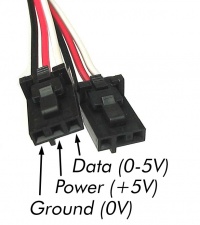
&lt;tr&gt;&lt;td colspan=&quot;2&quot; class=&quot;diff-side-deleted&quot;&gt;&lt;/td&gt;&lt;td class=&quot;diff-marker&quot; data-marker=&quot;+&quot;&gt;&lt;/td&gt;&lt;td style=&quot;color: #202122; font-size: 88%; border-style: solid; border-width: 1px 1px 1px 4px; border-radius: 0.33em; border-color: #a3d3ff; vertical-align: top; white-space: pre-wrap;&quot;&gt;&lt;div&gt;&lt;ins style=&quot;font-weight: bold; text-decoration: none;&quot;&gt;{{UGC-Entry|Connector Details||{{UGasens}}}}&lt;/ins&gt;&lt;/div&gt;&lt;/td&gt;&lt;/tr&gt;
&lt;tr&gt;&lt;td class=&quot;diff-marker&quot;&gt;&lt;/td&gt;&lt;td style=&quot;background-color: #f8f9fa; color: #202122; font-size: 88%; border-style: solid; border-width: 1px 1px 1px 4px; border-radius: 0.33em; border-color: #eaecf0; vertical-align: top; white-space: pre-wrap;&quot;&gt;&lt;br/&gt;&lt;/td&gt;&lt;td class=&quot;diff-marker&quot;&gt;&lt;/td&gt;&lt;td style=&quot;background-color: #f8f9fa; color: #202122; font-size: 88%; border-style: solid; border-width: 1px 1px 1px 4px; border-radius: 0.33em; border-color: #eaecf0; vertical-align: top; white-space: pre-wrap;&quot;&gt;&lt;br/&gt;&lt;/td&gt;&lt;/tr&gt;
&lt;tr&gt;&lt;td class=&quot;diff-marker&quot; data-marker=&quot;−&quot;&gt;&lt;/td&gt;&lt;td style=&quot;color: #202122; font-size: 88%; border-style: solid; border-width: 1px 1px 1px 4px; border-radius: 0.33em; border-color: #ffe49c; vertical-align: top; white-space: pre-wrap;&quot;&gt;&lt;div&gt;&lt;del style=&quot;font-weight: bold; text-decoration: none;&quot;&gt;===&lt;/del&gt;Customizing Sensitivity&lt;del style=&quot;font-weight: bold; text-decoration: none;&quot;&gt;===&lt;/del&gt;&lt;/div&gt;&lt;/td&gt;&lt;td class=&quot;diff-marker&quot; data-marker=&quot;+&quot;&gt;&lt;/td&gt;&lt;td style=&quot;color: #202122; font-size: 88%; border-style: solid; border-width: 1px 1px 1px 4px; border-radius: 0.33em; border-color: #a3d3ff; vertical-align: top; white-space: pre-wrap;&quot;&gt;&lt;div&gt;&lt;ins style=&quot;font-weight: bold; text-decoration: none;&quot;&gt;{{UGC-Entry|&lt;/ins&gt;Customizing Sensitivity&lt;ins style=&quot;font-weight: bold; text-decoration: none;&quot;&gt;||&lt;/ins&gt;&lt;/div&gt;&lt;/td&gt;&lt;/tr&gt;
&lt;tr&gt;&lt;td class=&quot;diff-marker&quot;&gt;&lt;/td&gt;&lt;td style=&quot;background-color: #f8f9fa; color: #202122; font-size: 88%; border-style: solid; border-width: 1px 1px 1px 4px; border-radius: 0.33em; border-color: #eaecf0; vertical-align: top; white-space: pre-wrap;&quot;&gt;&lt;div&gt;The capacitor labelled C1 is the &amp;#039;&amp;#039;sensing&amp;#039;&amp;#039; capacitor. In other words this is the capacitor that determines how sensitive the sensor is. By default it is a 10nF capacitor. By changing this value we can adjust the sensitivity. Smaller capacitors will yield lower sensitivity while higher values will yield higher sensitivity. The integrated circuit (IC) on the 1129 specifies that the acceptable range for C1 is 2nF-50nF. In testing, 2nF will not sense through any thickness of material while 50nF can sense through over 1&amp;quot; of material and even through double paned windows with an air gap of up to 3/4&amp;quot;. If the size of your capacitive touch surface is very large, you may have to increase C1 even more. Up to 100nF even.&lt;/div&gt;&lt;/td&gt;&lt;td class=&quot;diff-marker&quot;&gt;&lt;/td&gt;&lt;td style=&quot;background-color: #f8f9fa; color: #202122; font-size: 88%; border-style: solid; border-width: 1px 1px 1px 4px; border-radius: 0.33em; border-color: #eaecf0; vertical-align: top; white-space: pre-wrap;&quot;&gt;&lt;div&gt;The capacitor labelled C1 is the &amp;#039;&amp;#039;sensing&amp;#039;&amp;#039; capacitor. In other words this is the capacitor that determines how sensitive the sensor is. By default it is a 10nF capacitor. By changing this value we can adjust the sensitivity. Smaller capacitors will yield lower sensitivity while higher values will yield higher sensitivity. The integrated circuit (IC) on the 1129 specifies that the acceptable range for C1 is 2nF-50nF. In testing, 2nF will not sense through any thickness of material while 50nF can sense through over 1&amp;quot; of material and even through double paned windows with an air gap of up to 3/4&amp;quot;. If the size of your capacitive touch surface is very large, you may have to increase C1 even more. Up to 100nF even.&lt;/div&gt;&lt;/td&gt;&lt;/tr&gt;
&lt;tr&gt;&lt;td class=&quot;diff-marker&quot;&gt;&lt;/td&gt;&lt;td style=&quot;background-color: #f8f9fa; color: #202122; font-size: 88%; border-style: solid; border-width: 1px 1px 1px 4px; border-radius: 0.33em; border-color: #eaecf0; vertical-align: top; white-space: pre-wrap;&quot;&gt;&lt;div&gt;(C1 is soldered onto the board, in order to replace it you will need a soldering iron).&lt;/div&gt;&lt;/td&gt;&lt;td class=&quot;diff-marker&quot;&gt;&lt;/td&gt;&lt;td style=&quot;background-color: #f8f9fa; color: #202122; font-size: 88%; border-style: solid; border-width: 1px 1px 1px 4px; border-radius: 0.33em; border-color: #eaecf0; vertical-align: top; white-space: pre-wrap;&quot;&gt;&lt;div&gt;(C1 is soldered onto the board, in order to replace it you will need a soldering iron).&lt;/div&gt;&lt;/td&gt;&lt;/tr&gt;
&lt;tr&gt;&lt;td colspan=&quot;2&quot; class=&quot;diff-side-deleted&quot;&gt;&lt;/td&gt;&lt;td class=&quot;diff-marker&quot; data-marker=&quot;+&quot;&gt;&lt;/td&gt;&lt;td style=&quot;color: #202122; font-size: 88%; border-style: solid; border-width: 1px 1px 1px 4px; border-radius: 0.33em; border-color: #a3d3ff; vertical-align: top; white-space: pre-wrap;&quot;&gt;&lt;div&gt;&lt;ins style=&quot;font-weight: bold; text-decoration: none;&quot;&gt;}}&lt;/ins&gt;&lt;/div&gt;&lt;/td&gt;&lt;/tr&gt;
&lt;tr&gt;&lt;td colspan=&quot;2&quot; class=&quot;diff-side-deleted&quot;&gt;&lt;/td&gt;&lt;td class=&quot;diff-marker&quot; data-marker=&quot;+&quot;&gt;&lt;/td&gt;&lt;td style=&quot;color: #202122; font-size: 88%; border-style: solid; border-width: 1px 1px 1px 4px; border-radius: 0.33em; border-color: #a3d3ff; vertical-align: top; white-space: pre-wrap;&quot;&gt;&lt;div&gt;&lt;ins style=&quot;font-weight: bold; text-decoration: none;&quot;&gt;{{UGC-Entry|Saturation Error||&lt;/ins&gt;&lt;/div&gt;&lt;/td&gt;&lt;/tr&gt;
&lt;tr&gt;&lt;td colspan=&quot;2&quot; class=&quot;diff-side-deleted&quot;&gt;&lt;/td&gt;&lt;td class=&quot;diff-marker&quot; data-marker=&quot;+&quot;&gt;&lt;/td&gt;&lt;td style=&quot;color: #202122; font-size: 88%; border-style: solid; border-width: 1px 1px 1px 4px; border-radius: 0.33em; border-color: #a3d3ff; vertical-align: top; white-space: pre-wrap;&quot;&gt;&lt;div&gt;&lt;ins style=&quot;font-weight: bold; text-decoration: none;&quot;&gt;The DST1200 will fire saturation error events when the nearest reflection is closer than 40mm from the sensor. At this range it is too close for the sensor to accurately determine the range of the object.&lt;/ins&gt;&lt;/div&gt;&lt;/td&gt;&lt;/tr&gt;
&lt;tr&gt;&lt;td colspan=&quot;2&quot; class=&quot;diff-side-deleted&quot;&gt;&lt;/td&gt;&lt;td class=&quot;diff-marker&quot; data-marker=&quot;+&quot;&gt;&lt;/td&gt;&lt;td style=&quot;color: #202122; font-size: 88%; border-style: solid; border-width: 1px 1px 1px 4px; border-radius: 0.33em; border-color: #a3d3ff; vertical-align: top; white-space: pre-wrap;&quot;&gt;&lt;div&gt;&lt;ins style=&quot;font-weight: bold; text-decoration: none;&quot;&gt;}}&lt;/ins&gt;&lt;/div&gt;&lt;/td&gt;&lt;/tr&gt;
&lt;tr&gt;&lt;td class=&quot;diff-marker&quot;&gt;&lt;/td&gt;&lt;td style=&quot;background-color: #f8f9fa; color: #202122; font-size: 88%; border-style: solid; border-width: 1px 1px 1px 4px; border-radius: 0.33em; border-color: #eaecf0; vertical-align: top; white-space: pre-wrap;&quot;&gt;&lt;br/&gt;&lt;/td&gt;&lt;td class=&quot;diff-marker&quot;&gt;&lt;/td&gt;&lt;td style=&quot;background-color: #f8f9fa; color: #202122; font-size: 88%; border-style: solid; border-width: 1px 1px 1px 4px; border-radius: 0.33em; border-color: #eaecf0; vertical-align: top; white-space: pre-wrap;&quot;&gt;&lt;br/&gt;&lt;/td&gt;&lt;/tr&gt;
&lt;tr&gt;&lt;td class=&quot;diff-marker&quot; data-marker=&quot;−&quot;&gt;&lt;/td&gt;&lt;td style=&quot;color: #202122; font-size: 88%; border-style: solid; border-width: 1px 1px 1px 4px; border-radius: 0.33em; border-color: #ffe49c; vertical-align: top; white-space: pre-wrap;&quot;&gt;&lt;div&gt;{{&lt;del style=&quot;font-weight: bold; text-decoration: none;&quot;&gt;UGasens&lt;/del&gt;}}&lt;/div&gt;&lt;/td&gt;&lt;td class=&quot;diff-marker&quot; data-marker=&quot;+&quot;&gt;&lt;/td&gt;&lt;td style=&quot;color: #202122; font-size: 88%; border-style: solid; border-width: 1px 1px 1px 4px; border-radius: 0.33em; border-color: #a3d3ff; vertical-align: top; white-space: pre-wrap;&quot;&gt;&lt;div&gt;{{&lt;ins style=&quot;font-weight: bold; text-decoration: none;&quot;&gt;UGC-Entry|The sensor gets stuck at &amp;#039;1&amp;#039; when touched, even after breaking contact||&lt;/ins&gt;&lt;/div&gt;&lt;/td&gt;&lt;/tr&gt;
&lt;tr&gt;&lt;td colspan=&quot;2&quot; class=&quot;diff-side-deleted&quot;&gt;&lt;/td&gt;&lt;td class=&quot;diff-marker&quot; data-marker=&quot;+&quot;&gt;&lt;/td&gt;&lt;td style=&quot;color: #202122; font-size: 88%; border-style: solid; border-width: 1px 1px 1px 4px; border-radius: 0.33em; border-color: #a3d3ff; vertical-align: top; white-space: pre-wrap;&quot;&gt;&lt;div&gt;&lt;ins style=&quot;font-weight: bold; text-decoration: none;&quot;&gt;If this happens, it could be due to interference on the power supply. If you&amp;#039;re using the 1129 on a Wireless VINT Hub, laptop, or PhidgetSBC, try switching out the power supply to see if the problem persists. &lt;/ins&gt;&lt;/div&gt;&lt;/td&gt;&lt;/tr&gt;
&lt;tr&gt;&lt;td colspan=&quot;2&quot; class=&quot;diff-side-deleted&quot;&gt;&lt;/td&gt;&lt;td class=&quot;diff-marker&quot; data-marker=&quot;+&quot;&gt;&lt;/td&gt;&lt;td style=&quot;color: #202122; font-size: 88%; border-style: solid; border-width: 1px 1px 1px 4px; border-radius: 0.33em; border-color: #a3d3ff; vertical-align: top; white-space: pre-wrap;&quot;&gt;&lt;div&gt;&lt;ins style=&quot;font-weight: bold; text-decoration: none;&quot;&gt;}}&lt;/ins&gt;&lt;/div&gt;&lt;/td&gt;&lt;/tr&gt;
&lt;tr&gt;&lt;td colspan=&quot;2&quot; class=&quot;diff-side-deleted&quot;&gt;&lt;/td&gt;&lt;td class=&quot;diff-marker&quot; data-marker=&quot;+&quot;&gt;&lt;/td&gt;&lt;td style=&quot;color: #202122; font-size: 88%; border-style: solid; border-width: 1px 1px 1px 4px; border-radius: 0.33em; border-color: #a3d3ff; vertical-align: top; white-space: pre-wrap;&quot;&gt;&lt;div&gt;&lt;ins style=&quot;font-weight: bold; text-decoration: none;&quot;&gt;{{UGC-End&lt;/ins&gt;}}&lt;/div&gt;&lt;/td&gt;&lt;/tr&gt;
&lt;tr&gt;&lt;td class=&quot;diff-marker&quot;&gt;&lt;/td&gt;&lt;td style=&quot;background-color: #f8f9fa; color: #202122; font-size: 88%; border-style: solid; border-width: 1px 1px 1px 4px; border-radius: 0.33em; border-color: #eaecf0; vertical-align: top; white-space: pre-wrap;&quot;&gt;&lt;br/&gt;&lt;/td&gt;&lt;td class=&quot;diff-marker&quot;&gt;&lt;/td&gt;&lt;td style=&quot;background-color: #f8f9fa; color: #202122; font-size: 88%; border-style: solid; border-width: 1px 1px 1px 4px; border-radius: 0.33em; border-color: #eaecf0; vertical-align: top; white-space: pre-wrap;&quot;&gt;&lt;br/&gt;&lt;/td&gt;&lt;/tr&gt;
&lt;tr&gt;&lt;td class=&quot;diff-marker&quot;&gt;&lt;/td&gt;&lt;td style=&quot;background-color: #f8f9fa; color: #202122; font-size: 88%; border-style: solid; border-width: 1px 1px 1px 4px; border-radius: 0.33em; border-color: #eaecf0; vertical-align: top; white-space: pre-wrap;&quot;&gt;&lt;div&gt;{{UGnext|}}&lt;/div&gt;&lt;/td&gt;&lt;td class=&quot;diff-marker&quot;&gt;&lt;/td&gt;&lt;td style=&quot;background-color: #f8f9fa; color: #202122; font-size: 88%; border-style: solid; border-width: 1px 1px 1px 4px; border-radius: 0.33em; border-color: #eaecf0; vertical-align: top; white-space: pre-wrap;&quot;&gt;&lt;div&gt;{{UGnext|}}&lt;/div&gt;&lt;/td&gt;&lt;/tr&gt;
&lt;/table&gt;</summary>
		<author><name>Mparadis</name></author>
	</entry>
	<entry>
		<id>https://www.phidgets.com/docs/index.php?title=1129_User_Guide&amp;diff=29439&amp;oldid=prev</id>
		<title>Mparadis at 16:49, 7 June 2018</title>
		<link rel="alternate" type="text/html" href="https://www.phidgets.com/docs/index.php?title=1129_User_Guide&amp;diff=29439&amp;oldid=prev"/>
		<updated>2018-06-07T16:49:13Z</updated>

		<summary type="html">&lt;p&gt;&lt;/p&gt;
&lt;table style=&quot;background-color: #fff; color: #202122;&quot; data-mw=&quot;interface&quot;&gt;
				&lt;col class=&quot;diff-marker&quot; /&gt;
				&lt;col class=&quot;diff-content&quot; /&gt;
				&lt;col class=&quot;diff-marker&quot; /&gt;
				&lt;col class=&quot;diff-content&quot; /&gt;
				&lt;tr class=&quot;diff-title&quot; lang=&quot;en&quot;&gt;
				&lt;td colspan=&quot;2&quot; style=&quot;background-color: #fff; color: #202122; text-align: center;&quot;&gt;← Older revision&lt;/td&gt;
				&lt;td colspan=&quot;2&quot; style=&quot;background-color: #fff; color: #202122; text-align: center;&quot;&gt;Revision as of 16:49, 7 June 2018&lt;/td&gt;
				&lt;/tr&gt;&lt;tr&gt;&lt;td colspan=&quot;2&quot; class=&quot;diff-lineno&quot; id=&quot;mw-diff-left-l21&quot;&gt;Line 21:&lt;/td&gt;
&lt;td colspan=&quot;2&quot; class=&quot;diff-lineno&quot;&gt;Line 21:&lt;/td&gt;&lt;/tr&gt;
&lt;tr&gt;&lt;td class=&quot;diff-marker&quot;&gt;&lt;/td&gt;&lt;td style=&quot;background-color: #f8f9fa; color: #202122; font-size: 88%; border-style: solid; border-width: 1px 1px 1px 4px; border-radius: 0.33em; border-color: #eaecf0; vertical-align: top; white-space: pre-wrap;&quot;&gt;&lt;div&gt;==Technical Details==&lt;/div&gt;&lt;/td&gt;&lt;td class=&quot;diff-marker&quot;&gt;&lt;/td&gt;&lt;td style=&quot;background-color: #f8f9fa; color: #202122; font-size: 88%; border-style: solid; border-width: 1px 1px 1px 4px; border-radius: 0.33em; border-color: #eaecf0; vertical-align: top; white-space: pre-wrap;&quot;&gt;&lt;div&gt;==Technical Details==&lt;/div&gt;&lt;/td&gt;&lt;/tr&gt;
&lt;tr&gt;&lt;td class=&quot;diff-marker&quot;&gt;&lt;/td&gt;&lt;td style=&quot;background-color: #f8f9fa; color: #202122; font-size: 88%; border-style: solid; border-width: 1px 1px 1px 4px; border-radius: 0.33em; border-color: #eaecf0; vertical-align: top; white-space: pre-wrap;&quot;&gt;&lt;div&gt;===General===&lt;/div&gt;&lt;/td&gt;&lt;td class=&quot;diff-marker&quot;&gt;&lt;/td&gt;&lt;td style=&quot;background-color: #f8f9fa; color: #202122; font-size: 88%; border-style: solid; border-width: 1px 1px 1px 4px; border-radius: 0.33em; border-color: #eaecf0; vertical-align: top; white-space: pre-wrap;&quot;&gt;&lt;div&gt;===General===&lt;/div&gt;&lt;/td&gt;&lt;/tr&gt;
&lt;tr&gt;&lt;td class=&quot;diff-marker&quot; data-marker=&quot;−&quot;&gt;&lt;/td&gt;&lt;td style=&quot;color: #202122; font-size: 88%; border-style: solid; border-width: 1px 1px 1px 4px; border-radius: 0.33em; border-color: #ffe49c; vertical-align: top; white-space: pre-wrap;&quot;&gt;&lt;div&gt;The 1129 is actually a capacitive change sensor. When the capacitance changes the &amp;#039;&amp;#039;Sensor Value&amp;#039;&amp;#039; reports 1. If the &amp;#039;&amp;#039;Sensor Value&amp;#039;&amp;#039; remains at 1 for longer than 60 seconds, it will recalibrate back down to 0, regardless if the sensor is still being touched. This recalibration can also be done manually by unplugging and plugging the sensor back into the HUB0000 (or &lt;del style=&quot;font-weight: bold; text-decoration: none;&quot;&gt;[&lt;/del&gt;{{&lt;del style=&quot;font-weight: bold; text-decoration: none;&quot;&gt;SERVER&lt;/del&gt;}}&lt;del style=&quot;font-weight: bold; text-decoration: none;&quot;&gt;/?view=comparetable&amp;amp;rel=Analog%20Inputs compatible product]&lt;/del&gt;). This is a useful feature because it means that the sensor can be mounted on a flat surface such as a piece of glass or plastic and be reset so that it does not register the change in capacitance caused by the surface it is mounted on. On the bottom side of the 1129 there is a small exposed metallic pad. A soldered connection can be made to the pad to increase the size and dimensions of the touchable area, such as attaching the sensor to a metallic object or some wire. Once the sensor is recalibrated, the &amp;#039;&amp;#039;Sensor Value&amp;#039;&amp;#039; will increase to 1 if the attached object is touched anywhere. Although there is an exposed metallic pad on the bottom of the board, the pad does not have to be touched directly to activate the sensor - touching anywhere on the board will activate the sensor. The 1129 can work as a close proximity sensor, sensing objects at a distance of up to 1/2&amp;quot; from the board in all directions without direct contact. The 1129 will also work through a thickness of up to 1/2&amp;quot; of glass, plastic, or paper.&lt;/div&gt;&lt;/td&gt;&lt;td class=&quot;diff-marker&quot; data-marker=&quot;+&quot;&gt;&lt;/td&gt;&lt;td style=&quot;color: #202122; font-size: 88%; border-style: solid; border-width: 1px 1px 1px 4px; border-radius: 0.33em; border-color: #a3d3ff; vertical-align: top; white-space: pre-wrap;&quot;&gt;&lt;div&gt;The 1129 is actually a capacitive change sensor. When the capacitance changes the &amp;#039;&amp;#039;Sensor Value&amp;#039;&amp;#039; reports 1. If the &amp;#039;&amp;#039;Sensor Value&amp;#039;&amp;#039; remains at 1 for longer than 60 seconds, it will recalibrate back down to 0, regardless if the sensor is still being touched. This recalibration can also be done manually by unplugging and plugging the sensor back into the HUB0000 (or {{&lt;ins style=&quot;font-weight: bold; text-decoration: none;&quot;&gt;CT|HasAI|compatible product&lt;/ins&gt;}}). This is a useful feature because it means that the sensor can be mounted on a flat surface such as a piece of glass or plastic and be reset so that it does not register the change in capacitance caused by the surface it is mounted on. On the bottom side of the 1129 there is a small exposed metallic pad. A soldered connection can be made to the pad to increase the size and dimensions of the touchable area, such as attaching the sensor to a metallic object or some wire. Once the sensor is recalibrated, the &amp;#039;&amp;#039;Sensor Value&amp;#039;&amp;#039; will increase to 1 if the attached object is touched anywhere. Although there is an exposed metallic pad on the bottom of the board, the pad does not have to be touched directly to activate the sensor - touching anywhere on the board will activate the sensor. The 1129 can work as a close proximity sensor, sensing objects at a distance of up to 1/2&amp;quot; from the board in all directions without direct contact. The 1129 will also work through a thickness of up to 1/2&amp;quot; of glass, plastic, or paper.&lt;/div&gt;&lt;/td&gt;&lt;/tr&gt;
&lt;tr&gt;&lt;td class=&quot;diff-marker&quot;&gt;&lt;/td&gt;&lt;td style=&quot;background-color: #f8f9fa; color: #202122; font-size: 88%; border-style: solid; border-width: 1px 1px 1px 4px; border-radius: 0.33em; border-color: #eaecf0; vertical-align: top; white-space: pre-wrap;&quot;&gt;&lt;br/&gt;&lt;/td&gt;&lt;td class=&quot;diff-marker&quot;&gt;&lt;/td&gt;&lt;td style=&quot;background-color: #f8f9fa; color: #202122; font-size: 88%; border-style: solid; border-width: 1px 1px 1px 4px; border-radius: 0.33em; border-color: #eaecf0; vertical-align: top; white-space: pre-wrap;&quot;&gt;&lt;br/&gt;&lt;/td&gt;&lt;/tr&gt;
&lt;tr&gt;&lt;td class=&quot;diff-marker&quot;&gt;&lt;/td&gt;&lt;td style=&quot;background-color: #f8f9fa; color: #202122; font-size: 88%; border-style: solid; border-width: 1px 1px 1px 4px; border-radius: 0.33em; border-color: #eaecf0; vertical-align: top; white-space: pre-wrap;&quot;&gt;&lt;div&gt;===Customizing Sensitivity===&lt;/div&gt;&lt;/td&gt;&lt;td class=&quot;diff-marker&quot;&gt;&lt;/td&gt;&lt;td style=&quot;background-color: #f8f9fa; color: #202122; font-size: 88%; border-style: solid; border-width: 1px 1px 1px 4px; border-radius: 0.33em; border-color: #eaecf0; vertical-align: top; white-space: pre-wrap;&quot;&gt;&lt;div&gt;===Customizing Sensitivity===&lt;/div&gt;&lt;/td&gt;&lt;/tr&gt;
&lt;/table&gt;</summary>
		<author><name>Mparadis</name></author>
	</entry>
	<entry>
		<id>https://www.phidgets.com/docs/index.php?title=1129_User_Guide&amp;diff=29282&amp;oldid=prev</id>
		<title>Mparadis at 20:55, 8 May 2018</title>
		<link rel="alternate" type="text/html" href="https://www.phidgets.com/docs/index.php?title=1129_User_Guide&amp;diff=29282&amp;oldid=prev"/>
		<updated>2018-05-08T20:55:59Z</updated>

		<summary type="html">&lt;p&gt;&lt;/p&gt;
&lt;table style=&quot;background-color: #fff; color: #202122;&quot; data-mw=&quot;interface&quot;&gt;
				&lt;col class=&quot;diff-marker&quot; /&gt;
				&lt;col class=&quot;diff-content&quot; /&gt;
				&lt;col class=&quot;diff-marker&quot; /&gt;
				&lt;col class=&quot;diff-content&quot; /&gt;
				&lt;tr class=&quot;diff-title&quot; lang=&quot;en&quot;&gt;
				&lt;td colspan=&quot;2&quot; style=&quot;background-color: #fff; color: #202122; text-align: center;&quot;&gt;← Older revision&lt;/td&gt;
				&lt;td colspan=&quot;2&quot; style=&quot;background-color: #fff; color: #202122; text-align: center;&quot;&gt;Revision as of 20:55, 8 May 2018&lt;/td&gt;
				&lt;/tr&gt;&lt;tr&gt;&lt;td colspan=&quot;2&quot; class=&quot;diff-lineno&quot; id=&quot;mw-diff-left-l1&quot;&gt;Line 1:&lt;/td&gt;
&lt;td colspan=&quot;2&quot; class=&quot;diff-lineno&quot;&gt;Line 1:&lt;/td&gt;&lt;/tr&gt;
&lt;tr&gt;&lt;td colspan=&quot;2&quot; class=&quot;diff-side-deleted&quot;&gt;&lt;/td&gt;&lt;td class=&quot;diff-marker&quot; data-marker=&quot;+&quot;&gt;&lt;/td&gt;&lt;td style=&quot;color: #202122; font-size: 88%; border-style: solid; border-width: 1px 1px 1px 4px; border-radius: 0.33em; border-color: #a3d3ff; vertical-align: top; white-space: pre-wrap;&quot;&gt;&lt;div&gt;&lt;ins style=&quot;font-weight: bold; text-decoration: none;&quot;&gt;__NOINDEX__&lt;/ins&gt;&lt;/div&gt;&lt;/td&gt;&lt;/tr&gt;
&lt;tr&gt;&lt;td class=&quot;diff-marker&quot;&gt;&lt;/td&gt;&lt;td style=&quot;background-color: #f8f9fa; color: #202122; font-size: 88%; border-style: solid; border-width: 1px 1px 1px 4px; border-radius: 0.33em; border-color: #eaecf0; vertical-align: top; white-space: pre-wrap;&quot;&gt;&lt;div&gt;&amp;lt;metadesc&amp;gt;Detect human touch through up to 1/2&amp;quot; of glass or plastic with the low-cost Phidgets Touch Sensor. Connects to an Analog Input or VINT Hub port.&amp;lt;/metadesc&amp;gt;&lt;/div&gt;&lt;/td&gt;&lt;td class=&quot;diff-marker&quot;&gt;&lt;/td&gt;&lt;td style=&quot;background-color: #f8f9fa; color: #202122; font-size: 88%; border-style: solid; border-width: 1px 1px 1px 4px; border-radius: 0.33em; border-color: #eaecf0; vertical-align: top; white-space: pre-wrap;&quot;&gt;&lt;div&gt;&amp;lt;metadesc&amp;gt;Detect human touch through up to 1/2&amp;quot; of glass or plastic with the low-cost Phidgets Touch Sensor. Connects to an Analog Input or VINT Hub port.&amp;lt;/metadesc&amp;gt;&lt;/div&gt;&lt;/td&gt;&lt;/tr&gt;
&lt;tr&gt;&lt;td class=&quot;diff-marker&quot;&gt;&lt;/td&gt;&lt;td style=&quot;background-color: #f8f9fa; color: #202122; font-size: 88%; border-style: solid; border-width: 1px 1px 1px 4px; border-radius: 0.33em; border-color: #eaecf0; vertical-align: top; white-space: pre-wrap;&quot;&gt;&lt;div&gt;[[Category:UserGuide]]&lt;/div&gt;&lt;/td&gt;&lt;td class=&quot;diff-marker&quot;&gt;&lt;/td&gt;&lt;td style=&quot;background-color: #f8f9fa; color: #202122; font-size: 88%; border-style: solid; border-width: 1px 1px 1px 4px; border-radius: 0.33em; border-color: #eaecf0; vertical-align: top; white-space: pre-wrap;&quot;&gt;&lt;div&gt;[[Category:UserGuide]]&lt;/div&gt;&lt;/td&gt;&lt;/tr&gt;
&lt;/table&gt;</summary>
		<author><name>Mparadis</name></author>
	</entry>
	<entry>
		<id>https://www.phidgets.com/docs/index.php?title=1129_User_Guide&amp;diff=29064&amp;oldid=prev</id>
		<title>Jdecoux at 17:44, 11 April 2018</title>
		<link rel="alternate" type="text/html" href="https://www.phidgets.com/docs/index.php?title=1129_User_Guide&amp;diff=29064&amp;oldid=prev"/>
		<updated>2018-04-11T17:44:10Z</updated>

		<summary type="html">&lt;p&gt;&lt;/p&gt;
&lt;table style=&quot;background-color: #fff; color: #202122;&quot; data-mw=&quot;interface&quot;&gt;
				&lt;col class=&quot;diff-marker&quot; /&gt;
				&lt;col class=&quot;diff-content&quot; /&gt;
				&lt;col class=&quot;diff-marker&quot; /&gt;
				&lt;col class=&quot;diff-content&quot; /&gt;
				&lt;tr class=&quot;diff-title&quot; lang=&quot;en&quot;&gt;
				&lt;td colspan=&quot;2&quot; style=&quot;background-color: #fff; color: #202122; text-align: center;&quot;&gt;← Older revision&lt;/td&gt;
				&lt;td colspan=&quot;2&quot; style=&quot;background-color: #fff; color: #202122; text-align: center;&quot;&gt;Revision as of 17:44, 11 April 2018&lt;/td&gt;
				&lt;/tr&gt;&lt;tr&gt;&lt;td colspan=&quot;2&quot; class=&quot;diff-lineno&quot; id=&quot;mw-diff-left-l7&quot;&gt;Line 7:&lt;/td&gt;
&lt;td colspan=&quot;2&quot; class=&quot;diff-lineno&quot;&gt;Line 7:&lt;/td&gt;&lt;/tr&gt;
&lt;tr&gt;&lt;td class=&quot;diff-marker&quot;&gt;&lt;/td&gt;&lt;td style=&quot;background-color: #f8f9fa; color: #202122; font-size: 88%; border-style: solid; border-width: 1px 1px 1px 4px; border-radius: 0.33em; border-color: #eaecf0; vertical-align: top; white-space: pre-wrap;&quot;&gt;&lt;div&gt;Next, you will need to connect the pieces:&lt;/div&gt;&lt;/td&gt;&lt;td class=&quot;diff-marker&quot;&gt;&lt;/td&gt;&lt;td style=&quot;background-color: #f8f9fa; color: #202122; font-size: 88%; border-style: solid; border-width: 1px 1px 1px 4px; border-radius: 0.33em; border-color: #eaecf0; vertical-align: top; white-space: pre-wrap;&quot;&gt;&lt;div&gt;Next, you will need to connect the pieces:&lt;/div&gt;&lt;/td&gt;&lt;/tr&gt;
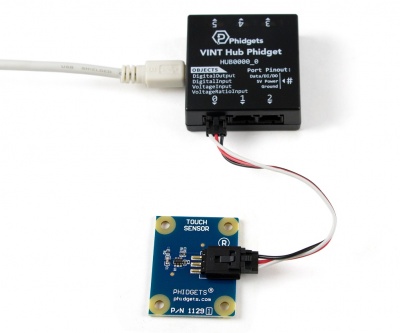
&lt;tr&gt;&lt;td class=&quot;diff-marker&quot;&gt;&lt;/td&gt;&lt;td style=&quot;background-color: #f8f9fa; color: #202122; font-size: 88%; border-style: solid; border-width: 1px 1px 1px 4px; border-radius: 0.33em; border-color: #eaecf0; vertical-align: top; white-space: pre-wrap;&quot;&gt;&lt;div&gt;[[Image:1129_0_Connecting_The_Hardware.jpg|400px|right|link=]]&lt;/div&gt;&lt;/td&gt;&lt;td class=&quot;diff-marker&quot;&gt;&lt;/td&gt;&lt;td style=&quot;background-color: #f8f9fa; color: #202122; font-size: 88%; border-style: solid; border-width: 1px 1px 1px 4px; border-radius: 0.33em; border-color: #eaecf0; vertical-align: top; white-space: pre-wrap;&quot;&gt;&lt;div&gt;[[Image:1129_0_Connecting_The_Hardware.jpg|400px|right|link=]]&lt;/div&gt;&lt;/td&gt;&lt;/tr&gt;
&lt;tr&gt;&lt;td class=&quot;diff-marker&quot; data-marker=&quot;−&quot;&gt;&lt;/td&gt;&lt;td style=&quot;color: #202122; font-size: 88%; border-style: solid; border-width: 1px 1px 1px 4px; border-radius: 0.33em; border-color: #ffe49c; vertical-align: top; white-space: pre-wrap;&quot;&gt;&lt;div&gt;# Connect the 1129 to the &lt;del style=&quot;font-weight: bold; text-decoration: none;&quot;&gt;1018 &lt;/del&gt;with the Phidget cable.&lt;/div&gt;&lt;/td&gt;&lt;td class=&quot;diff-marker&quot; data-marker=&quot;+&quot;&gt;&lt;/td&gt;&lt;td style=&quot;color: #202122; font-size: 88%; border-style: solid; border-width: 1px 1px 1px 4px; border-radius: 0.33em; border-color: #a3d3ff; vertical-align: top; white-space: pre-wrap;&quot;&gt;&lt;div&gt;# Connect the 1129 to the &lt;ins style=&quot;font-weight: bold; text-decoration: none;&quot;&gt;HUB0000 &lt;/ins&gt;with the Phidget cable.&lt;/div&gt;&lt;/td&gt;&lt;/tr&gt;
&lt;tr&gt;&lt;td class=&quot;diff-marker&quot; data-marker=&quot;−&quot;&gt;&lt;/td&gt;&lt;td style=&quot;color: #202122; font-size: 88%; border-style: solid; border-width: 1px 1px 1px 4px; border-radius: 0.33em; border-color: #ffe49c; vertical-align: top; white-space: pre-wrap;&quot;&gt;&lt;div&gt;# Connect the &lt;del style=&quot;font-weight: bold; text-decoration: none;&quot;&gt;1018 &lt;/del&gt;to your computer with the USB cable.&lt;/div&gt;&lt;/td&gt;&lt;td class=&quot;diff-marker&quot; data-marker=&quot;+&quot;&gt;&lt;/td&gt;&lt;td style=&quot;color: #202122; font-size: 88%; border-style: solid; border-width: 1px 1px 1px 4px; border-radius: 0.33em; border-color: #a3d3ff; vertical-align: top; white-space: pre-wrap;&quot;&gt;&lt;div&gt;# Connect the &lt;ins style=&quot;font-weight: bold; text-decoration: none;&quot;&gt;HUB0000 &lt;/ins&gt;to your computer with the USB cable.&lt;/div&gt;&lt;/td&gt;&lt;/tr&gt;
&lt;tr&gt;&lt;td class=&quot;diff-marker&quot;&gt;&lt;/td&gt;&lt;td style=&quot;background-color: #f8f9fa; color: #202122; font-size: 88%; border-style: solid; border-width: 1px 1px 1px 4px; border-radius: 0.33em; border-color: #eaecf0; vertical-align: top; white-space: pre-wrap;&quot;&gt;&lt;br/&gt;&lt;/td&gt;&lt;td class=&quot;diff-marker&quot;&gt;&lt;/td&gt;&lt;td style=&quot;background-color: #f8f9fa; color: #202122; font-size: 88%; border-style: solid; border-width: 1px 1px 1px 4px; border-radius: 0.33em; border-color: #eaecf0; vertical-align: top; white-space: pre-wrap;&quot;&gt;&lt;br/&gt;&lt;/td&gt;&lt;/tr&gt;
&lt;tr&gt;&lt;td class=&quot;diff-marker&quot;&gt;&lt;/td&gt;&lt;td style=&quot;background-color: #f8f9fa; color: #202122; font-size: 88%; border-style: solid; border-width: 1px 1px 1px 4px; border-radius: 0.33em; border-color: #eaecf0; vertical-align: top; white-space: pre-wrap;&quot;&gt;&lt;div&gt;&amp;lt;br clear=&amp;quot;all&amp;quot;&amp;gt;&lt;/div&gt;&lt;/td&gt;&lt;td class=&quot;diff-marker&quot;&gt;&lt;/td&gt;&lt;td style=&quot;background-color: #f8f9fa; color: #202122; font-size: 88%; border-style: solid; border-width: 1px 1px 1px 4px; border-radius: 0.33em; border-color: #eaecf0; vertical-align: top; white-space: pre-wrap;&quot;&gt;&lt;div&gt;&amp;lt;br clear=&amp;quot;all&amp;quot;&amp;gt;&lt;/div&gt;&lt;/td&gt;&lt;/tr&gt;
&lt;tr&gt;&lt;td colspan=&quot;2&quot; class=&quot;diff-lineno&quot; id=&quot;mw-diff-left-l14&quot;&gt;Line 14:&lt;/td&gt;
&lt;td colspan=&quot;2&quot; class=&quot;diff-lineno&quot;&gt;Line 14:&lt;/td&gt;&lt;/tr&gt;
&lt;tr&gt;&lt;td class=&quot;diff-marker&quot;&gt;&lt;/td&gt;&lt;td style=&quot;background-color: #f8f9fa; color: #202122; font-size: 88%; border-style: solid; border-width: 1px 1px 1px 4px; border-radius: 0.33em; border-color: #eaecf0; vertical-align: top; white-space: pre-wrap;&quot;&gt;&lt;br/&gt;&lt;/td&gt;&lt;td class=&quot;diff-marker&quot;&gt;&lt;/td&gt;&lt;td style=&quot;background-color: #f8f9fa; color: #202122; font-size: 88%; border-style: solid; border-width: 1px 1px 1px 4px; border-radius: 0.33em; border-color: #eaecf0; vertical-align: top; white-space: pre-wrap;&quot;&gt;&lt;br/&gt;&lt;/td&gt;&lt;/tr&gt;
&lt;tr&gt;&lt;td class=&quot;diff-marker&quot;&gt;&lt;/td&gt;&lt;td style=&quot;background-color: #f8f9fa; color: #202122; font-size: 88%; border-style: solid; border-width: 1px 1px 1px 4px; border-radius: 0.33em; border-color: #eaecf0; vertical-align: top; white-space: pre-wrap;&quot;&gt;&lt;div&gt;==Using the 1129==&lt;/div&gt;&lt;/td&gt;&lt;td class=&quot;diff-marker&quot;&gt;&lt;/td&gt;&lt;td style=&quot;background-color: #f8f9fa; color: #202122; font-size: 88%; border-style: solid; border-width: 1px 1px 1px 4px; border-radius: 0.33em; border-color: #eaecf0; vertical-align: top; white-space: pre-wrap;&quot;&gt;&lt;div&gt;==Using the 1129==&lt;/div&gt;&lt;/td&gt;&lt;/tr&gt;
&lt;tr&gt;&lt;td class=&quot;diff-marker&quot; data-marker=&quot;−&quot;&gt;&lt;/td&gt;&lt;td style=&quot;color: #202122; font-size: 88%; border-style: solid; border-width: 1px 1px 1px 4px; border-radius: 0.33em; border-color: #ffe49c; vertical-align: top; white-space: pre-wrap;&quot;&gt;&lt;div&gt;{{UGcontrolpanelSensor|1129|&lt;del style=&quot;font-weight: bold; text-decoration: none;&quot;&gt;1018&lt;/del&gt;}}&lt;/div&gt;&lt;/td&gt;&lt;td class=&quot;diff-marker&quot; data-marker=&quot;+&quot;&gt;&lt;/td&gt;&lt;td style=&quot;color: #202122; font-size: 88%; border-style: solid; border-width: 1px 1px 1px 4px; border-radius: 0.33em; border-color: #a3d3ff; vertical-align: top; white-space: pre-wrap;&quot;&gt;&lt;div&gt;{{UGcontrolpanelSensor|1129|&lt;ins style=&quot;font-weight: bold; text-decoration: none;&quot;&gt;HUB0000&lt;/ins&gt;}}&lt;/div&gt;&lt;/td&gt;&lt;/tr&gt;
&lt;tr&gt;&lt;td class=&quot;diff-marker&quot;&gt;&lt;/td&gt;&lt;td style=&quot;background-color: #f8f9fa; color: #202122; font-size: 88%; border-style: solid; border-width: 1px 1px 1px 4px; border-radius: 0.33em; border-color: #eaecf0; vertical-align: top; white-space: pre-wrap;&quot;&gt;&lt;br/&gt;&lt;/td&gt;&lt;td class=&quot;diff-marker&quot;&gt;&lt;/td&gt;&lt;td style=&quot;background-color: #f8f9fa; color: #202122; font-size: 88%; border-style: solid; border-width: 1px 1px 1px 4px; border-radius: 0.33em; border-color: #eaecf0; vertical-align: top; white-space: pre-wrap;&quot;&gt;&lt;br/&gt;&lt;/td&gt;&lt;/tr&gt;
&lt;tr&gt;&lt;td class=&quot;diff-marker&quot;&gt;&lt;/td&gt;&lt;td style=&quot;background-color: #f8f9fa; color: #202122; font-size: 88%; border-style: solid; border-width: 1px 1px 1px 4px; border-radius: 0.33em; border-color: #eaecf0; vertical-align: top; white-space: pre-wrap;&quot;&gt;&lt;div&gt;{{UGSensorVoltageRatioInput|1129|a 1 (touch detected) or 0 (touch not detected)}}&lt;/div&gt;&lt;/td&gt;&lt;td class=&quot;diff-marker&quot;&gt;&lt;/td&gt;&lt;td style=&quot;background-color: #f8f9fa; color: #202122; font-size: 88%; border-style: solid; border-width: 1px 1px 1px 4px; border-radius: 0.33em; border-color: #eaecf0; vertical-align: top; white-space: pre-wrap;&quot;&gt;&lt;div&gt;{{UGSensorVoltageRatioInput|1129|a 1 (touch detected) or 0 (touch not detected)}}&lt;/div&gt;&lt;/td&gt;&lt;/tr&gt;
&lt;tr&gt;&lt;td colspan=&quot;2&quot; class=&quot;diff-lineno&quot; id=&quot;mw-diff-left-l20&quot;&gt;Line 20:&lt;/td&gt;
&lt;td colspan=&quot;2&quot; class=&quot;diff-lineno&quot;&gt;Line 20:&lt;/td&gt;&lt;/tr&gt;
&lt;tr&gt;&lt;td class=&quot;diff-marker&quot;&gt;&lt;/td&gt;&lt;td style=&quot;background-color: #f8f9fa; color: #202122; font-size: 88%; border-style: solid; border-width: 1px 1px 1px 4px; border-radius: 0.33em; border-color: #eaecf0; vertical-align: top; white-space: pre-wrap;&quot;&gt;&lt;div&gt;==Technical Details==&lt;/div&gt;&lt;/td&gt;&lt;td class=&quot;diff-marker&quot;&gt;&lt;/td&gt;&lt;td style=&quot;background-color: #f8f9fa; color: #202122; font-size: 88%; border-style: solid; border-width: 1px 1px 1px 4px; border-radius: 0.33em; border-color: #eaecf0; vertical-align: top; white-space: pre-wrap;&quot;&gt;&lt;div&gt;==Technical Details==&lt;/div&gt;&lt;/td&gt;&lt;/tr&gt;
&lt;tr&gt;&lt;td class=&quot;diff-marker&quot;&gt;&lt;/td&gt;&lt;td style=&quot;background-color: #f8f9fa; color: #202122; font-size: 88%; border-style: solid; border-width: 1px 1px 1px 4px; border-radius: 0.33em; border-color: #eaecf0; vertical-align: top; white-space: pre-wrap;&quot;&gt;&lt;div&gt;===General===&lt;/div&gt;&lt;/td&gt;&lt;td class=&quot;diff-marker&quot;&gt;&lt;/td&gt;&lt;td style=&quot;background-color: #f8f9fa; color: #202122; font-size: 88%; border-style: solid; border-width: 1px 1px 1px 4px; border-radius: 0.33em; border-color: #eaecf0; vertical-align: top; white-space: pre-wrap;&quot;&gt;&lt;div&gt;===General===&lt;/div&gt;&lt;/td&gt;&lt;/tr&gt;
&lt;tr&gt;&lt;td class=&quot;diff-marker&quot; data-marker=&quot;−&quot;&gt;&lt;/td&gt;&lt;td style=&quot;color: #202122; font-size: 88%; border-style: solid; border-width: 1px 1px 1px 4px; border-radius: 0.33em; border-color: #ffe49c; vertical-align: top; white-space: pre-wrap;&quot;&gt;&lt;div&gt;The 1129 is actually a capacitive change sensor. When the capacitance changes the &amp;#039;&amp;#039;Sensor Value&amp;#039;&amp;#039; reports 1. If the &amp;#039;&amp;#039;Sensor Value&amp;#039;&amp;#039; remains at 1 for longer than 60 seconds, it will recalibrate back down to 0, regardless if the sensor is still being touched. This recalibration can also be done manually by unplugging and plugging the sensor back into the &lt;del style=&quot;font-weight: bold; text-decoration: none;&quot;&gt;1018 &lt;/del&gt;(or [{{SERVER}}/?view=comparetable&amp;amp;rel=Analog%20Inputs compatible product]). This is a useful feature because it means that the sensor can be mounted on a flat surface such as a piece of glass or plastic and be reset so that it does not register the change in capacitance caused by the surface it is mounted on. On the bottom side of the 1129 there is a small exposed metallic pad. A soldered connection can be made to the pad to increase the size and dimensions of the touchable area, such as attaching the sensor to a metallic object or some wire. Once the sensor is recalibrated, the &amp;#039;&amp;#039;Sensor Value&amp;#039;&amp;#039; will increase to 1 if the attached object is touched anywhere. Although there is an exposed metallic pad on the bottom of the board, the pad does not have to be touched directly to activate the sensor - touching anywhere on the board will activate the sensor. The 1129 can work as a close proximity sensor, sensing objects at a distance of up to 1/2&amp;quot; from the board in all directions without direct contact. The 1129 will also work through a thickness of up to 1/2&amp;quot; of glass, plastic, or paper.&lt;/div&gt;&lt;/td&gt;&lt;td class=&quot;diff-marker&quot; data-marker=&quot;+&quot;&gt;&lt;/td&gt;&lt;td style=&quot;color: #202122; font-size: 88%; border-style: solid; border-width: 1px 1px 1px 4px; border-radius: 0.33em; border-color: #a3d3ff; vertical-align: top; white-space: pre-wrap;&quot;&gt;&lt;div&gt;The 1129 is actually a capacitive change sensor. When the capacitance changes the &amp;#039;&amp;#039;Sensor Value&amp;#039;&amp;#039; reports 1. If the &amp;#039;&amp;#039;Sensor Value&amp;#039;&amp;#039; remains at 1 for longer than 60 seconds, it will recalibrate back down to 0, regardless if the sensor is still being touched. This recalibration can also be done manually by unplugging and plugging the sensor back into the &lt;ins style=&quot;font-weight: bold; text-decoration: none;&quot;&gt;HUB0000 &lt;/ins&gt;(or [{{SERVER}}/?view=comparetable&amp;amp;rel=Analog%20Inputs compatible product]). This is a useful feature because it means that the sensor can be mounted on a flat surface such as a piece of glass or plastic and be reset so that it does not register the change in capacitance caused by the surface it is mounted on. On the bottom side of the 1129 there is a small exposed metallic pad. A soldered connection can be made to the pad to increase the size and dimensions of the touchable area, such as attaching the sensor to a metallic object or some wire. Once the sensor is recalibrated, the &amp;#039;&amp;#039;Sensor Value&amp;#039;&amp;#039; will increase to 1 if the attached object is touched anywhere. Although there is an exposed metallic pad on the bottom of the board, the pad does not have to be touched directly to activate the sensor - touching anywhere on the board will activate the sensor. The 1129 can work as a close proximity sensor, sensing objects at a distance of up to 1/2&amp;quot; from the board in all directions without direct contact. The 1129 will also work through a thickness of up to 1/2&amp;quot; of glass, plastic, or paper.&lt;/div&gt;&lt;/td&gt;&lt;/tr&gt;
&lt;tr&gt;&lt;td class=&quot;diff-marker&quot;&gt;&lt;/td&gt;&lt;td style=&quot;background-color: #f8f9fa; color: #202122; font-size: 88%; border-style: solid; border-width: 1px 1px 1px 4px; border-radius: 0.33em; border-color: #eaecf0; vertical-align: top; white-space: pre-wrap;&quot;&gt;&lt;br/&gt;&lt;/td&gt;&lt;td class=&quot;diff-marker&quot;&gt;&lt;/td&gt;&lt;td style=&quot;background-color: #f8f9fa; color: #202122; font-size: 88%; border-style: solid; border-width: 1px 1px 1px 4px; border-radius: 0.33em; border-color: #eaecf0; vertical-align: top; white-space: pre-wrap;&quot;&gt;&lt;br/&gt;&lt;/td&gt;&lt;/tr&gt;
&lt;tr&gt;&lt;td class=&quot;diff-marker&quot;&gt;&lt;/td&gt;&lt;td style=&quot;background-color: #f8f9fa; color: #202122; font-size: 88%; border-style: solid; border-width: 1px 1px 1px 4px; border-radius: 0.33em; border-color: #eaecf0; vertical-align: top; white-space: pre-wrap;&quot;&gt;&lt;div&gt;===Customizing Sensitivity===&lt;/div&gt;&lt;/td&gt;&lt;td class=&quot;diff-marker&quot;&gt;&lt;/td&gt;&lt;td style=&quot;background-color: #f8f9fa; color: #202122; font-size: 88%; border-style: solid; border-width: 1px 1px 1px 4px; border-radius: 0.33em; border-color: #eaecf0; vertical-align: top; white-space: pre-wrap;&quot;&gt;&lt;div&gt;===Customizing Sensitivity===&lt;/div&gt;&lt;/td&gt;&lt;/tr&gt;
&lt;/table&gt;</summary>
		<author><name>Jdecoux</name></author>
	</entry>
	<entry>
		<id>https://www.phidgets.com/docs/index.php?title=1129_User_Guide&amp;diff=28648&amp;oldid=prev</id>
		<title>Mparadis at 16:17, 29 November 2017</title>
		<link rel="alternate" type="text/html" href="https://www.phidgets.com/docs/index.php?title=1129_User_Guide&amp;diff=28648&amp;oldid=prev"/>
		<updated>2017-11-29T16:17:36Z</updated>

		<summary type="html">&lt;p&gt;&lt;/p&gt;
&lt;table style=&quot;background-color: #fff; color: #202122;&quot; data-mw=&quot;interface&quot;&gt;
				&lt;col class=&quot;diff-marker&quot; /&gt;
				&lt;col class=&quot;diff-content&quot; /&gt;
				&lt;col class=&quot;diff-marker&quot; /&gt;
				&lt;col class=&quot;diff-content&quot; /&gt;
				&lt;tr class=&quot;diff-title&quot; lang=&quot;en&quot;&gt;
				&lt;td colspan=&quot;2&quot; style=&quot;background-color: #fff; color: #202122; text-align: center;&quot;&gt;← Older revision&lt;/td&gt;
				&lt;td colspan=&quot;2&quot; style=&quot;background-color: #fff; color: #202122; text-align: center;&quot;&gt;Revision as of 16:17, 29 November 2017&lt;/td&gt;
				&lt;/tr&gt;&lt;tr&gt;&lt;td colspan=&quot;2&quot; class=&quot;diff-lineno&quot; id=&quot;mw-diff-left-l1&quot;&gt;Line 1:&lt;/td&gt;
&lt;td colspan=&quot;2&quot; class=&quot;diff-lineno&quot;&gt;Line 1:&lt;/td&gt;&lt;/tr&gt;
&lt;tr&gt;&lt;td colspan=&quot;2&quot; class=&quot;diff-side-deleted&quot;&gt;&lt;/td&gt;&lt;td class=&quot;diff-marker&quot; data-marker=&quot;+&quot;&gt;&lt;/td&gt;&lt;td style=&quot;color: #202122; font-size: 88%; border-style: solid; border-width: 1px 1px 1px 4px; border-radius: 0.33em; border-color: #a3d3ff; vertical-align: top; white-space: pre-wrap;&quot;&gt;&lt;div&gt;&lt;ins style=&quot;font-weight: bold; text-decoration: none;&quot;&gt;&amp;lt;metadesc&gt;Detect human touch through up to 1/2&quot; of glass or plastic with the low-cost Phidgets Touch Sensor. Connects to an Analog Input or VINT Hub port.&amp;lt;/metadesc&gt;&lt;/ins&gt;&lt;/div&gt;&lt;/td&gt;&lt;/tr&gt;
&lt;tr&gt;&lt;td class=&quot;diff-marker&quot;&gt;&lt;/td&gt;&lt;td style=&quot;background-color: #f8f9fa; color: #202122; font-size: 88%; border-style: solid; border-width: 1px 1px 1px 4px; border-radius: 0.33em; border-color: #eaecf0; vertical-align: top; white-space: pre-wrap;&quot;&gt;&lt;div&gt;[[Category:UserGuide]]&lt;/div&gt;&lt;/td&gt;&lt;td class=&quot;diff-marker&quot;&gt;&lt;/td&gt;&lt;td style=&quot;background-color: #f8f9fa; color: #202122; font-size: 88%; border-style: solid; border-width: 1px 1px 1px 4px; border-radius: 0.33em; border-color: #eaecf0; vertical-align: top; white-space: pre-wrap;&quot;&gt;&lt;div&gt;[[Category:UserGuide]]&lt;/div&gt;&lt;/td&gt;&lt;/tr&gt;
&lt;tr&gt;&lt;td class=&quot;diff-marker&quot;&gt;&lt;/td&gt;&lt;td style=&quot;background-color: #f8f9fa; color: #202122; font-size: 88%; border-style: solid; border-width: 1px 1px 1px 4px; border-radius: 0.33em; border-color: #eaecf0; vertical-align: top; white-space: pre-wrap;&quot;&gt;&lt;div&gt;==Getting Started==&lt;/div&gt;&lt;/td&gt;&lt;td class=&quot;diff-marker&quot;&gt;&lt;/td&gt;&lt;td style=&quot;background-color: #f8f9fa; color: #202122; font-size: 88%; border-style: solid; border-width: 1px 1px 1px 4px; border-radius: 0.33em; border-color: #eaecf0; vertical-align: top; white-space: pre-wrap;&quot;&gt;&lt;div&gt;==Getting Started==&lt;/div&gt;&lt;/td&gt;&lt;/tr&gt;
&lt;/table&gt;</summary>
		<author><name>Mparadis</name></author>
	</entry>
	<entry>
		<id>https://www.phidgets.com/docs/index.php?title=1129_User_Guide&amp;diff=27527&amp;oldid=prev</id>
		<title>Lmpacent at 16:40, 19 June 2017</title>
		<link rel="alternate" type="text/html" href="https://www.phidgets.com/docs/index.php?title=1129_User_Guide&amp;diff=27527&amp;oldid=prev"/>
		<updated>2017-06-19T16:40:17Z</updated>

		<summary type="html">&lt;p&gt;&lt;/p&gt;
&lt;table style=&quot;background-color: #fff; color: #202122;&quot; data-mw=&quot;interface&quot;&gt;
				&lt;col class=&quot;diff-marker&quot; /&gt;
				&lt;col class=&quot;diff-content&quot; /&gt;
				&lt;col class=&quot;diff-marker&quot; /&gt;
				&lt;col class=&quot;diff-content&quot; /&gt;
				&lt;tr class=&quot;diff-title&quot; lang=&quot;en&quot;&gt;
				&lt;td colspan=&quot;2&quot; style=&quot;background-color: #fff; color: #202122; text-align: center;&quot;&gt;← Older revision&lt;/td&gt;
				&lt;td colspan=&quot;2&quot; style=&quot;background-color: #fff; color: #202122; text-align: center;&quot;&gt;Revision as of 16:40, 19 June 2017&lt;/td&gt;
				&lt;/tr&gt;&lt;tr&gt;&lt;td colspan=&quot;2&quot; class=&quot;diff-lineno&quot; id=&quot;mw-diff-left-l6&quot;&gt;Line 6:&lt;/td&gt;
&lt;td colspan=&quot;2&quot; class=&quot;diff-lineno&quot;&gt;Line 6:&lt;/td&gt;&lt;/tr&gt;
&lt;tr&gt;&lt;td class=&quot;diff-marker&quot;&gt;&lt;/td&gt;&lt;td style=&quot;background-color: #f8f9fa; color: #202122; font-size: 88%; border-style: solid; border-width: 1px 1px 1px 4px; border-radius: 0.33em; border-color: #eaecf0; vertical-align: top; white-space: pre-wrap;&quot;&gt;&lt;div&gt;Next, you will need to connect the pieces:&lt;/div&gt;&lt;/td&gt;&lt;td class=&quot;diff-marker&quot;&gt;&lt;/td&gt;&lt;td style=&quot;background-color: #f8f9fa; color: #202122; font-size: 88%; border-style: solid; border-width: 1px 1px 1px 4px; border-radius: 0.33em; border-color: #eaecf0; vertical-align: top; white-space: pre-wrap;&quot;&gt;&lt;div&gt;Next, you will need to connect the pieces:&lt;/div&gt;&lt;/td&gt;&lt;/tr&gt;
&lt;tr&gt;&lt;td class=&quot;diff-marker&quot;&gt;&lt;/td&gt;&lt;td style=&quot;background-color: #f8f9fa; color: #202122; font-size: 88%; border-style: solid; border-width: 1px 1px 1px 4px; border-radius: 0.33em; border-color: #eaecf0; vertical-align: top; white-space: pre-wrap;&quot;&gt;&lt;div&gt;[[Image:1129_0_Connecting_The_Hardware.jpg|400px|right|link=]]&lt;/div&gt;&lt;/td&gt;&lt;td class=&quot;diff-marker&quot;&gt;&lt;/td&gt;&lt;td style=&quot;background-color: #f8f9fa; color: #202122; font-size: 88%; border-style: solid; border-width: 1px 1px 1px 4px; border-radius: 0.33em; border-color: #eaecf0; vertical-align: top; white-space: pre-wrap;&quot;&gt;&lt;div&gt;[[Image:1129_0_Connecting_The_Hardware.jpg|400px|right|link=]]&lt;/div&gt;&lt;/td&gt;&lt;/tr&gt;
&lt;tr&gt;&lt;td class=&quot;diff-marker&quot; data-marker=&quot;−&quot;&gt;&lt;/td&gt;&lt;td style=&quot;color: #202122; font-size: 88%; border-style: solid; border-width: 1px 1px 1px 4px; border-radius: 0.33em; border-color: #ffe49c; vertical-align: top; white-space: pre-wrap;&quot;&gt;&lt;div&gt;# Connect the &lt;del style=&quot;font-weight: bold; text-decoration: none;&quot;&gt;touch sensor &lt;/del&gt;to the 1018 with the Phidget cable.&lt;/div&gt;&lt;/td&gt;&lt;td class=&quot;diff-marker&quot; data-marker=&quot;+&quot;&gt;&lt;/td&gt;&lt;td style=&quot;color: #202122; font-size: 88%; border-style: solid; border-width: 1px 1px 1px 4px; border-radius: 0.33em; border-color: #a3d3ff; vertical-align: top; white-space: pre-wrap;&quot;&gt;&lt;div&gt;# Connect the &lt;ins style=&quot;font-weight: bold; text-decoration: none;&quot;&gt;1129 &lt;/ins&gt;to the 1018 with the Phidget cable.&lt;/div&gt;&lt;/td&gt;&lt;/tr&gt;
&lt;tr&gt;&lt;td class=&quot;diff-marker&quot;&gt;&lt;/td&gt;&lt;td style=&quot;background-color: #f8f9fa; color: #202122; font-size: 88%; border-style: solid; border-width: 1px 1px 1px 4px; border-radius: 0.33em; border-color: #eaecf0; vertical-align: top; white-space: pre-wrap;&quot;&gt;&lt;div&gt;# Connect the 1018 to your computer with the USB cable.&lt;/div&gt;&lt;/td&gt;&lt;td class=&quot;diff-marker&quot;&gt;&lt;/td&gt;&lt;td style=&quot;background-color: #f8f9fa; color: #202122; font-size: 88%; border-style: solid; border-width: 1px 1px 1px 4px; border-radius: 0.33em; border-color: #eaecf0; vertical-align: top; white-space: pre-wrap;&quot;&gt;&lt;div&gt;# Connect the 1018 to your computer with the USB cable.&lt;/div&gt;&lt;/td&gt;&lt;/tr&gt;
&lt;tr&gt;&lt;td class=&quot;diff-marker&quot;&gt;&lt;/td&gt;&lt;td style=&quot;background-color: #f8f9fa; color: #202122; font-size: 88%; border-style: solid; border-width: 1px 1px 1px 4px; border-radius: 0.33em; border-color: #eaecf0; vertical-align: top; white-space: pre-wrap;&quot;&gt;&lt;br/&gt;&lt;/td&gt;&lt;td class=&quot;diff-marker&quot;&gt;&lt;/td&gt;&lt;td style=&quot;background-color: #f8f9fa; color: #202122; font-size: 88%; border-style: solid; border-width: 1px 1px 1px 4px; border-radius: 0.33em; border-color: #eaecf0; vertical-align: top; white-space: pre-wrap;&quot;&gt;&lt;br/&gt;&lt;/td&gt;&lt;/tr&gt;
&lt;tr&gt;&lt;td colspan=&quot;2&quot; class=&quot;diff-lineno&quot; id=&quot;mw-diff-left-l18&quot;&gt;Line 18:&lt;/td&gt;
&lt;td colspan=&quot;2&quot; class=&quot;diff-lineno&quot;&gt;Line 18:&lt;/td&gt;&lt;/tr&gt;
&lt;tr&gt;&lt;td class=&quot;diff-marker&quot;&gt;&lt;/td&gt;&lt;td style=&quot;background-color: #f8f9fa; color: #202122; font-size: 88%; border-style: solid; border-width: 1px 1px 1px 4px; border-radius: 0.33em; border-color: #eaecf0; vertical-align: top; white-space: pre-wrap;&quot;&gt;&lt;br/&gt;&lt;/td&gt;&lt;td class=&quot;diff-marker&quot;&gt;&lt;/td&gt;&lt;td style=&quot;background-color: #f8f9fa; color: #202122; font-size: 88%; border-style: solid; border-width: 1px 1px 1px 4px; border-radius: 0.33em; border-color: #eaecf0; vertical-align: top; white-space: pre-wrap;&quot;&gt;&lt;br/&gt;&lt;/td&gt;&lt;/tr&gt;
&lt;tr&gt;&lt;td class=&quot;diff-marker&quot;&gt;&lt;/td&gt;&lt;td style=&quot;background-color: #f8f9fa; color: #202122; font-size: 88%; border-style: solid; border-width: 1px 1px 1px 4px; border-radius: 0.33em; border-color: #eaecf0; vertical-align: top; white-space: pre-wrap;&quot;&gt;&lt;div&gt;==Technical Details==&lt;/div&gt;&lt;/td&gt;&lt;td class=&quot;diff-marker&quot;&gt;&lt;/td&gt;&lt;td style=&quot;background-color: #f8f9fa; color: #202122; font-size: 88%; border-style: solid; border-width: 1px 1px 1px 4px; border-radius: 0.33em; border-color: #eaecf0; vertical-align: top; white-space: pre-wrap;&quot;&gt;&lt;div&gt;==Technical Details==&lt;/div&gt;&lt;/td&gt;&lt;/tr&gt;
&lt;tr&gt;&lt;td class=&quot;diff-marker&quot; data-marker=&quot;−&quot;&gt;&lt;/td&gt;&lt;td style=&quot;color: #202122; font-size: 88%; border-style: solid; border-width: 1px 1px 1px 4px; border-radius: 0.33em; border-color: #ffe49c; vertical-align: top; white-space: pre-wrap;&quot;&gt;&lt;div&gt;===&lt;del style=&quot;font-weight: bold; text-decoration: none;&quot;&gt;Touch Sensor&lt;/del&gt;===&lt;/div&gt;&lt;/td&gt;&lt;td class=&quot;diff-marker&quot; data-marker=&quot;+&quot;&gt;&lt;/td&gt;&lt;td style=&quot;color: #202122; font-size: 88%; border-style: solid; border-width: 1px 1px 1px 4px; border-radius: 0.33em; border-color: #a3d3ff; vertical-align: top; white-space: pre-wrap;&quot;&gt;&lt;div&gt;===&lt;ins style=&quot;font-weight: bold; text-decoration: none;&quot;&gt;General&lt;/ins&gt;===&lt;/div&gt;&lt;/td&gt;&lt;/tr&gt;
&lt;tr&gt;&lt;td class=&quot;diff-marker&quot; data-marker=&quot;−&quot;&gt;&lt;/td&gt;&lt;td style=&quot;color: #202122; font-size: 88%; border-style: solid; border-width: 1px 1px 1px 4px; border-radius: 0.33em; border-color: #ffe49c; vertical-align: top; white-space: pre-wrap;&quot;&gt;&lt;div&gt;&lt;del style=&quot;font-weight: bold; text-decoration: none;&quot;&gt;This sensor &lt;/del&gt;is actually a capacitive change sensor. When the capacitance changes the &amp;#039;&amp;#039;Sensor Value&amp;#039;&amp;#039; reports 1. If the &amp;#039;&amp;#039;Sensor Value&amp;#039;&amp;#039; remains at 1 for longer than 60 seconds, it will recalibrate back down to 0, regardless if the sensor is still being touched. This recalibration can also be done manually by unplugging and plugging the sensor back into the 1018 (or [{{SERVER}}/?view=comparetable&amp;amp;rel=Analog%20Inputs compatible product]). This is a useful feature because it means that the sensor can be mounted on a flat surface such as a piece of glass or plastic and be reset so that it does not register the change in capacitance caused by the surface it is mounted on. On the bottom side of the 1129 there is a small exposed metallic pad. A soldered connection can be made to the pad to increase the size and dimensions of the touchable area, such as attaching the sensor to a metallic object or some wire. Once the sensor is recalibrated, the &amp;#039;&amp;#039;Sensor Value&amp;#039;&amp;#039; will increase to 1 if the attached object is touched anywhere. Although there is an exposed metallic pad on the bottom of the board, the pad does not have to be touched directly to activate the sensor - touching anywhere on the board will activate the sensor. The &lt;del style=&quot;font-weight: bold; text-decoration: none;&quot;&gt;sensor &lt;/del&gt;can work as a close  &lt;/div&gt;&lt;/td&gt;&lt;td class=&quot;diff-marker&quot; data-marker=&quot;+&quot;&gt;&lt;/td&gt;&lt;td style=&quot;color: #202122; font-size: 88%; border-style: solid; border-width: 1px 1px 1px 4px; border-radius: 0.33em; border-color: #a3d3ff; vertical-align: top; white-space: pre-wrap;&quot;&gt;&lt;div&gt;&lt;ins style=&quot;font-weight: bold; text-decoration: none;&quot;&gt;The 1129 &lt;/ins&gt;is actually a capacitive change sensor. When the capacitance changes the &amp;#039;&amp;#039;Sensor Value&amp;#039;&amp;#039; reports 1. If the &amp;#039;&amp;#039;Sensor Value&amp;#039;&amp;#039; remains at 1 for longer than 60 seconds, it will recalibrate back down to 0, regardless if the sensor is still being touched. This recalibration can also be done manually by unplugging and plugging the sensor back into the 1018 (or [{{SERVER}}/?view=comparetable&amp;amp;rel=Analog%20Inputs compatible product]). This is a useful feature because it means that the sensor can be mounted on a flat surface such as a piece of glass or plastic and be reset so that it does not register the change in capacitance caused by the surface it is mounted on. On the bottom side of the 1129 there is a small exposed metallic pad. A soldered connection can be made to the pad to increase the size and dimensions of the touchable area, such as attaching the sensor to a metallic object or some wire. Once the sensor is recalibrated, the &amp;#039;&amp;#039;Sensor Value&amp;#039;&amp;#039; will increase to 1 if the attached object is touched anywhere. Although there is an exposed metallic pad on the bottom of the board, the pad does not have to be touched directly to activate the sensor - touching anywhere on the board will activate the sensor. The &lt;ins style=&quot;font-weight: bold; text-decoration: none;&quot;&gt;1129 &lt;/ins&gt;can work as a close proximity sensor, sensing objects at a distance of up to 1/2&amp;quot; from the board in all directions without direct contact. The 1129 will also work through a thickness of up to 1/2&amp;quot; of glass, plastic, or paper.&lt;/div&gt;&lt;/td&gt;&lt;/tr&gt;
&lt;tr&gt;&lt;td class=&quot;diff-marker&quot; data-marker=&quot;−&quot;&gt;&lt;/td&gt;&lt;td style=&quot;color: #202122; font-size: 88%; border-style: solid; border-width: 1px 1px 1px 4px; border-radius: 0.33em; border-color: #ffe49c; vertical-align: top; white-space: pre-wrap;&quot;&gt;&lt;div&gt;proximity sensor, sensing objects at a distance of up to 1/2&amp;quot; from the board in all directions without direct contact. The 1129 will also work through a thickness of up to 1/2&amp;quot; of glass, plastic, or paper.&lt;/div&gt;&lt;/td&gt;&lt;td colspan=&quot;2&quot; class=&quot;diff-side-added&quot;&gt;&lt;/td&gt;&lt;/tr&gt;
&lt;tr&gt;&lt;td class=&quot;diff-marker&quot;&gt;&lt;/td&gt;&lt;td style=&quot;background-color: #f8f9fa; color: #202122; font-size: 88%; border-style: solid; border-width: 1px 1px 1px 4px; border-radius: 0.33em; border-color: #eaecf0; vertical-align: top; white-space: pre-wrap;&quot;&gt;&lt;br/&gt;&lt;/td&gt;&lt;td class=&quot;diff-marker&quot;&gt;&lt;/td&gt;&lt;td style=&quot;background-color: #f8f9fa; color: #202122; font-size: 88%; border-style: solid; border-width: 1px 1px 1px 4px; border-radius: 0.33em; border-color: #eaecf0; vertical-align: top; white-space: pre-wrap;&quot;&gt;&lt;br/&gt;&lt;/td&gt;&lt;/tr&gt;
&lt;tr&gt;&lt;td class=&quot;diff-marker&quot;&gt;&lt;/td&gt;&lt;td style=&quot;background-color: #f8f9fa; color: #202122; font-size: 88%; border-style: solid; border-width: 1px 1px 1px 4px; border-radius: 0.33em; border-color: #eaecf0; vertical-align: top; white-space: pre-wrap;&quot;&gt;&lt;div&gt;===Customizing Sensitivity===&lt;/div&gt;&lt;/td&gt;&lt;td class=&quot;diff-marker&quot;&gt;&lt;/td&gt;&lt;td style=&quot;background-color: #f8f9fa; color: #202122; font-size: 88%; border-style: solid; border-width: 1px 1px 1px 4px; border-radius: 0.33em; border-color: #eaecf0; vertical-align: top; white-space: pre-wrap;&quot;&gt;&lt;div&gt;===Customizing Sensitivity===&lt;/div&gt;&lt;/td&gt;&lt;/tr&gt;
&lt;tr&gt;&lt;td class=&quot;diff-marker&quot; data-marker=&quot;−&quot;&gt;&lt;/td&gt;&lt;td style=&quot;color: #202122; font-size: 88%; border-style: solid; border-width: 1px 1px 1px 4px; border-radius: 0.33em; border-color: #ffe49c; vertical-align: top; white-space: pre-wrap;&quot;&gt;&lt;div&gt;The capacitor labelled C1 is the &amp;#039;&amp;#039;sensing&amp;#039;&amp;#039; capacitor. In other words this is the capacitor that determines how sensitive the sensor is. By default it is a 10nF capacitor. By changing this value we can adjust the sensitivity. Smaller capacitors will yield lower sensitivity while higher values will yield higher sensitivity. The &lt;del style=&quot;font-weight: bold; text-decoration: none;&quot;&gt;IC (&lt;/del&gt;integrated circuit) on the 1129 specifies that the acceptable range for C1 is &lt;del style=&quot;font-weight: bold; text-decoration: none;&quot;&gt;2&lt;/del&gt;-50nF. In testing, 2nF will not sense through any thickness of material while 50nF can sense through over 1&amp;quot; of material and even through double paned windows with an air gap of up to 3/4&amp;quot;. If the size of your capacitive touch surface is very large, you may have to increase C1 even more. Up to 100nF even.&lt;/div&gt;&lt;/td&gt;&lt;td class=&quot;diff-marker&quot; data-marker=&quot;+&quot;&gt;&lt;/td&gt;&lt;td style=&quot;color: #202122; font-size: 88%; border-style: solid; border-width: 1px 1px 1px 4px; border-radius: 0.33em; border-color: #a3d3ff; vertical-align: top; white-space: pre-wrap;&quot;&gt;&lt;div&gt;The capacitor labelled C1 is the &amp;#039;&amp;#039;sensing&amp;#039;&amp;#039; capacitor. In other words this is the capacitor that determines how sensitive the sensor is. By default it is a 10nF capacitor. By changing this value we can adjust the sensitivity. Smaller capacitors will yield lower sensitivity while higher values will yield higher sensitivity. The integrated circuit &lt;ins style=&quot;font-weight: bold; text-decoration: none;&quot;&gt;(IC&lt;/ins&gt;) on the 1129 specifies that the acceptable range for C1 is &lt;ins style=&quot;font-weight: bold; text-decoration: none;&quot;&gt;2nF&lt;/ins&gt;-50nF. In testing, 2nF will not sense through any thickness of material while 50nF can sense through over 1&amp;quot; of material and even through double paned windows with an air gap of up to 3/4&amp;quot;. If the size of your capacitive touch surface is very large, you may have to increase C1 even more. Up to 100nF even.&lt;/div&gt;&lt;/td&gt;&lt;/tr&gt;
&lt;tr&gt;&lt;td class=&quot;diff-marker&quot;&gt;&lt;/td&gt;&lt;td style=&quot;background-color: #f8f9fa; color: #202122; font-size: 88%; border-style: solid; border-width: 1px 1px 1px 4px; border-radius: 0.33em; border-color: #eaecf0; vertical-align: top; white-space: pre-wrap;&quot;&gt;&lt;div&gt;(C1 is soldered onto the board, in order to replace it you will need a soldering iron).&lt;/div&gt;&lt;/td&gt;&lt;td class=&quot;diff-marker&quot;&gt;&lt;/td&gt;&lt;td style=&quot;background-color: #f8f9fa; color: #202122; font-size: 88%; border-style: solid; border-width: 1px 1px 1px 4px; border-radius: 0.33em; border-color: #eaecf0; vertical-align: top; white-space: pre-wrap;&quot;&gt;&lt;div&gt;(C1 is soldered onto the board, in order to replace it you will need a soldering iron).&lt;/div&gt;&lt;/td&gt;&lt;/tr&gt;
&lt;tr&gt;&lt;td class=&quot;diff-marker&quot;&gt;&lt;/td&gt;&lt;td style=&quot;background-color: #f8f9fa; color: #202122; font-size: 88%; border-style: solid; border-width: 1px 1px 1px 4px; border-radius: 0.33em; border-color: #eaecf0; vertical-align: top; white-space: pre-wrap;&quot;&gt;&lt;br/&gt;&lt;/td&gt;&lt;td class=&quot;diff-marker&quot;&gt;&lt;/td&gt;&lt;td style=&quot;background-color: #f8f9fa; color: #202122; font-size: 88%; border-style: solid; border-width: 1px 1px 1px 4px; border-radius: 0.33em; border-color: #eaecf0; vertical-align: top; white-space: pre-wrap;&quot;&gt;&lt;br/&gt;&lt;/td&gt;&lt;/tr&gt;
&lt;/table&gt;</summary>
		<author><name>Lmpacent</name></author>
	</entry>
	<entry>
		<id>https://www.phidgets.com/docs/index.php?title=1129_User_Guide&amp;diff=27458&amp;oldid=prev</id>
		<title>Lmpacent at 20:15, 16 June 2017</title>
		<link rel="alternate" type="text/html" href="https://www.phidgets.com/docs/index.php?title=1129_User_Guide&amp;diff=27458&amp;oldid=prev"/>
		<updated>2017-06-16T20:15:07Z</updated>

		<summary type="html">&lt;p&gt;&lt;/p&gt;
&lt;table style=&quot;background-color: #fff; color: #202122;&quot; data-mw=&quot;interface&quot;&gt;
				&lt;col class=&quot;diff-marker&quot; /&gt;
				&lt;col class=&quot;diff-content&quot; /&gt;
				&lt;col class=&quot;diff-marker&quot; /&gt;
				&lt;col class=&quot;diff-content&quot; /&gt;
				&lt;tr class=&quot;diff-title&quot; lang=&quot;en&quot;&gt;
				&lt;td colspan=&quot;2&quot; style=&quot;background-color: #fff; color: #202122; text-align: center;&quot;&gt;← Older revision&lt;/td&gt;
				&lt;td colspan=&quot;2&quot; style=&quot;background-color: #fff; color: #202122; text-align: center;&quot;&gt;Revision as of 20:15, 16 June 2017&lt;/td&gt;
				&lt;/tr&gt;&lt;tr&gt;&lt;td colspan=&quot;2&quot; class=&quot;diff-lineno&quot; id=&quot;mw-diff-left-l1&quot;&gt;Line 1:&lt;/td&gt;
&lt;td colspan=&quot;2&quot; class=&quot;diff-lineno&quot;&gt;Line 1:&lt;/td&gt;&lt;/tr&gt;
&lt;tr&gt;&lt;td class=&quot;diff-marker&quot;&gt;&lt;/td&gt;&lt;td style=&quot;background-color: #f8f9fa; color: #202122; font-size: 88%; border-style: solid; border-width: 1px 1px 1px 4px; border-radius: 0.33em; border-color: #eaecf0; vertical-align: top; white-space: pre-wrap;&quot;&gt;&lt;div&gt;[[Category:UserGuide]]&lt;/div&gt;&lt;/td&gt;&lt;td class=&quot;diff-marker&quot;&gt;&lt;/td&gt;&lt;td style=&quot;background-color: #f8f9fa; color: #202122; font-size: 88%; border-style: solid; border-width: 1px 1px 1px 4px; border-radius: 0.33em; border-color: #eaecf0; vertical-align: top; white-space: pre-wrap;&quot;&gt;&lt;div&gt;[[Category:UserGuide]]&lt;/div&gt;&lt;/td&gt;&lt;/tr&gt;
&lt;tr&gt;&lt;td colspan=&quot;2&quot; class=&quot;diff-side-deleted&quot;&gt;&lt;/td&gt;&lt;td class=&quot;diff-marker&quot; data-marker=&quot;+&quot;&gt;&lt;/td&gt;&lt;td style=&quot;color: #202122; font-size: 88%; border-style: solid; border-width: 1px 1px 1px 4px; border-radius: 0.33em; border-color: #a3d3ff; vertical-align: top; white-space: pre-wrap;&quot;&gt;&lt;div&gt;&lt;ins style=&quot;font-weight: bold; text-decoration: none;&quot;&gt;==Getting Started==&lt;/ins&gt;&lt;/div&gt;&lt;/td&gt;&lt;/tr&gt;
&lt;tr&gt;&lt;td colspan=&quot;2&quot; class=&quot;diff-side-deleted&quot;&gt;&lt;/td&gt;&lt;td class=&quot;diff-marker&quot; data-marker=&quot;+&quot;&gt;&lt;/td&gt;&lt;td style=&quot;color: #202122; font-size: 88%; border-style: solid; border-width: 1px 1px 1px 4px; border-radius: 0.33em; border-color: #a3d3ff; vertical-align: top; white-space: pre-wrap;&quot;&gt;&lt;div&gt;&lt;ins style=&quot;font-weight: bold; text-decoration: none;&quot;&gt;{{UgSensorIntro|1129|Touch Sensor|Voltage Ratio Input port}}&lt;/ins&gt;&lt;/div&gt;&lt;/td&gt;&lt;/tr&gt;
&lt;tr&gt;&lt;td class=&quot;diff-marker&quot;&gt;&lt;/td&gt;&lt;td style=&quot;background-color: #f8f9fa; color: #202122; font-size: 88%; border-style: solid; border-width: 1px 1px 1px 4px; border-radius: 0.33em; border-color: #eaecf0; vertical-align: top; white-space: pre-wrap;&quot;&gt;&lt;br/&gt;&lt;/td&gt;&lt;td class=&quot;diff-marker&quot;&gt;&lt;/td&gt;&lt;td style=&quot;background-color: #f8f9fa; color: #202122; font-size: 88%; border-style: solid; border-width: 1px 1px 1px 4px; border-radius: 0.33em; border-color: #eaecf0; vertical-align: top; white-space: pre-wrap;&quot;&gt;&lt;br/&gt;&lt;/td&gt;&lt;/tr&gt;
&lt;tr&gt;&lt;td class=&quot;diff-marker&quot; data-marker=&quot;−&quot;&gt;&lt;/td&gt;&lt;td style=&quot;color: #202122; font-size: 88%; border-style: solid; border-width: 1px 1px 1px 4px; border-radius: 0.33em; border-color: #ffe49c; vertical-align: top; white-space: pre-wrap;&quot;&gt;&lt;div&gt;&lt;del style=&quot;font-weight: bold; text-decoration: none;&quot;&gt;===Required Hardware===&lt;/del&gt;&lt;/div&gt;&lt;/td&gt;&lt;td colspan=&quot;2&quot; class=&quot;diff-side-added&quot;&gt;&lt;/td&gt;&lt;/tr&gt;
&lt;tr&gt;&lt;td class=&quot;diff-marker&quot;&gt;&lt;/td&gt;&lt;td style=&quot;background-color: #f8f9fa; color: #202122; font-size: 88%; border-style: solid; border-width: 1px 1px 1px 4px; border-radius: 0.33em; border-color: #eaecf0; vertical-align: top; white-space: pre-wrap;&quot;&gt;&lt;br/&gt;&lt;/td&gt;&lt;td class=&quot;diff-marker&quot;&gt;&lt;/td&gt;&lt;td style=&quot;background-color: #f8f9fa; color: #202122; font-size: 88%; border-style: solid; border-width: 1px 1px 1px 4px; border-radius: 0.33em; border-color: #eaecf0; vertical-align: top; white-space: pre-wrap;&quot;&gt;&lt;br/&gt;&lt;/td&gt;&lt;/tr&gt;
&lt;tr&gt;&lt;td class=&quot;diff-marker&quot; data-marker=&quot;−&quot;&gt;&lt;/td&gt;&lt;td style=&quot;color: #202122; font-size: 88%; border-style: solid; border-width: 1px 1px 1px 4px; border-radius: 0.33em; border-color: #ffe49c; vertical-align: top; white-space: pre-wrap;&quot;&gt;&lt;div&gt;&lt;del style=&quot;font-weight: bold; text-decoration: none;&quot;&gt;* A [{{SERVER}}/products.php?product_id=1129 1129 Touch Sensor]&lt;/del&gt;&lt;/div&gt;&lt;/td&gt;&lt;td class=&quot;diff-marker&quot; data-marker=&quot;+&quot;&gt;&lt;/td&gt;&lt;td style=&quot;color: #202122; font-size: 88%; border-style: solid; border-width: 1px 1px 1px 4px; border-radius: 0.33em; border-color: #a3d3ff; vertical-align: top; white-space: pre-wrap;&quot;&gt;&lt;div&gt;&lt;ins style=&quot;font-weight: bold; text-decoration: none;&quot;&gt;Next, you will need &lt;/ins&gt;to &lt;ins style=&quot;font-weight: bold; text-decoration: none;&quot;&gt;connect &lt;/ins&gt;the &lt;ins style=&quot;font-weight: bold; text-decoration: none;&quot;&gt;pieces:&lt;/ins&gt;&lt;/div&gt;&lt;/td&gt;&lt;/tr&gt;
&lt;tr&gt;&lt;td class=&quot;diff-marker&quot; data-marker=&quot;−&quot;&gt;&lt;/td&gt;&lt;td style=&quot;color: #202122; font-size: 88%; border-style: solid; border-width: 1px 1px 1px 4px; border-radius: 0.33em; border-color: #ffe49c; vertical-align: top; white-space: pre-wrap;&quot;&gt;&lt;div&gt;&lt;del style=&quot;font-weight: bold; text-decoration: none;&quot;&gt;* An InterfaceKit or Hub &lt;/del&gt;to &lt;del style=&quot;font-weight: bold; text-decoration: none;&quot;&gt;read &lt;/del&gt;the &lt;del style=&quot;font-weight: bold; text-decoration: none;&quot;&gt;sensor&lt;/del&gt;&lt;/div&gt;&lt;/td&gt;&lt;td colspan=&quot;2&quot; class=&quot;diff-side-added&quot;&gt;&lt;/td&gt;&lt;/tr&gt;
&lt;tr&gt;&lt;td class=&quot;diff-marker&quot; data-marker=&quot;−&quot;&gt;&lt;/td&gt;&lt;td style=&quot;color: #202122; font-size: 88%; border-style: solid; border-width: 1px 1px 1px 4px; border-radius: 0.33em; border-color: #ffe49c; vertical-align: top; white-space: pre-wrap;&quot;&gt;&lt;div&gt;&lt;del style=&quot;font-weight: bold; text-decoration: none;&quot;&gt;* A Phidget cable&lt;/del&gt;&lt;/div&gt;&lt;/td&gt;&lt;td colspan=&quot;2&quot; class=&quot;diff-side-added&quot;&gt;&lt;/td&gt;&lt;/tr&gt;
&lt;tr&gt;&lt;td class=&quot;diff-marker&quot; data-marker=&quot;−&quot;&gt;&lt;/td&gt;&lt;td style=&quot;color: #202122; font-size: 88%; border-style: solid; border-width: 1px 1px 1px 4px; border-radius: 0.33em; border-color: #ffe49c; vertical-align: top; white-space: pre-wrap;&quot;&gt;&lt;div&gt;&lt;del style=&quot;font-weight: bold; text-decoration: none;&quot;&gt;* A USB cable&lt;/del&gt;&lt;/div&gt;&lt;/td&gt;&lt;td colspan=&quot;2&quot; class=&quot;diff-side-added&quot;&gt;&lt;/td&gt;&lt;/tr&gt;
&lt;tr&gt;&lt;td class=&quot;diff-marker&quot; data-marker=&quot;−&quot;&gt;&lt;/td&gt;&lt;td style=&quot;color: #202122; font-size: 88%; border-style: solid; border-width: 1px 1px 1px 4px; border-radius: 0.33em; border-color: #ffe49c; vertical-align: top; white-space: pre-wrap;&quot;&gt;&lt;div&gt;&lt;del style=&quot;font-weight: bold; text-decoration: none;&quot;&gt;* A computer&lt;/del&gt;&lt;/div&gt;&lt;/td&gt;&lt;td colspan=&quot;2&quot; class=&quot;diff-side-added&quot;&gt;&lt;/td&gt;&lt;/tr&gt;
&lt;tr&gt;&lt;td class=&quot;diff-marker&quot; data-marker=&quot;−&quot;&gt;&lt;/td&gt;&lt;td style=&quot;color: #202122; font-size: 88%; border-style: solid; border-width: 1px 1px 1px 4px; border-radius: 0.33em; border-color: #ffe49c; vertical-align: top; white-space: pre-wrap;&quot;&gt;&lt;div&gt; &lt;/div&gt;&lt;/td&gt;&lt;td colspan=&quot;2&quot; class=&quot;diff-side-added&quot;&gt;&lt;/td&gt;&lt;/tr&gt;
&lt;tr&gt;&lt;td class=&quot;diff-marker&quot; data-marker=&quot;−&quot;&gt;&lt;/td&gt;&lt;td style=&quot;color: #202122; font-size: 88%; border-style: solid; border-width: 1px 1px 1px 4px; border-radius: 0.33em; border-color: #ffe49c; vertical-align: top; white-space: pre-wrap;&quot;&gt;&lt;div&gt;&lt;del style=&quot;font-weight: bold; text-decoration: none;&quot;&gt;===Connecting the Pieces===&lt;/del&gt;&lt;/div&gt;&lt;/td&gt;&lt;td colspan=&quot;2&quot; class=&quot;diff-side-added&quot;&gt;&lt;/td&gt;&lt;/tr&gt;
&lt;tr&gt;&lt;td class=&quot;diff-marker&quot;&gt;&lt;/td&gt;&lt;td style=&quot;background-color: #f8f9fa; color: #202122; font-size: 88%; border-style: solid; border-width: 1px 1px 1px 4px; border-radius: 0.33em; border-color: #eaecf0; vertical-align: top; white-space: pre-wrap;&quot;&gt;&lt;div&gt;[[Image:1129_0_Connecting_The_Hardware.jpg|400px|right|link=]]&lt;/div&gt;&lt;/td&gt;&lt;td class=&quot;diff-marker&quot;&gt;&lt;/td&gt;&lt;td style=&quot;background-color: #f8f9fa; color: #202122; font-size: 88%; border-style: solid; border-width: 1px 1px 1px 4px; border-radius: 0.33em; border-color: #eaecf0; vertical-align: top; white-space: pre-wrap;&quot;&gt;&lt;div&gt;[[Image:1129_0_Connecting_The_Hardware.jpg|400px|right|link=]]&lt;/div&gt;&lt;/td&gt;&lt;/tr&gt;
&lt;tr&gt;&lt;td class=&quot;diff-marker&quot; data-marker=&quot;−&quot;&gt;&lt;/td&gt;&lt;td style=&quot;color: #202122; font-size: 88%; border-style: solid; border-width: 1px 1px 1px 4px; border-radius: 0.33em; border-color: #ffe49c; vertical-align: top; white-space: pre-wrap;&quot;&gt;&lt;div&gt;# Connect the touch sensor to the &lt;del style=&quot;font-weight: bold; text-decoration: none;&quot;&gt;InterfaceKit or Hub &lt;/del&gt;with the Phidget cable.&lt;/div&gt;&lt;/td&gt;&lt;td class=&quot;diff-marker&quot; data-marker=&quot;+&quot;&gt;&lt;/td&gt;&lt;td style=&quot;color: #202122; font-size: 88%; border-style: solid; border-width: 1px 1px 1px 4px; border-radius: 0.33em; border-color: #a3d3ff; vertical-align: top; white-space: pre-wrap;&quot;&gt;&lt;div&gt;# Connect the touch sensor to the &lt;ins style=&quot;font-weight: bold; text-decoration: none;&quot;&gt;1018 &lt;/ins&gt;with the Phidget cable.&lt;/div&gt;&lt;/td&gt;&lt;/tr&gt;
&lt;tr&gt;&lt;td class=&quot;diff-marker&quot; data-marker=&quot;−&quot;&gt;&lt;/td&gt;&lt;td style=&quot;color: #202122; font-size: 88%; border-style: solid; border-width: 1px 1px 1px 4px; border-radius: 0.33em; border-color: #ffe49c; vertical-align: top; white-space: pre-wrap;&quot;&gt;&lt;div&gt;# Connect the &lt;del style=&quot;font-weight: bold; text-decoration: none;&quot;&gt;InterfaceKit or Hub &lt;/del&gt;to your computer with the USB cable.&lt;/div&gt;&lt;/td&gt;&lt;td class=&quot;diff-marker&quot; data-marker=&quot;+&quot;&gt;&lt;/td&gt;&lt;td style=&quot;color: #202122; font-size: 88%; border-style: solid; border-width: 1px 1px 1px 4px; border-radius: 0.33em; border-color: #a3d3ff; vertical-align: top; white-space: pre-wrap;&quot;&gt;&lt;div&gt;# Connect the &lt;ins style=&quot;font-weight: bold; text-decoration: none;&quot;&gt;1018 &lt;/ins&gt;to your computer with the USB cable.&lt;/div&gt;&lt;/td&gt;&lt;/tr&gt;
&lt;tr&gt;&lt;td class=&quot;diff-marker&quot;&gt;&lt;/td&gt;&lt;td style=&quot;background-color: #f8f9fa; color: #202122; font-size: 88%; border-style: solid; border-width: 1px 1px 1px 4px; border-radius: 0.33em; border-color: #eaecf0; vertical-align: top; white-space: pre-wrap;&quot;&gt;&lt;br/&gt;&lt;/td&gt;&lt;td class=&quot;diff-marker&quot;&gt;&lt;/td&gt;&lt;td style=&quot;background-color: #f8f9fa; color: #202122; font-size: 88%; border-style: solid; border-width: 1px 1px 1px 4px; border-radius: 0.33em; border-color: #eaecf0; vertical-align: top; white-space: pre-wrap;&quot;&gt;&lt;br/&gt;&lt;/td&gt;&lt;/tr&gt;
&lt;tr&gt;&lt;td class=&quot;diff-marker&quot;&gt;&lt;/td&gt;&lt;td style=&quot;background-color: #f8f9fa; color: #202122; font-size: 88%; border-style: solid; border-width: 1px 1px 1px 4px; border-radius: 0.33em; border-color: #eaecf0; vertical-align: top; white-space: pre-wrap;&quot;&gt;&lt;div&gt;&amp;lt;br clear=&amp;quot;all&amp;quot;&amp;gt;&lt;/div&gt;&lt;/td&gt;&lt;td class=&quot;diff-marker&quot;&gt;&lt;/td&gt;&lt;td style=&quot;background-color: #f8f9fa; color: #202122; font-size: 88%; border-style: solid; border-width: 1px 1px 1px 4px; border-radius: 0.33em; border-color: #eaecf0; vertical-align: top; white-space: pre-wrap;&quot;&gt;&lt;div&gt;&amp;lt;br clear=&amp;quot;all&amp;quot;&amp;gt;&lt;/div&gt;&lt;/td&gt;&lt;/tr&gt;
&lt;tr&gt;&lt;td class=&quot;diff-marker&quot; data-marker=&quot;−&quot;&gt;&lt;/td&gt;&lt;td style=&quot;color: #202122; font-size: 88%; border-style: solid; border-width: 1px 1px 1px 4px; border-radius: 0.33em; border-color: #ffe49c; vertical-align: top; white-space: pre-wrap;&quot;&gt;&lt;div&gt;&lt;del style=&quot;font-weight: bold; text-decoration: none;&quot;&gt;==Testing Using Windows==&lt;/del&gt;&lt;/div&gt;&lt;/td&gt;&lt;td class=&quot;diff-marker&quot; data-marker=&quot;+&quot;&gt;&lt;/td&gt;&lt;td style=&quot;color: #202122; font-size: 88%; border-style: solid; border-width: 1px 1px 1px 4px; border-radius: 0.33em; border-color: #a3d3ff; vertical-align: top; white-space: pre-wrap;&quot;&gt;&lt;div&gt;&lt;ins style=&quot;font-weight: bold; text-decoration: none;&quot;&gt;{{UGIntroDone|1129}}&lt;/ins&gt;&lt;/div&gt;&lt;/td&gt;&lt;/tr&gt;
&lt;tr&gt;&lt;td class=&quot;diff-marker&quot;&gt;&lt;/td&gt;&lt;td style=&quot;background-color: #f8f9fa; color: #202122; font-size: 88%; border-style: solid; border-width: 1px 1px 1px 4px; border-radius: 0.33em; border-color: #eaecf0; vertical-align: top; white-space: pre-wrap;&quot;&gt;&lt;br/&gt;&lt;/td&gt;&lt;td class=&quot;diff-marker&quot;&gt;&lt;/td&gt;&lt;td style=&quot;background-color: #f8f9fa; color: #202122; font-size: 88%; border-style: solid; border-width: 1px 1px 1px 4px; border-radius: 0.33em; border-color: #eaecf0; vertical-align: top; white-space: pre-wrap;&quot;&gt;&lt;br/&gt;&lt;/td&gt;&lt;/tr&gt;
&lt;tr&gt;&lt;td class=&quot;diff-marker&quot; data-marker=&quot;−&quot;&gt;&lt;/td&gt;&lt;td style=&quot;color: #202122; font-size: 88%; border-style: solid; border-width: 1px 1px 1px 4px; border-radius: 0.33em; border-color: #ffe49c; vertical-align: top; white-space: pre-wrap;&quot;&gt;&lt;div&gt;{{&lt;del style=&quot;font-weight: bold; text-decoration: none;&quot;&gt;UgSensor&lt;/del&gt;}}&lt;/div&gt;&lt;/td&gt;&lt;td class=&quot;diff-marker&quot; data-marker=&quot;+&quot;&gt;&lt;/td&gt;&lt;td style=&quot;color: #202122; font-size: 88%; border-style: solid; border-width: 1px 1px 1px 4px; border-radius: 0.33em; border-color: #a3d3ff; vertical-align: top; white-space: pre-wrap;&quot;&gt;&lt;div&gt;&lt;ins style=&quot;font-weight: bold; text-decoration: none;&quot;&gt;==Using the 1129==&lt;/ins&gt;&lt;/div&gt;&lt;/td&gt;&lt;/tr&gt;
&lt;tr&gt;&lt;td colspan=&quot;2&quot; class=&quot;diff-side-deleted&quot;&gt;&lt;/td&gt;&lt;td class=&quot;diff-marker&quot; data-marker=&quot;+&quot;&gt;&lt;/td&gt;&lt;td style=&quot;color: #202122; font-size: 88%; border-style: solid; border-width: 1px 1px 1px 4px; border-radius: 0.33em; border-color: #a3d3ff; vertical-align: top; white-space: pre-wrap;&quot;&gt;&lt;div&gt;{{&lt;ins style=&quot;font-weight: bold; text-decoration: none;&quot;&gt;UGcontrolpanelSensor|1129|1018}}&lt;/ins&gt;&lt;/div&gt;&lt;/td&gt;&lt;/tr&gt;
&lt;tr&gt;&lt;td colspan=&quot;2&quot; class=&quot;diff-side-deleted&quot;&gt;&lt;/td&gt;&lt;td class=&quot;diff-marker&quot; data-marker=&quot;+&quot;&gt;&lt;/td&gt;&lt;td style=&quot;color: #202122; font-size: 88%; border-style: solid; border-width: 1px 1px 1px 4px; border-radius: 0.33em; border-color: #a3d3ff; vertical-align: top; white-space: pre-wrap;&quot;&gt;&lt;div&gt; &lt;/div&gt;&lt;/td&gt;&lt;/tr&gt;
&lt;tr&gt;&lt;td colspan=&quot;2&quot; class=&quot;diff-side-deleted&quot;&gt;&lt;/td&gt;&lt;td class=&quot;diff-marker&quot; data-marker=&quot;+&quot;&gt;&lt;/td&gt;&lt;td style=&quot;color: #202122; font-size: 88%; border-style: solid; border-width: 1px 1px 1px 4px; border-radius: 0.33em; border-color: #a3d3ff; vertical-align: top; white-space: pre-wrap;&quot;&gt;&lt;div&gt;&lt;ins style=&quot;font-weight: bold; text-decoration: none;&quot;&gt;{{UGSensorVoltageRatioInput|1129|a 1 (touch detected) or 0 (touch not detected)&lt;/ins&gt;}}&lt;/div&gt;&lt;/td&gt;&lt;/tr&gt;
&lt;tr&gt;&lt;td class=&quot;diff-marker&quot;&gt;&lt;/td&gt;&lt;td style=&quot;background-color: #f8f9fa; color: #202122; font-size: 88%; border-style: solid; border-width: 1px 1px 1px 4px; border-radius: 0.33em; border-color: #eaecf0; vertical-align: top; white-space: pre-wrap;&quot;&gt;&lt;br/&gt;&lt;/td&gt;&lt;td class=&quot;diff-marker&quot;&gt;&lt;/td&gt;&lt;td style=&quot;background-color: #f8f9fa; color: #202122; font-size: 88%; border-style: solid; border-width: 1px 1px 1px 4px; border-radius: 0.33em; border-color: #eaecf0; vertical-align: top; white-space: pre-wrap;&quot;&gt;&lt;br/&gt;&lt;/td&gt;&lt;/tr&gt;
&lt;tr&gt;&lt;td class=&quot;diff-marker&quot;&gt;&lt;/td&gt;&lt;td style=&quot;background-color: #f8f9fa; color: #202122; font-size: 88%; border-style: solid; border-width: 1px 1px 1px 4px; border-radius: 0.33em; border-color: #eaecf0; vertical-align: top; white-space: pre-wrap;&quot;&gt;&lt;div&gt;==Technical Details==&lt;/div&gt;&lt;/td&gt;&lt;td class=&quot;diff-marker&quot;&gt;&lt;/td&gt;&lt;td style=&quot;background-color: #f8f9fa; color: #202122; font-size: 88%; border-style: solid; border-width: 1px 1px 1px 4px; border-radius: 0.33em; border-color: #eaecf0; vertical-align: top; white-space: pre-wrap;&quot;&gt;&lt;div&gt;==Technical Details==&lt;/div&gt;&lt;/td&gt;&lt;/tr&gt;
&lt;tr&gt;&lt;td class=&quot;diff-marker&quot; data-marker=&quot;−&quot;&gt;&lt;/td&gt;&lt;td style=&quot;color: #202122; font-size: 88%; border-style: solid; border-width: 1px 1px 1px 4px; border-radius: 0.33em; border-color: #ffe49c; vertical-align: top; white-space: pre-wrap;&quot;&gt;&lt;div&gt;&lt;del style=&quot;font-weight: bold; text-decoration: none;&quot;&gt;The &lt;/del&gt;Touch Sensor &lt;del style=&quot;font-weight: bold; text-decoration: none;&quot;&gt;changes value from 0 to 1000 (which corresponds to 0V - 5V) when it is touched.  More specifically, this &lt;/del&gt;sensor is actually a capacitive change sensor. &lt;del style=&quot;font-weight: bold; text-decoration: none;&quot;&gt; &lt;/del&gt;When the capacitance changes the &lt;del style=&quot;font-weight: bold; text-decoration: none;&quot;&gt;sensor &lt;/del&gt;reports &lt;del style=&quot;font-weight: bold; text-decoration: none;&quot;&gt;a thousand&lt;/del&gt;. &lt;del style=&quot;font-weight: bold; text-decoration: none;&quot;&gt; &lt;/del&gt;If the &lt;del style=&quot;font-weight: bold; text-decoration: none;&quot;&gt;sensor &lt;/del&gt;remains at &lt;del style=&quot;font-weight: bold; text-decoration: none;&quot;&gt;1000 &lt;/del&gt;for longer than 60 seconds, it will recalibrate back down to &lt;del style=&quot;font-weight: bold; text-decoration: none;&quot;&gt;zero&lt;/del&gt;, regardless if the sensor is still being touched. &lt;del style=&quot;font-weight: bold; text-decoration: none;&quot;&gt; &lt;/del&gt;This recalibration can also be done manually by unplugging and plugging the sensor back into the &lt;del style=&quot;font-weight: bold; text-decoration: none;&quot;&gt;Interface kit&lt;/del&gt;. &lt;del style=&quot;font-weight: bold; text-decoration: none;&quot;&gt; &lt;/del&gt;This is a useful feature because it means that the sensor can be mounted on a flat surface such as a piece of glass or plastic and be reset so that it does not register the change in capacitance caused by the surface it is mounted on. On the bottom side of the &lt;del style=&quot;font-weight: bold; text-decoration: none;&quot;&gt;Touch Sensor &lt;/del&gt;there is a small exposed metallic pad. &lt;del style=&quot;font-weight: bold; text-decoration: none;&quot;&gt; &lt;/del&gt;A soldered connection can be made to the pad to increase the size and dimensions of the touchable area, such as attaching the sensor to a metallic object or some wire. &lt;del style=&quot;font-weight: bold; text-decoration: none;&quot;&gt; &lt;/del&gt;Once the sensor is recalibrated, the &lt;del style=&quot;font-weight: bold; text-decoration: none;&quot;&gt;sensor’s value &lt;/del&gt;will increase to &lt;del style=&quot;font-weight: bold; text-decoration: none;&quot;&gt;1000 &lt;/del&gt;if the attached object is touched anywhere. Although there is an exposed metallic pad on the bottom of the board, the pad does not have to be touched directly to activate the sensor - touching anywhere on the board will activate the sensor. &lt;del style=&quot;font-weight: bold; text-decoration: none;&quot;&gt; &lt;/del&gt;The sensor can work as a close  &lt;/div&gt;&lt;/td&gt;&lt;td class=&quot;diff-marker&quot; data-marker=&quot;+&quot;&gt;&lt;/td&gt;&lt;td style=&quot;color: #202122; font-size: 88%; border-style: solid; border-width: 1px 1px 1px 4px; border-radius: 0.33em; border-color: #a3d3ff; vertical-align: top; white-space: pre-wrap;&quot;&gt;&lt;div&gt;&lt;ins style=&quot;font-weight: bold; text-decoration: none;&quot;&gt;===&lt;/ins&gt;Touch Sensor&lt;ins style=&quot;font-weight: bold; text-decoration: none;&quot;&gt;===&lt;/ins&gt;&lt;/div&gt;&lt;/td&gt;&lt;/tr&gt;
&lt;tr&gt;&lt;td class=&quot;diff-marker&quot; data-marker=&quot;−&quot;&gt;&lt;/td&gt;&lt;td style=&quot;color: #202122; font-size: 88%; border-style: solid; border-width: 1px 1px 1px 4px; border-radius: 0.33em; border-color: #ffe49c; vertical-align: top; white-space: pre-wrap;&quot;&gt;&lt;div&gt;proximity sensor, sensing objects at a distance of up to 1/&lt;del style=&quot;font-weight: bold; text-decoration: none;&quot;&gt;2” &lt;/del&gt;from the board in all directions without direct contact. The &lt;del style=&quot;font-weight: bold; text-decoration: none;&quot;&gt;Touch sensor &lt;/del&gt;will also work through a thickness of up to 1/&lt;del style=&quot;font-weight: bold; text-decoration: none;&quot;&gt;2” &lt;/del&gt;of glass, plastic, or paper.&lt;/div&gt;&lt;/td&gt;&lt;td class=&quot;diff-marker&quot; data-marker=&quot;+&quot;&gt;&lt;/td&gt;&lt;td style=&quot;color: #202122; font-size: 88%; border-style: solid; border-width: 1px 1px 1px 4px; border-radius: 0.33em; border-color: #a3d3ff; vertical-align: top; white-space: pre-wrap;&quot;&gt;&lt;div&gt;&lt;ins style=&quot;font-weight: bold; text-decoration: none;&quot;&gt;This &lt;/ins&gt;sensor is actually a capacitive change sensor. When the capacitance changes the &lt;ins style=&quot;font-weight: bold; text-decoration: none;&quot;&gt;&amp;#039;&amp;#039;Sensor Value&amp;#039;&amp;#039; &lt;/ins&gt;reports &lt;ins style=&quot;font-weight: bold; text-decoration: none;&quot;&gt;1&lt;/ins&gt;. If the &lt;ins style=&quot;font-weight: bold; text-decoration: none;&quot;&gt;&amp;#039;&amp;#039;Sensor Value&amp;#039;&amp;#039; &lt;/ins&gt;remains at &lt;ins style=&quot;font-weight: bold; text-decoration: none;&quot;&gt;1 &lt;/ins&gt;for longer than 60 seconds, it will recalibrate back down to &lt;ins style=&quot;font-weight: bold; text-decoration: none;&quot;&gt;0&lt;/ins&gt;, regardless if the sensor is still being touched. This recalibration can also be done manually by unplugging and plugging the sensor back into the &lt;ins style=&quot;font-weight: bold; text-decoration: none;&quot;&gt;1018 (or [{{SERVER}}/?view=comparetable&amp;amp;rel=Analog%20Inputs compatible product])&lt;/ins&gt;. This is a useful feature because it means that the sensor can be mounted on a flat surface such as a piece of glass or plastic and be reset so that it does not register the change in capacitance caused by the surface it is mounted on. On the bottom side of the &lt;ins style=&quot;font-weight: bold; text-decoration: none;&quot;&gt;1129 &lt;/ins&gt;there is a small exposed metallic pad. A soldered connection can be made to the pad to increase the size and dimensions of the touchable area, such as attaching the sensor to a metallic object or some wire. Once the sensor is recalibrated, the &lt;ins style=&quot;font-weight: bold; text-decoration: none;&quot;&gt;&amp;#039;&amp;#039;Sensor Value&amp;#039;&amp;#039; &lt;/ins&gt;will increase to &lt;ins style=&quot;font-weight: bold; text-decoration: none;&quot;&gt;1 &lt;/ins&gt;if the attached object is touched anywhere. Although there is an exposed metallic pad on the bottom of the board, the pad does not have to be touched directly to activate the sensor - touching anywhere on the board will activate the sensor. The sensor can work as a close  &lt;/div&gt;&lt;/td&gt;&lt;/tr&gt;
&lt;tr&gt;&lt;td colspan=&quot;2&quot; class=&quot;diff-side-deleted&quot;&gt;&lt;/td&gt;&lt;td class=&quot;diff-marker&quot; data-marker=&quot;+&quot;&gt;&lt;/td&gt;&lt;td style=&quot;color: #202122; font-size: 88%; border-style: solid; border-width: 1px 1px 1px 4px; border-radius: 0.33em; border-color: #a3d3ff; vertical-align: top; white-space: pre-wrap;&quot;&gt;&lt;div&gt;proximity sensor, sensing objects at a distance of up to 1/&lt;ins style=&quot;font-weight: bold; text-decoration: none;&quot;&gt;2&amp;quot; &lt;/ins&gt;from the board in all directions without direct contact. The &lt;ins style=&quot;font-weight: bold; text-decoration: none;&quot;&gt;1129 &lt;/ins&gt;will also work through a thickness of up to 1/&lt;ins style=&quot;font-weight: bold; text-decoration: none;&quot;&gt;2&amp;quot; &lt;/ins&gt;of glass, plastic, or paper.&lt;/div&gt;&lt;/td&gt;&lt;/tr&gt;
&lt;tr&gt;&lt;td class=&quot;diff-marker&quot;&gt;&lt;/td&gt;&lt;td style=&quot;background-color: #f8f9fa; color: #202122; font-size: 88%; border-style: solid; border-width: 1px 1px 1px 4px; border-radius: 0.33em; border-color: #eaecf0; vertical-align: top; white-space: pre-wrap;&quot;&gt;&lt;br/&gt;&lt;/td&gt;&lt;td class=&quot;diff-marker&quot;&gt;&lt;/td&gt;&lt;td style=&quot;background-color: #f8f9fa; color: #202122; font-size: 88%; border-style: solid; border-width: 1px 1px 1px 4px; border-radius: 0.33em; border-color: #eaecf0; vertical-align: top; white-space: pre-wrap;&quot;&gt;&lt;br/&gt;&lt;/td&gt;&lt;/tr&gt;
&lt;tr&gt;&lt;td class=&quot;diff-marker&quot;&gt;&lt;/td&gt;&lt;td style=&quot;background-color: #f8f9fa; color: #202122; font-size: 88%; border-style: solid; border-width: 1px 1px 1px 4px; border-radius: 0.33em; border-color: #eaecf0; vertical-align: top; white-space: pre-wrap;&quot;&gt;&lt;div&gt;===Customizing Sensitivity===&lt;/div&gt;&lt;/td&gt;&lt;td class=&quot;diff-marker&quot;&gt;&lt;/td&gt;&lt;td style=&quot;background-color: #f8f9fa; color: #202122; font-size: 88%; border-style: solid; border-width: 1px 1px 1px 4px; border-radius: 0.33em; border-color: #eaecf0; vertical-align: top; white-space: pre-wrap;&quot;&gt;&lt;div&gt;===Customizing Sensitivity===&lt;/div&gt;&lt;/td&gt;&lt;/tr&gt;
&lt;tr&gt;&lt;td class=&quot;diff-marker&quot; data-marker=&quot;−&quot;&gt;&lt;/td&gt;&lt;td style=&quot;color: #202122; font-size: 88%; border-style: solid; border-width: 1px 1px 1px 4px; border-radius: 0.33em; border-color: #ffe49c; vertical-align: top; white-space: pre-wrap;&quot;&gt;&lt;div&gt; &lt;/div&gt;&lt;/td&gt;&lt;td class=&quot;diff-marker&quot; data-marker=&quot;+&quot;&gt;&lt;/td&gt;&lt;td style=&quot;color: #202122; font-size: 88%; border-style: solid; border-width: 1px 1px 1px 4px; border-radius: 0.33em; border-color: #a3d3ff; vertical-align: top; white-space: pre-wrap;&quot;&gt;&lt;div&gt;The capacitor labelled C1 is the &lt;ins style=&quot;font-weight: bold; text-decoration: none;&quot;&gt;&amp;#039;&amp;#039;&lt;/ins&gt;sensing&lt;ins style=&quot;font-weight: bold; text-decoration: none;&quot;&gt;&amp;#039;&amp;#039; &lt;/ins&gt;capacitor. In other words this is the capacitor that determines how sensitive the sensor is. By default it is a 10nF capacitor. By changing this value we can adjust the sensitivity. Smaller capacitors will yield lower sensitivity while higher values will yield higher sensitivity. The IC (integrated circuit) on the 1129 specifies that the acceptable range for C1 is 2-50nF. In testing, 2nF will not sense through any thickness of material while 50nF can sense through over 1&amp;quot; of material and even through double paned windows with an air gap of up to 3/4&amp;quot;. If the size of your capacitive touch surface is very large, you may have to increase C1 even more. Up to 100nF even.&lt;/div&gt;&lt;/td&gt;&lt;/tr&gt;
&lt;tr&gt;&lt;td class=&quot;diff-marker&quot; data-marker=&quot;−&quot;&gt;&lt;/td&gt;&lt;td style=&quot;color: #202122; font-size: 88%; border-style: solid; border-width: 1px 1px 1px 4px; border-radius: 0.33em; border-color: #ffe49c; vertical-align: top; white-space: pre-wrap;&quot;&gt;&lt;div&gt;The capacitor labelled C1 is the &lt;del style=&quot;font-weight: bold; text-decoration: none;&quot;&gt;&amp;quot;&lt;/del&gt;sensing&lt;del style=&quot;font-weight: bold; text-decoration: none;&quot;&gt;&amp;quot; &lt;/del&gt;capacitor. In other words this is the capacitor that determines how sensitive the sensor is. By default it is a 10nF capacitor. By changing this value we can adjust the sensitivity. Smaller capacitors will yield lower sensitivity while higher values will yield higher sensitivity. The IC (integrated circuit) on the 1129 specifies that the acceptable range for C1 is 2-50nF. In testing, 2nF will not sense through any thickness of material while 50nF can sense through over 1&amp;quot; of material and even through double paned windows with an air gap of up to 3/4&amp;quot;. If the size of your capacitive touch surface is very large, you may have to increase C1 even more. Up to 100nF even.&lt;/div&gt;&lt;/td&gt;&lt;td class=&quot;diff-marker&quot; data-marker=&quot;+&quot;&gt;&lt;/td&gt;&lt;td style=&quot;color: #202122; font-size: 88%; border-style: solid; border-width: 1px 1px 1px 4px; border-radius: 0.33em; border-color: #a3d3ff; vertical-align: top; white-space: pre-wrap;&quot;&gt;&lt;div&gt;(C1 is soldered onto the board, in order to replace it you will need a soldering iron).&lt;/div&gt;&lt;/td&gt;&lt;/tr&gt;
&lt;tr&gt;&lt;td class=&quot;diff-marker&quot; data-marker=&quot;−&quot;&gt;&lt;/td&gt;&lt;td style=&quot;color: #202122; font-size: 88%; border-style: solid; border-width: 1px 1px 1px 4px; border-radius: 0.33em; border-color: #ffe49c; vertical-align: top; white-space: pre-wrap;&quot;&gt;&lt;div&gt;(&lt;del style=&quot;font-weight: bold; text-decoration: none;&quot;&gt;Note: &lt;/del&gt;C1 is soldered onto the board, in order to replace it you will need a soldering iron).&lt;/div&gt;&lt;/td&gt;&lt;td colspan=&quot;2&quot; class=&quot;diff-side-added&quot;&gt;&lt;/td&gt;&lt;/tr&gt;
&lt;tr&gt;&lt;td class=&quot;diff-marker&quot;&gt;&lt;/td&gt;&lt;td style=&quot;background-color: #f8f9fa; color: #202122; font-size: 88%; border-style: solid; border-width: 1px 1px 1px 4px; border-radius: 0.33em; border-color: #eaecf0; vertical-align: top; white-space: pre-wrap;&quot;&gt;&lt;br/&gt;&lt;/td&gt;&lt;td class=&quot;diff-marker&quot;&gt;&lt;/td&gt;&lt;td style=&quot;background-color: #f8f9fa; color: #202122; font-size: 88%; border-style: solid; border-width: 1px 1px 1px 4px; border-radius: 0.33em; border-color: #eaecf0; vertical-align: top; white-space: pre-wrap;&quot;&gt;&lt;br/&gt;&lt;/td&gt;&lt;/tr&gt;
&lt;tr&gt;&lt;td class=&quot;diff-marker&quot;&gt;&lt;/td&gt;&lt;td style=&quot;background-color: #f8f9fa; color: #202122; font-size: 88%; border-style: solid; border-width: 1px 1px 1px 4px; border-radius: 0.33em; border-color: #eaecf0; vertical-align: top; white-space: pre-wrap;&quot;&gt;&lt;div&gt;{{UGasens}}&lt;/div&gt;&lt;/td&gt;&lt;td class=&quot;diff-marker&quot;&gt;&lt;/td&gt;&lt;td style=&quot;background-color: #f8f9fa; color: #202122; font-size: 88%; border-style: solid; border-width: 1px 1px 1px 4px; border-radius: 0.33em; border-color: #eaecf0; vertical-align: top; white-space: pre-wrap;&quot;&gt;&lt;div&gt;{{UGasens}}&lt;/div&gt;&lt;/td&gt;&lt;/tr&gt;
&lt;tr&gt;&lt;td class=&quot;diff-marker&quot;&gt;&lt;/td&gt;&lt;td style=&quot;background-color: #f8f9fa; color: #202122; font-size: 88%; border-style: solid; border-width: 1px 1px 1px 4px; border-radius: 0.33em; border-color: #eaecf0; vertical-align: top; white-space: pre-wrap;&quot;&gt;&lt;br/&gt;&lt;/td&gt;&lt;td class=&quot;diff-marker&quot;&gt;&lt;/td&gt;&lt;td style=&quot;background-color: #f8f9fa; color: #202122; font-size: 88%; border-style: solid; border-width: 1px 1px 1px 4px; border-radius: 0.33em; border-color: #eaecf0; vertical-align: top; white-space: pre-wrap;&quot;&gt;&lt;br/&gt;&lt;/td&gt;&lt;/tr&gt;
&lt;tr&gt;&lt;td class=&quot;diff-marker&quot;&gt;&lt;/td&gt;&lt;td style=&quot;background-color: #f8f9fa; color: #202122; font-size: 88%; border-style: solid; border-width: 1px 1px 1px 4px; border-radius: 0.33em; border-color: #eaecf0; vertical-align: top; white-space: pre-wrap;&quot;&gt;&lt;div&gt;{{UGnext|}}&lt;/div&gt;&lt;/td&gt;&lt;td class=&quot;diff-marker&quot;&gt;&lt;/td&gt;&lt;td style=&quot;background-color: #f8f9fa; color: #202122; font-size: 88%; border-style: solid; border-width: 1px 1px 1px 4px; border-radius: 0.33em; border-color: #eaecf0; vertical-align: top; white-space: pre-wrap;&quot;&gt;&lt;div&gt;{{UGnext|}}&lt;/div&gt;&lt;/td&gt;&lt;/tr&gt;
&lt;/table&gt;</summary>
		<author><name>Lmpacent</name></author>
	</entry>
	<entry>
		<id>https://www.phidgets.com/docs/index.php?title=1129_User_Guide&amp;diff=26665&amp;oldid=prev</id>
		<title>Mparadis at 16:20, 6 June 2017</title>
		<link rel="alternate" type="text/html" href="https://www.phidgets.com/docs/index.php?title=1129_User_Guide&amp;diff=26665&amp;oldid=prev"/>
		<updated>2017-06-06T16:20:08Z</updated>

		<summary type="html">&lt;p&gt;&lt;/p&gt;
&lt;table style=&quot;background-color: #fff; color: #202122;&quot; data-mw=&quot;interface&quot;&gt;
				&lt;col class=&quot;diff-marker&quot; /&gt;
				&lt;col class=&quot;diff-content&quot; /&gt;
				&lt;col class=&quot;diff-marker&quot; /&gt;
				&lt;col class=&quot;diff-content&quot; /&gt;
				&lt;tr class=&quot;diff-title&quot; lang=&quot;en&quot;&gt;
				&lt;td colspan=&quot;2&quot; style=&quot;background-color: #fff; color: #202122; text-align: center;&quot;&gt;← Older revision&lt;/td&gt;
				&lt;td colspan=&quot;2&quot; style=&quot;background-color: #fff; color: #202122; text-align: center;&quot;&gt;Revision as of 16:20, 6 June 2017&lt;/td&gt;
				&lt;/tr&gt;&lt;tr&gt;&lt;td colspan=&quot;2&quot; class=&quot;diff-lineno&quot; id=&quot;mw-diff-left-l3&quot;&gt;Line 3:&lt;/td&gt;
&lt;td colspan=&quot;2&quot; class=&quot;diff-lineno&quot;&gt;Line 3:&lt;/td&gt;&lt;/tr&gt;
&lt;tr&gt;&lt;td class=&quot;diff-marker&quot;&gt;&lt;/td&gt;&lt;td style=&quot;background-color: #f8f9fa; color: #202122; font-size: 88%; border-style: solid; border-width: 1px 1px 1px 4px; border-radius: 0.33em; border-color: #eaecf0; vertical-align: top; white-space: pre-wrap;&quot;&gt;&lt;div&gt;===Required Hardware===&lt;/div&gt;&lt;/td&gt;&lt;td class=&quot;diff-marker&quot;&gt;&lt;/td&gt;&lt;td style=&quot;background-color: #f8f9fa; color: #202122; font-size: 88%; border-style: solid; border-width: 1px 1px 1px 4px; border-radius: 0.33em; border-color: #eaecf0; vertical-align: top; white-space: pre-wrap;&quot;&gt;&lt;div&gt;===Required Hardware===&lt;/div&gt;&lt;/td&gt;&lt;/tr&gt;
&lt;tr&gt;&lt;td class=&quot;diff-marker&quot;&gt;&lt;/td&gt;&lt;td style=&quot;background-color: #f8f9fa; color: #202122; font-size: 88%; border-style: solid; border-width: 1px 1px 1px 4px; border-radius: 0.33em; border-color: #eaecf0; vertical-align: top; white-space: pre-wrap;&quot;&gt;&lt;br/&gt;&lt;/td&gt;&lt;td class=&quot;diff-marker&quot;&gt;&lt;/td&gt;&lt;td style=&quot;background-color: #f8f9fa; color: #202122; font-size: 88%; border-style: solid; border-width: 1px 1px 1px 4px; border-radius: 0.33em; border-color: #eaecf0; vertical-align: top; white-space: pre-wrap;&quot;&gt;&lt;br/&gt;&lt;/td&gt;&lt;/tr&gt;
&lt;tr&gt;&lt;td class=&quot;diff-marker&quot; data-marker=&quot;−&quot;&gt;&lt;/td&gt;&lt;td style=&quot;color: #202122; font-size: 88%; border-style: solid; border-width: 1px 1px 1px 4px; border-radius: 0.33em; border-color: #ffe49c; vertical-align: top; white-space: pre-wrap;&quot;&gt;&lt;div&gt;* A 1129 Touch Sensor&lt;/div&gt;&lt;/td&gt;&lt;td class=&quot;diff-marker&quot; data-marker=&quot;+&quot;&gt;&lt;/td&gt;&lt;td style=&quot;color: #202122; font-size: 88%; border-style: solid; border-width: 1px 1px 1px 4px; border-radius: 0.33em; border-color: #a3d3ff; vertical-align: top; white-space: pre-wrap;&quot;&gt;&lt;div&gt;* A &lt;ins style=&quot;font-weight: bold; text-decoration: none;&quot;&gt;[{{SERVER}}/products.php?product_id=1129 &lt;/ins&gt;1129 Touch Sensor&lt;ins style=&quot;font-weight: bold; text-decoration: none;&quot;&gt;]&lt;/ins&gt;&lt;/div&gt;&lt;/td&gt;&lt;/tr&gt;
&lt;tr&gt;&lt;td class=&quot;diff-marker&quot;&gt;&lt;/td&gt;&lt;td style=&quot;background-color: #f8f9fa; color: #202122; font-size: 88%; border-style: solid; border-width: 1px 1px 1px 4px; border-radius: 0.33em; border-color: #eaecf0; vertical-align: top; white-space: pre-wrap;&quot;&gt;&lt;div&gt;* An InterfaceKit or Hub to read the sensor&lt;/div&gt;&lt;/td&gt;&lt;td class=&quot;diff-marker&quot;&gt;&lt;/td&gt;&lt;td style=&quot;background-color: #f8f9fa; color: #202122; font-size: 88%; border-style: solid; border-width: 1px 1px 1px 4px; border-radius: 0.33em; border-color: #eaecf0; vertical-align: top; white-space: pre-wrap;&quot;&gt;&lt;div&gt;* An InterfaceKit or Hub to read the sensor&lt;/div&gt;&lt;/td&gt;&lt;/tr&gt;
&lt;tr&gt;&lt;td class=&quot;diff-marker&quot;&gt;&lt;/td&gt;&lt;td style=&quot;background-color: #f8f9fa; color: #202122; font-size: 88%; border-style: solid; border-width: 1px 1px 1px 4px; border-radius: 0.33em; border-color: #eaecf0; vertical-align: top; white-space: pre-wrap;&quot;&gt;&lt;div&gt;* A Phidget cable&lt;/div&gt;&lt;/td&gt;&lt;td class=&quot;diff-marker&quot;&gt;&lt;/td&gt;&lt;td style=&quot;background-color: #f8f9fa; color: #202122; font-size: 88%; border-style: solid; border-width: 1px 1px 1px 4px; border-radius: 0.33em; border-color: #eaecf0; vertical-align: top; white-space: pre-wrap;&quot;&gt;&lt;div&gt;* A Phidget cable&lt;/div&gt;&lt;/td&gt;&lt;/tr&gt;
&lt;/table&gt;</summary>
		<author><name>Mparadis</name></author>
	</entry>
	<entry>
		<id>https://www.phidgets.com/docs/index.php?title=1129_User_Guide&amp;diff=24468&amp;oldid=prev</id>
		<title>Mparadis: /* Technical Details */</title>
		<link rel="alternate" type="text/html" href="https://www.phidgets.com/docs/index.php?title=1129_User_Guide&amp;diff=24468&amp;oldid=prev"/>
		<updated>2016-11-14T15:48:05Z</updated>

		<summary type="html">&lt;p&gt;&lt;span dir=&quot;auto&quot;&gt;&lt;span class=&quot;autocomment&quot;&gt;Technical Details&lt;/span&gt;&lt;/span&gt;&lt;/p&gt;
&lt;table style=&quot;background-color: #fff; color: #202122;&quot; data-mw=&quot;interface&quot;&gt;
				&lt;col class=&quot;diff-marker&quot; /&gt;
				&lt;col class=&quot;diff-content&quot; /&gt;
				&lt;col class=&quot;diff-marker&quot; /&gt;
				&lt;col class=&quot;diff-content&quot; /&gt;
				&lt;tr class=&quot;diff-title&quot; lang=&quot;en&quot;&gt;
				&lt;td colspan=&quot;2&quot; style=&quot;background-color: #fff; color: #202122; text-align: center;&quot;&gt;← Older revision&lt;/td&gt;
				&lt;td colspan=&quot;2&quot; style=&quot;background-color: #fff; color: #202122; text-align: center;&quot;&gt;Revision as of 15:48, 14 November 2016&lt;/td&gt;
				&lt;/tr&gt;&lt;tr&gt;&lt;td colspan=&quot;2&quot; class=&quot;diff-lineno&quot; id=&quot;mw-diff-left-l27&quot;&gt;Line 27:&lt;/td&gt;
&lt;td colspan=&quot;2&quot; class=&quot;diff-lineno&quot;&gt;Line 27:&lt;/td&gt;&lt;/tr&gt;
&lt;tr&gt;&lt;td class=&quot;diff-marker&quot;&gt;&lt;/td&gt;&lt;td style=&quot;background-color: #f8f9fa; color: #202122; font-size: 88%; border-style: solid; border-width: 1px 1px 1px 4px; border-radius: 0.33em; border-color: #eaecf0; vertical-align: top; white-space: pre-wrap;&quot;&gt;&lt;div&gt;The capacitor labelled C1 is the &amp;quot;sensing&amp;quot; capacitor. In other words this is the capacitor that determines how sensitive the sensor is. By default it is a 10nF capacitor. By changing this value we can adjust the sensitivity. Smaller capacitors will yield lower sensitivity while higher values will yield higher sensitivity. The IC (integrated circuit) on the 1129 specifies that the acceptable range for C1 is 2-50nF. In testing, 2nF will not sense through any thickness of material while 50nF can sense through over 1&amp;quot; of material and even through double paned windows with an air gap of up to 3/4&amp;quot;. If the size of your capacitive touch surface is very large, you may have to increase C1 even more. Up to 100nF even.&lt;/div&gt;&lt;/td&gt;&lt;td class=&quot;diff-marker&quot;&gt;&lt;/td&gt;&lt;td style=&quot;background-color: #f8f9fa; color: #202122; font-size: 88%; border-style: solid; border-width: 1px 1px 1px 4px; border-radius: 0.33em; border-color: #eaecf0; vertical-align: top; white-space: pre-wrap;&quot;&gt;&lt;div&gt;The capacitor labelled C1 is the &amp;quot;sensing&amp;quot; capacitor. In other words this is the capacitor that determines how sensitive the sensor is. By default it is a 10nF capacitor. By changing this value we can adjust the sensitivity. Smaller capacitors will yield lower sensitivity while higher values will yield higher sensitivity. The IC (integrated circuit) on the 1129 specifies that the acceptable range for C1 is 2-50nF. In testing, 2nF will not sense through any thickness of material while 50nF can sense through over 1&amp;quot; of material and even through double paned windows with an air gap of up to 3/4&amp;quot;. If the size of your capacitive touch surface is very large, you may have to increase C1 even more. Up to 100nF even.&lt;/div&gt;&lt;/td&gt;&lt;/tr&gt;
&lt;tr&gt;&lt;td class=&quot;diff-marker&quot;&gt;&lt;/td&gt;&lt;td style=&quot;background-color: #f8f9fa; color: #202122; font-size: 88%; border-style: solid; border-width: 1px 1px 1px 4px; border-radius: 0.33em; border-color: #eaecf0; vertical-align: top; white-space: pre-wrap;&quot;&gt;&lt;div&gt;(Note: C1 is soldered onto the board, in order to replace it you will need a soldering iron).&lt;/div&gt;&lt;/td&gt;&lt;td class=&quot;diff-marker&quot;&gt;&lt;/td&gt;&lt;td style=&quot;background-color: #f8f9fa; color: #202122; font-size: 88%; border-style: solid; border-width: 1px 1px 1px 4px; border-radius: 0.33em; border-color: #eaecf0; vertical-align: top; white-space: pre-wrap;&quot;&gt;&lt;div&gt;(Note: C1 is soldered onto the board, in order to replace it you will need a soldering iron).&lt;/div&gt;&lt;/td&gt;&lt;/tr&gt;
&lt;tr&gt;&lt;td class=&quot;diff-marker&quot; data-marker=&quot;−&quot;&gt;&lt;/td&gt;&lt;td style=&quot;color: #202122; font-size: 88%; border-style: solid; border-width: 1px 1px 1px 4px; border-radius: 0.33em; border-color: #ffe49c; vertical-align: top; white-space: pre-wrap;&quot;&gt;&lt;div&gt;&lt;del style=&quot;font-weight: bold; text-decoration: none;&quot;&gt;&lt;/del&gt;&lt;/div&gt;&lt;/td&gt;&lt;td colspan=&quot;2&quot; class=&quot;diff-side-added&quot;&gt;&lt;/td&gt;&lt;/tr&gt;
&lt;tr&gt;&lt;td class=&quot;diff-marker&quot; data-marker=&quot;−&quot;&gt;&lt;/td&gt;&lt;td style=&quot;color: #202122; font-size: 88%; border-style: solid; border-width: 1px 1px 1px 4px; border-radius: 0.33em; border-color: #ffe49c; vertical-align: top; white-space: pre-wrap;&quot;&gt;&lt;div&gt;&lt;del style=&quot;font-weight: bold; text-decoration: none;&quot;&gt;{{UGotherint}}&lt;/del&gt;&lt;/div&gt;&lt;/td&gt;&lt;td colspan=&quot;2&quot; class=&quot;diff-side-added&quot;&gt;&lt;/td&gt;&lt;/tr&gt;
&lt;tr&gt;&lt;td class=&quot;diff-marker&quot;&gt;&lt;/td&gt;&lt;td style=&quot;background-color: #f8f9fa; color: #202122; font-size: 88%; border-style: solid; border-width: 1px 1px 1px 4px; border-radius: 0.33em; border-color: #eaecf0; vertical-align: top; white-space: pre-wrap;&quot;&gt;&lt;br/&gt;&lt;/td&gt;&lt;td class=&quot;diff-marker&quot;&gt;&lt;/td&gt;&lt;td style=&quot;background-color: #f8f9fa; color: #202122; font-size: 88%; border-style: solid; border-width: 1px 1px 1px 4px; border-radius: 0.33em; border-color: #eaecf0; vertical-align: top; white-space: pre-wrap;&quot;&gt;&lt;br/&gt;&lt;/td&gt;&lt;/tr&gt;
&lt;tr&gt;&lt;td class=&quot;diff-marker&quot;&gt;&lt;/td&gt;&lt;td style=&quot;background-color: #f8f9fa; color: #202122; font-size: 88%; border-style: solid; border-width: 1px 1px 1px 4px; border-radius: 0.33em; border-color: #eaecf0; vertical-align: top; white-space: pre-wrap;&quot;&gt;&lt;div&gt;{{UGasens}}&lt;/div&gt;&lt;/td&gt;&lt;td class=&quot;diff-marker&quot;&gt;&lt;/td&gt;&lt;td style=&quot;background-color: #f8f9fa; color: #202122; font-size: 88%; border-style: solid; border-width: 1px 1px 1px 4px; border-radius: 0.33em; border-color: #eaecf0; vertical-align: top; white-space: pre-wrap;&quot;&gt;&lt;div&gt;{{UGasens}}&lt;/div&gt;&lt;/td&gt;&lt;/tr&gt;
&lt;tr&gt;&lt;td class=&quot;diff-marker&quot;&gt;&lt;/td&gt;&lt;td style=&quot;background-color: #f8f9fa; color: #202122; font-size: 88%; border-style: solid; border-width: 1px 1px 1px 4px; border-radius: 0.33em; border-color: #eaecf0; vertical-align: top; white-space: pre-wrap;&quot;&gt;&lt;br/&gt;&lt;/td&gt;&lt;td class=&quot;diff-marker&quot;&gt;&lt;/td&gt;&lt;td style=&quot;background-color: #f8f9fa; color: #202122; font-size: 88%; border-style: solid; border-width: 1px 1px 1px 4px; border-radius: 0.33em; border-color: #eaecf0; vertical-align: top; white-space: pre-wrap;&quot;&gt;&lt;br/&gt;&lt;/td&gt;&lt;/tr&gt;
&lt;tr&gt;&lt;td class=&quot;diff-marker&quot;&gt;&lt;/td&gt;&lt;td style=&quot;background-color: #f8f9fa; color: #202122; font-size: 88%; border-style: solid; border-width: 1px 1px 1px 4px; border-radius: 0.33em; border-color: #eaecf0; vertical-align: top; white-space: pre-wrap;&quot;&gt;&lt;div&gt;{{UGnext|}}&lt;/div&gt;&lt;/td&gt;&lt;td class=&quot;diff-marker&quot;&gt;&lt;/td&gt;&lt;td style=&quot;background-color: #f8f9fa; color: #202122; font-size: 88%; border-style: solid; border-width: 1px 1px 1px 4px; border-radius: 0.33em; border-color: #eaecf0; vertical-align: top; white-space: pre-wrap;&quot;&gt;&lt;div&gt;{{UGnext|}}&lt;/div&gt;&lt;/td&gt;&lt;/tr&gt;
&lt;/table&gt;</summary>
		<author><name>Mparadis</name></author>
	</entry>
</feed>