<?xml version="1.0"?>
<feed xmlns="http://www.w3.org/2005/Atom" xml:lang="en">
	<id>https://www.phidgets.com/docs/index.php?action=history&amp;feed=atom&amp;title=MURVV_Robot_with_JavaScript</id>
	<title>MURVV Robot with JavaScript - Revision history</title>
	<link rel="self" type="application/atom+xml" href="https://www.phidgets.com/docs/index.php?action=history&amp;feed=atom&amp;title=MURVV_Robot_with_JavaScript"/>
	<link rel="alternate" type="text/html" href="https://www.phidgets.com/docs/index.php?title=MURVV_Robot_with_JavaScript&amp;action=history"/>
	<updated>2026-04-24T13:15:11Z</updated>
	<subtitle>Revision history for this page on the wiki</subtitle>
	<generator>MediaWiki 1.39.8</generator>
	<entry>
		<id>https://www.phidgets.com/docs/index.php?title=MURVV_Robot_with_JavaScript&amp;diff=33839&amp;oldid=prev</id>
		<title>Mparadis at 20:27, 13 July 2023</title>
		<link rel="alternate" type="text/html" href="https://www.phidgets.com/docs/index.php?title=MURVV_Robot_with_JavaScript&amp;diff=33839&amp;oldid=prev"/>
		<updated>2023-07-13T20:27:36Z</updated>

		<summary type="html">&lt;p&gt;&lt;/p&gt;
&lt;table style=&quot;background-color: #fff; color: #202122;&quot; data-mw=&quot;interface&quot;&gt;
				&lt;col class=&quot;diff-marker&quot; /&gt;
				&lt;col class=&quot;diff-content&quot; /&gt;
				&lt;col class=&quot;diff-marker&quot; /&gt;
				&lt;col class=&quot;diff-content&quot; /&gt;
				&lt;tr class=&quot;diff-title&quot; lang=&quot;en&quot;&gt;
				&lt;td colspan=&quot;2&quot; style=&quot;background-color: #fff; color: #202122; text-align: center;&quot;&gt;← Older revision&lt;/td&gt;
				&lt;td colspan=&quot;2&quot; style=&quot;background-color: #fff; color: #202122; text-align: center;&quot;&gt;Revision as of 20:27, 13 July 2023&lt;/td&gt;
				&lt;/tr&gt;&lt;tr&gt;&lt;td colspan=&quot;2&quot; class=&quot;diff-lineno&quot; id=&quot;mw-diff-left-l1&quot;&gt;Line 1:&lt;/td&gt;
&lt;td colspan=&quot;2&quot; class=&quot;diff-lineno&quot;&gt;Line 1:&lt;/td&gt;&lt;/tr&gt;
&lt;tr&gt;&lt;td class=&quot;diff-marker&quot;&gt;&lt;/td&gt;&lt;td style=&quot;background-color: #f8f9fa; color: #202122; font-size: 88%; border-style: solid; border-width: 1px 1px 1px 4px; border-radius: 0.33em; border-color: #eaecf0; vertical-align: top; white-space: pre-wrap;&quot;&gt;&lt;div&gt;[[Category: Project]]&lt;/div&gt;&lt;/td&gt;&lt;td class=&quot;diff-marker&quot;&gt;&lt;/td&gt;&lt;td style=&quot;background-color: #f8f9fa; color: #202122; font-size: 88%; border-style: solid; border-width: 1px 1px 1px 4px; border-radius: 0.33em; border-color: #eaecf0; vertical-align: top; white-space: pre-wrap;&quot;&gt;&lt;div&gt;[[Category: Project]]&lt;/div&gt;&lt;/td&gt;&lt;/tr&gt;
&lt;tr&gt;&lt;td class=&quot;diff-marker&quot; data-marker=&quot;−&quot;&gt;&lt;/td&gt;&lt;td style=&quot;color: #202122; font-size: 88%; border-style: solid; border-width: 1px 1px 1px 4px; border-radius: 0.33em; border-color: #ffe49c; vertical-align: top; white-space: pre-wrap;&quot;&gt;&lt;div&gt;{{TOC limit|&lt;del style=&quot;font-weight: bold; text-decoration: none;&quot;&gt;4&lt;/del&gt;}}&lt;/div&gt;&lt;/td&gt;&lt;td class=&quot;diff-marker&quot; data-marker=&quot;+&quot;&gt;&lt;/td&gt;&lt;td style=&quot;color: #202122; font-size: 88%; border-style: solid; border-width: 1px 1px 1px 4px; border-radius: 0.33em; border-color: #a3d3ff; vertical-align: top; white-space: pre-wrap;&quot;&gt;&lt;div&gt;{{TOC limit|&lt;ins style=&quot;font-weight: bold; text-decoration: none;&quot;&gt;3&lt;/ins&gt;}}&lt;/div&gt;&lt;/td&gt;&lt;/tr&gt;
&lt;tr&gt;&lt;td class=&quot;diff-marker&quot;&gt;&lt;/td&gt;&lt;td style=&quot;background-color: #f8f9fa; color: #202122; font-size: 88%; border-style: solid; border-width: 1px 1px 1px 4px; border-radius: 0.33em; border-color: #eaecf0; vertical-align: top; white-space: pre-wrap;&quot;&gt;&lt;div&gt;{{#seo:|keywords=DC motor, phidget SBC}}&lt;/div&gt;&lt;/td&gt;&lt;td class=&quot;diff-marker&quot;&gt;&lt;/td&gt;&lt;td style=&quot;background-color: #f8f9fa; color: #202122; font-size: 88%; border-style: solid; border-width: 1px 1px 1px 4px; border-radius: 0.33em; border-color: #eaecf0; vertical-align: top; white-space: pre-wrap;&quot;&gt;&lt;div&gt;{{#seo:|keywords=DC motor, phidget SBC}}&lt;/div&gt;&lt;/td&gt;&lt;/tr&gt;
&lt;tr&gt;&lt;td class=&quot;diff-marker&quot;&gt;&lt;/td&gt;&lt;td style=&quot;background-color: #f8f9fa; color: #202122; font-size: 88%; border-style: solid; border-width: 1px 1px 1px 4px; border-radius: 0.33em; border-color: #eaecf0; vertical-align: top; white-space: pre-wrap;&quot;&gt;&lt;div&gt;{{#seo:|description=Use the Phidget JavaScript libraries to control a rover.}}&lt;/div&gt;&lt;/td&gt;&lt;td class=&quot;diff-marker&quot;&gt;&lt;/td&gt;&lt;td style=&quot;background-color: #f8f9fa; color: #202122; font-size: 88%; border-style: solid; border-width: 1px 1px 1px 4px; border-radius: 0.33em; border-color: #eaecf0; vertical-align: top; white-space: pre-wrap;&quot;&gt;&lt;div&gt;{{#seo:|description=Use the Phidget JavaScript libraries to control a rover.}}&lt;/div&gt;&lt;/td&gt;&lt;/tr&gt;
&lt;/table&gt;</summary>
		<author><name>Mparadis</name></author>
	</entry>
	<entry>
		<id>https://www.phidgets.com/docs/index.php?title=MURVV_Robot_with_JavaScript&amp;diff=33777&amp;oldid=prev</id>
		<title>Lmpacent at 17:18, 26 June 2023</title>
		<link rel="alternate" type="text/html" href="https://www.phidgets.com/docs/index.php?title=MURVV_Robot_with_JavaScript&amp;diff=33777&amp;oldid=prev"/>
		<updated>2023-06-26T17:18:35Z</updated>

		<summary type="html">&lt;p&gt;&lt;/p&gt;
&lt;table style=&quot;background-color: #fff; color: #202122;&quot; data-mw=&quot;interface&quot;&gt;
				&lt;col class=&quot;diff-marker&quot; /&gt;
				&lt;col class=&quot;diff-content&quot; /&gt;
				&lt;col class=&quot;diff-marker&quot; /&gt;
				&lt;col class=&quot;diff-content&quot; /&gt;
				&lt;tr class=&quot;diff-title&quot; lang=&quot;en&quot;&gt;
				&lt;td colspan=&quot;2&quot; style=&quot;background-color: #fff; color: #202122; text-align: center;&quot;&gt;← Older revision&lt;/td&gt;
				&lt;td colspan=&quot;2&quot; style=&quot;background-color: #fff; color: #202122; text-align: center;&quot;&gt;Revision as of 17:18, 26 June 2023&lt;/td&gt;
				&lt;/tr&gt;&lt;tr&gt;&lt;td colspan=&quot;2&quot; class=&quot;diff-lineno&quot; id=&quot;mw-diff-left-l1&quot;&gt;Line 1:&lt;/td&gt;
&lt;td colspan=&quot;2&quot; class=&quot;diff-lineno&quot;&gt;Line 1:&lt;/td&gt;&lt;/tr&gt;
&lt;tr&gt;&lt;td class=&quot;diff-marker&quot;&gt;&lt;/td&gt;&lt;td style=&quot;background-color: #f8f9fa; color: #202122; font-size: 88%; border-style: solid; border-width: 1px 1px 1px 4px; border-radius: 0.33em; border-color: #eaecf0; vertical-align: top; white-space: pre-wrap;&quot;&gt;&lt;div&gt;[[Category: Project]]&lt;/div&gt;&lt;/td&gt;&lt;td class=&quot;diff-marker&quot;&gt;&lt;/td&gt;&lt;td style=&quot;background-color: #f8f9fa; color: #202122; font-size: 88%; border-style: solid; border-width: 1px 1px 1px 4px; border-radius: 0.33em; border-color: #eaecf0; vertical-align: top; white-space: pre-wrap;&quot;&gt;&lt;div&gt;[[Category: Project]]&lt;/div&gt;&lt;/td&gt;&lt;/tr&gt;
&lt;tr&gt;&lt;td class=&quot;diff-marker&quot;&gt;&lt;/td&gt;&lt;td style=&quot;background-color: #f8f9fa; color: #202122; font-size: 88%; border-style: solid; border-width: 1px 1px 1px 4px; border-radius: 0.33em; border-color: #eaecf0; vertical-align: top; white-space: pre-wrap;&quot;&gt;&lt;div&gt;{{TOC limit|4}}&lt;/div&gt;&lt;/td&gt;&lt;td class=&quot;diff-marker&quot;&gt;&lt;/td&gt;&lt;td style=&quot;background-color: #f8f9fa; color: #202122; font-size: 88%; border-style: solid; border-width: 1px 1px 1px 4px; border-radius: 0.33em; border-color: #eaecf0; vertical-align: top; white-space: pre-wrap;&quot;&gt;&lt;div&gt;{{TOC limit|4}}&lt;/div&gt;&lt;/td&gt;&lt;/tr&gt;
&lt;tr&gt;&lt;td colspan=&quot;2&quot; class=&quot;diff-side-deleted&quot;&gt;&lt;/td&gt;&lt;td class=&quot;diff-marker&quot; data-marker=&quot;+&quot;&gt;&lt;/td&gt;&lt;td style=&quot;color: #202122; font-size: 88%; border-style: solid; border-width: 1px 1px 1px 4px; border-radius: 0.33em; border-color: #a3d3ff; vertical-align: top; white-space: pre-wrap;&quot;&gt;&lt;div&gt;&lt;ins style=&quot;font-weight: bold; text-decoration: none;&quot;&gt;{{#seo:|keywords=DC motor, phidget SBC}}&lt;/ins&gt;&lt;/div&gt;&lt;/td&gt;&lt;/tr&gt;
&lt;tr&gt;&lt;td class=&quot;diff-marker&quot;&gt;&lt;/td&gt;&lt;td style=&quot;background-color: #f8f9fa; color: #202122; font-size: 88%; border-style: solid; border-width: 1px 1px 1px 4px; border-radius: 0.33em; border-color: #eaecf0; vertical-align: top; white-space: pre-wrap;&quot;&gt;&lt;div&gt;{{#seo:|description=Use the Phidget JavaScript libraries to control a rover.}}&lt;/div&gt;&lt;/td&gt;&lt;td class=&quot;diff-marker&quot;&gt;&lt;/td&gt;&lt;td style=&quot;background-color: #f8f9fa; color: #202122; font-size: 88%; border-style: solid; border-width: 1px 1px 1px 4px; border-radius: 0.33em; border-color: #eaecf0; vertical-align: top; white-space: pre-wrap;&quot;&gt;&lt;div&gt;{{#seo:|description=Use the Phidget JavaScript libraries to control a rover.}}&lt;/div&gt;&lt;/td&gt;&lt;/tr&gt;
&lt;tr&gt;&lt;td class=&quot;diff-marker&quot;&gt;&lt;/td&gt;&lt;td style=&quot;background-color: #f8f9fa; color: #202122; font-size: 88%; border-style: solid; border-width: 1px 1px 1px 4px; border-radius: 0.33em; border-color: #eaecf0; vertical-align: top; white-space: pre-wrap;&quot;&gt;&lt;div&gt;[[Image:Murvv_main.jpg|400px|link=https://www.phidgets.com/docs/images/e/e1/Murvv_main.jpg|thumb|&amp;lt;center&amp;gt;MURVV: Phidget Mobile Robot&amp;lt;/center&amp;gt;]]&lt;/div&gt;&lt;/td&gt;&lt;td class=&quot;diff-marker&quot;&gt;&lt;/td&gt;&lt;td style=&quot;background-color: #f8f9fa; color: #202122; font-size: 88%; border-style: solid; border-width: 1px 1px 1px 4px; border-radius: 0.33em; border-color: #eaecf0; vertical-align: top; white-space: pre-wrap;&quot;&gt;&lt;div&gt;[[Image:Murvv_main.jpg|400px|link=https://www.phidgets.com/docs/images/e/e1/Murvv_main.jpg|thumb|&amp;lt;center&amp;gt;MURVV: Phidget Mobile Robot&amp;lt;/center&amp;gt;]]&lt;/div&gt;&lt;/td&gt;&lt;/tr&gt;
&lt;/table&gt;</summary>
		<author><name>Lmpacent</name></author>
	</entry>
	<entry>
		<id>https://www.phidgets.com/docs/index.php?title=MURVV_Robot_with_JavaScript&amp;diff=33765&amp;oldid=prev</id>
		<title>Lmpacent at 16:38, 26 June 2023</title>
		<link rel="alternate" type="text/html" href="https://www.phidgets.com/docs/index.php?title=MURVV_Robot_with_JavaScript&amp;diff=33765&amp;oldid=prev"/>
		<updated>2023-06-26T16:38:17Z</updated>

		<summary type="html">&lt;p&gt;&lt;/p&gt;
&lt;table style=&quot;background-color: #fff; color: #202122;&quot; data-mw=&quot;interface&quot;&gt;
				&lt;col class=&quot;diff-marker&quot; /&gt;
				&lt;col class=&quot;diff-content&quot; /&gt;
				&lt;col class=&quot;diff-marker&quot; /&gt;
				&lt;col class=&quot;diff-content&quot; /&gt;
				&lt;tr class=&quot;diff-title&quot; lang=&quot;en&quot;&gt;
				&lt;td colspan=&quot;2&quot; style=&quot;background-color: #fff; color: #202122; text-align: center;&quot;&gt;← Older revision&lt;/td&gt;
				&lt;td colspan=&quot;2&quot; style=&quot;background-color: #fff; color: #202122; text-align: center;&quot;&gt;Revision as of 16:38, 26 June 2023&lt;/td&gt;
				&lt;/tr&gt;&lt;tr&gt;&lt;td colspan=&quot;2&quot; class=&quot;diff-lineno&quot; id=&quot;mw-diff-left-l2&quot;&gt;Line 2:&lt;/td&gt;
&lt;td colspan=&quot;2&quot; class=&quot;diff-lineno&quot;&gt;Line 2:&lt;/td&gt;&lt;/tr&gt;
&lt;tr&gt;&lt;td class=&quot;diff-marker&quot;&gt;&lt;/td&gt;&lt;td style=&quot;background-color: #f8f9fa; color: #202122; font-size: 88%; border-style: solid; border-width: 1px 1px 1px 4px; border-radius: 0.33em; border-color: #eaecf0; vertical-align: top; white-space: pre-wrap;&quot;&gt;&lt;div&gt;{{TOC limit|4}}&lt;/div&gt;&lt;/td&gt;&lt;td class=&quot;diff-marker&quot;&gt;&lt;/td&gt;&lt;td style=&quot;background-color: #f8f9fa; color: #202122; font-size: 88%; border-style: solid; border-width: 1px 1px 1px 4px; border-radius: 0.33em; border-color: #eaecf0; vertical-align: top; white-space: pre-wrap;&quot;&gt;&lt;div&gt;{{TOC limit|4}}&lt;/div&gt;&lt;/td&gt;&lt;/tr&gt;
&lt;tr&gt;&lt;td class=&quot;diff-marker&quot;&gt;&lt;/td&gt;&lt;td style=&quot;background-color: #f8f9fa; color: #202122; font-size: 88%; border-style: solid; border-width: 1px 1px 1px 4px; border-radius: 0.33em; border-color: #eaecf0; vertical-align: top; white-space: pre-wrap;&quot;&gt;&lt;div&gt;{{#seo:|description=Use the Phidget JavaScript libraries to control a rover.}}&lt;/div&gt;&lt;/td&gt;&lt;td class=&quot;diff-marker&quot;&gt;&lt;/td&gt;&lt;td style=&quot;background-color: #f8f9fa; color: #202122; font-size: 88%; border-style: solid; border-width: 1px 1px 1px 4px; border-radius: 0.33em; border-color: #eaecf0; vertical-align: top; white-space: pre-wrap;&quot;&gt;&lt;div&gt;{{#seo:|description=Use the Phidget JavaScript libraries to control a rover.}}&lt;/div&gt;&lt;/td&gt;&lt;/tr&gt;
&lt;tr&gt;&lt;td class=&quot;diff-marker&quot; data-marker=&quot;−&quot;&gt;&lt;/td&gt;&lt;td style=&quot;color: #202122; font-size: 88%; border-style: solid; border-width: 1px 1px 1px 4px; border-radius: 0.33em; border-color: #ffe49c; vertical-align: top; white-space: pre-wrap;&quot;&gt;&lt;div&gt;[[Image:Murvv_main.jpg|400px|link=https://&lt;del style=&quot;font-weight: bold; text-decoration: none;&quot;&gt;wwwdev.int&lt;/del&gt;.phidgets.com/docs/images/e/e1/Murvv_main.jpg|thumb|&amp;lt;center&amp;gt;MURVV: Phidget Mobile Robot&amp;lt;/center&amp;gt;]]&lt;/div&gt;&lt;/td&gt;&lt;td class=&quot;diff-marker&quot; data-marker=&quot;+&quot;&gt;&lt;/td&gt;&lt;td style=&quot;color: #202122; font-size: 88%; border-style: solid; border-width: 1px 1px 1px 4px; border-radius: 0.33em; border-color: #a3d3ff; vertical-align: top; white-space: pre-wrap;&quot;&gt;&lt;div&gt;[[Image:Murvv_main.jpg|400px|link=https://&lt;ins style=&quot;font-weight: bold; text-decoration: none;&quot;&gt;www&lt;/ins&gt;.phidgets.com/docs/images/e/e1/Murvv_main.jpg|thumb|&amp;lt;center&amp;gt;MURVV: Phidget Mobile Robot&amp;lt;/center&amp;gt;]]&lt;/div&gt;&lt;/td&gt;&lt;/tr&gt;
&lt;tr&gt;&lt;td class=&quot;diff-marker&quot;&gt;&lt;/td&gt;&lt;td style=&quot;background-color: #f8f9fa; color: #202122; font-size: 88%; border-style: solid; border-width: 1px 1px 1px 4px; border-radius: 0.33em; border-color: #eaecf0; vertical-align: top; white-space: pre-wrap;&quot;&gt;&lt;div&gt;==Introduction==&lt;/div&gt;&lt;/td&gt;&lt;td class=&quot;diff-marker&quot;&gt;&lt;/td&gt;&lt;td style=&quot;background-color: #f8f9fa; color: #202122; font-size: 88%; border-style: solid; border-width: 1px 1px 1px 4px; border-radius: 0.33em; border-color: #eaecf0; vertical-align: top; white-space: pre-wrap;&quot;&gt;&lt;div&gt;==Introduction==&lt;/div&gt;&lt;/td&gt;&lt;/tr&gt;
&lt;tr&gt;&lt;td class=&quot;diff-marker&quot;&gt;&lt;/td&gt;&lt;td style=&quot;background-color: #f8f9fa; color: #202122; font-size: 88%; border-style: solid; border-width: 1px 1px 1px 4px; border-radius: 0.33em; border-color: #eaecf0; vertical-align: top; white-space: pre-wrap;&quot;&gt;&lt;div&gt;This project demonstrates how the Phidget JavaScript libraries can be used to control a robot.  &lt;/div&gt;&lt;/td&gt;&lt;td class=&quot;diff-marker&quot;&gt;&lt;/td&gt;&lt;td style=&quot;background-color: #f8f9fa; color: #202122; font-size: 88%; border-style: solid; border-width: 1px 1px 1px 4px; border-radius: 0.33em; border-color: #eaecf0; vertical-align: top; white-space: pre-wrap;&quot;&gt;&lt;div&gt;This project demonstrates how the Phidget JavaScript libraries can be used to control a robot.  &lt;/div&gt;&lt;/td&gt;&lt;/tr&gt;
&lt;/table&gt;</summary>
		<author><name>Lmpacent</name></author>
	</entry>
	<entry>
		<id>https://www.phidgets.com/docs/index.php?title=MURVV_Robot_with_JavaScript&amp;diff=33764&amp;oldid=prev</id>
		<title>Lmpacent: Created page with &quot;Category: Project {{TOC limit|4}} {{#seo:|description=Use the Phidget JavaScript libraries to control a rover.}} &lt;center&gt;MURVV: Phidget Mobile Robot&lt;/center&gt; ==Introduction== This project demonstrates how the Phidget JavaScript libraries can be used to control a robot.   MURVV is a four-wheeled vehicle with independent motors controlling mecanum wheels. These whe...&quot;</title>
		<link rel="alternate" type="text/html" href="https://www.phidgets.com/docs/index.php?title=MURVV_Robot_with_JavaScript&amp;diff=33764&amp;oldid=prev"/>
		<updated>2023-06-26T16:37:06Z</updated>

		<summary type="html">&lt;p&gt;Created page with &amp;quot;&lt;a href=&quot;/docs/index.php?title=Category:Project&amp;amp;action=edit&amp;amp;redlink=1&quot; class=&quot;new&quot; title=&quot;Category:Project (page does not exist)&quot;&gt;Category: Project&lt;/a&gt; {{TOC limit|4}} {{#seo:|description=Use the Phidget JavaScript libraries to control a rover.}} &lt;a href=&quot;/docs/File:Murvv_main.jpg&quot; title=&quot;File:Murvv main.jpg&quot;&gt;400px|link=https://wwwdev.int.phidgets.com/docs/images/e/e1/Murvv_main.jpg|thumb|&amp;lt;center&amp;gt;MURVV: Phidget Mobile Robot&amp;lt;/center&amp;gt;&lt;/a&gt; ==Introduction== This project demonstrates how the Phidget JavaScript libraries can be used to control a robot.   MURVV is a four-wheeled vehicle with independent motors controlling mecanum wheels. These whe...&amp;quot;&lt;/p&gt;
&lt;p&gt;&lt;b&gt;New page&lt;/b&gt;&lt;/p&gt;&lt;div&gt;[[Category: Project]]&lt;br /&gt;
{{TOC limit|4}}&lt;br /&gt;
{{#seo:|description=Use the Phidget JavaScript libraries to control a rover.}}&lt;br /&gt;
[[Image:Murvv_main.jpg|400px|link=https://wwwdev.int.phidgets.com/docs/images/e/e1/Murvv_main.jpg|thumb|&amp;lt;center&amp;gt;MURVV: Phidget Mobile Robot&amp;lt;/center&amp;gt;]]&lt;br /&gt;
==Introduction==&lt;br /&gt;
This project demonstrates how the Phidget JavaScript libraries can be used to control a robot. &lt;br /&gt;
&lt;br /&gt;
MURVV is a four-wheeled vehicle with independent motors controlling mecanum wheels. These wheels allow MURVV to move in almost any direction.&lt;br /&gt;
&amp;lt;br&amp;gt;&amp;lt;br&amp;gt;&amp;lt;br&amp;gt;&amp;lt;br&amp;gt;&lt;br /&gt;
&amp;lt;br&amp;gt;&amp;lt;br&amp;gt;&lt;br /&gt;
==Parts==&lt;br /&gt;
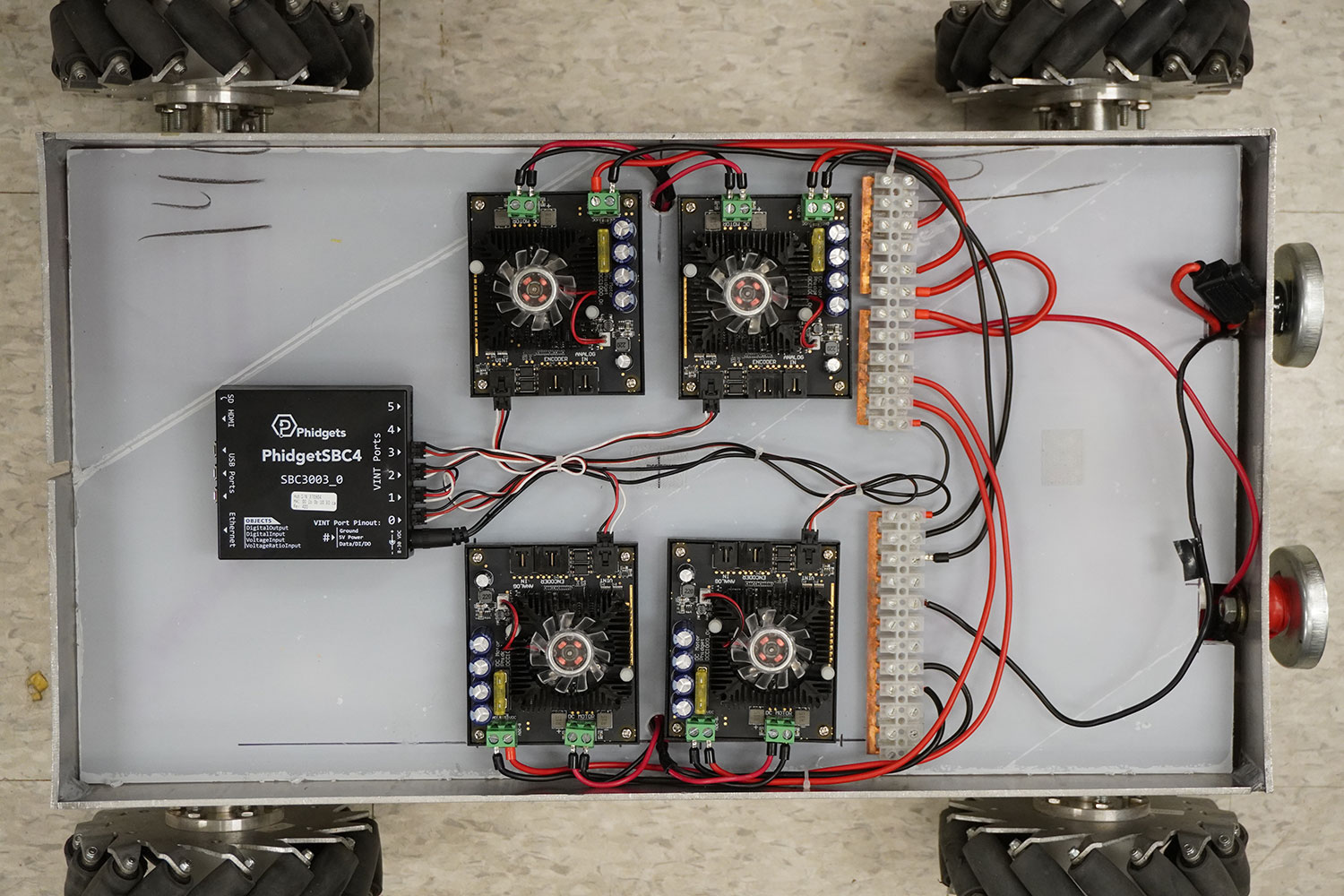
[[Image:Murvv_parts.jpg|link=https://www.phidgets.com/docs/images/6/6d/Murvv_parts.jpg|thumb]]&lt;br /&gt;
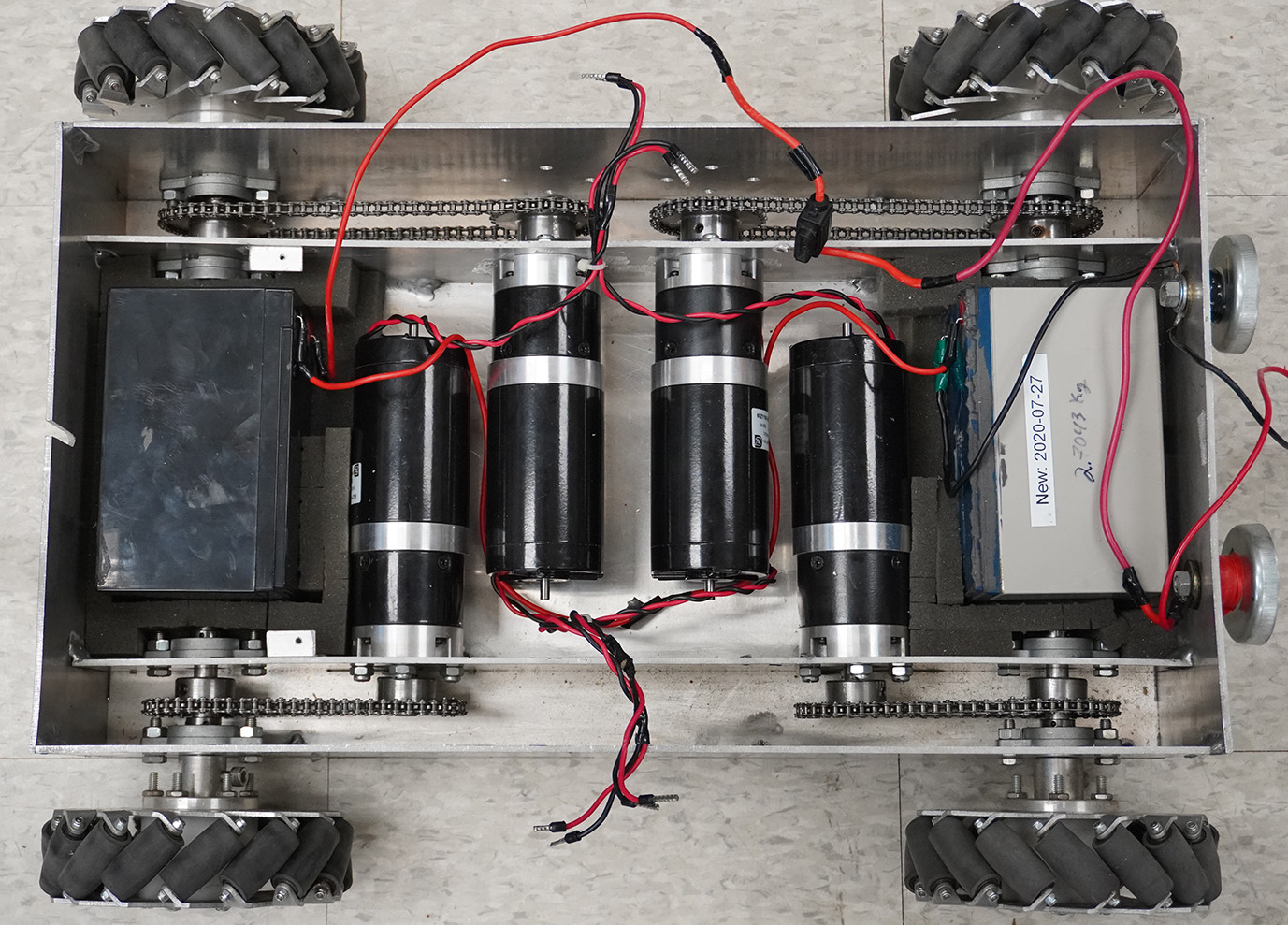
[[Image:Murvv_motors.jpg|link=https://www.phidgets.com/docs/images/a/a9/Murvv_motors.jpg|thumb]]&lt;br /&gt;
This project utilizes the following hardware:&lt;br /&gt;
&amp;lt;ul&amp;gt;&lt;br /&gt;
&amp;lt;li&amp;gt;[https://www.phidgets.com/?tier=3&amp;amp;catid=1&amp;amp;pcid=0&amp;amp;prodid=969 Phidget SBC4 - SBC3003_0]&amp;lt;/li&amp;gt;&lt;br /&gt;
&amp;lt;li&amp;gt;[https://www.phidgets.com/?&amp;amp;prodid=965 4x DC Motor Phidget - DCC1000_0]&lt;br /&gt;
&amp;lt;li&amp;gt;[https://www.phidgets.com/?tier=3&amp;amp;catid=97&amp;amp;pcid=77&amp;amp;prodid=1167 WiFi USB Adapter - SBC4104_0]&amp;lt;/li&amp;gt;&lt;br /&gt;
&amp;lt;li&amp;gt;USB webcam&amp;lt;/li&amp;gt;&lt;br /&gt;
&amp;lt;li&amp;gt;4x 24V brushed DC motors&amp;lt;/li&amp;gt;&lt;br /&gt;
&amp;lt;li&amp;gt;2x 12V lead acid batteries&amp;lt;/li&amp;gt;&lt;br /&gt;
&lt;br /&gt;
&amp;lt;/ul&amp;gt;&lt;br /&gt;
&amp;lt;br&amp;gt;&lt;br /&gt;
A custom chassis was made for this project, including mecanum wheels, however, the components listed above can be used with any chassis. &lt;br /&gt;
&amp;lt;br&amp;gt;&amp;lt;br&amp;gt;&amp;lt;br&amp;gt;&amp;lt;br&amp;gt;&lt;br /&gt;
==Software==&lt;br /&gt;
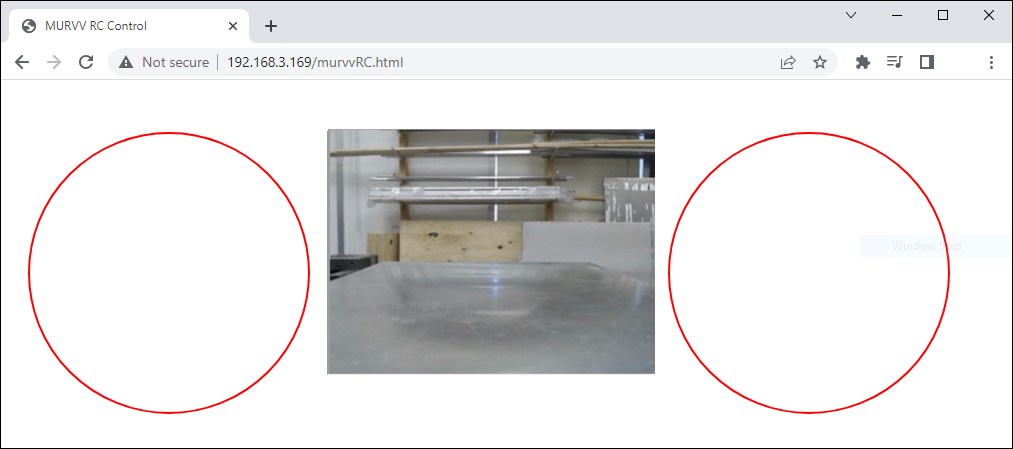
For this project, we will create a simple webpage that is hosted by the Phidget SBC4. Using the [https://www.phidgets.com/docs/Phidget_Network_Server Phidget Network Server] and the [https://www.phidgets.com/docs/Language_-_JavaScript Phidget22 JavaScript libraries], we will send commands to the DC Motor Phidgets and remotely control the robot. &lt;br /&gt;
&amp;lt;br&amp;gt;&amp;lt;br&amp;gt;&lt;br /&gt;
[[Image:Murvv_webpage.jpg|500px|link=https://www.phidgets.com/docs/images/6/65/Murvv_webpage.jpg|center]]&lt;br /&gt;
&amp;lt;br&amp;gt;&lt;br /&gt;
&amp;lt;center&amp;gt;&amp;lt;i&amp;gt;The webpage that is hosted by the Phidget SBC4. It includes a live video feed from the webcam, as well as two simple joysticks that are used to control MURVV&amp;lt;/i&amp;gt;&amp;lt;/center&amp;gt;&lt;br /&gt;
&lt;br /&gt;
===Configuration===&lt;br /&gt;
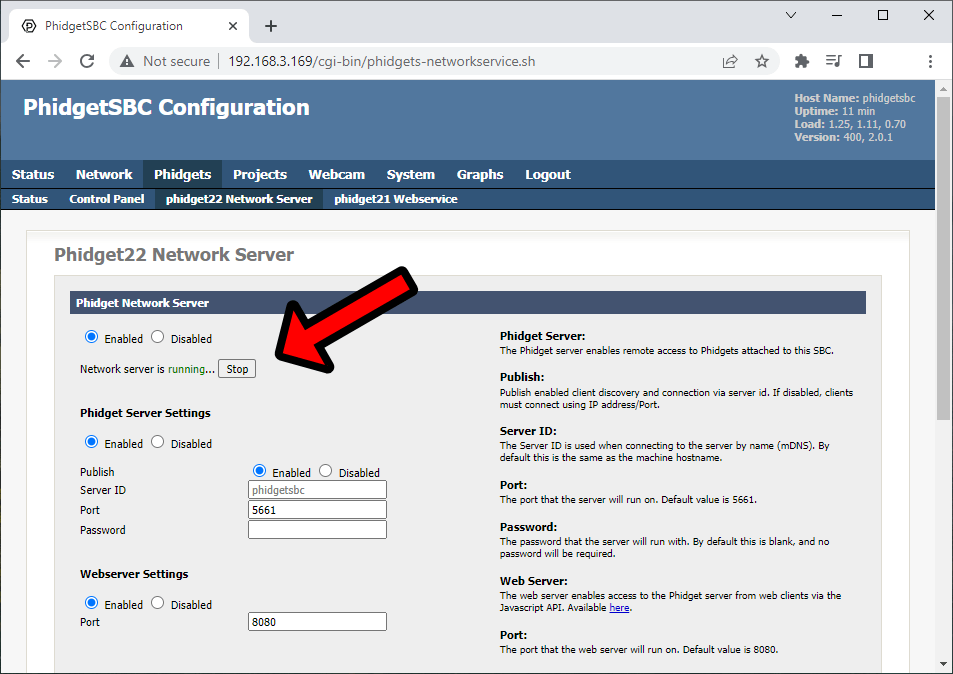
We will be using the Phidget Network Server to communicate with the DC Motor Phidgets connected to the Phidget SBC4. The Phidget Network Server can be enabled by navigating to &amp;#039;&amp;#039;&amp;#039;Phidgets &amp;gt; phidget22 Network Server&amp;#039;&amp;#039;&amp;#039;.&amp;lt;br&amp;gt;&amp;lt;br&amp;gt;&lt;br /&gt;
[[Image:Murvv_networkserver.png|500px|link=https://www.phidgets.com/docs/images/6/6e/Murvv_networkserver.png|center]]&lt;br /&gt;
&amp;lt;br&amp;gt;&amp;lt;br&amp;gt;&lt;br /&gt;
&lt;br /&gt;
===Webpage Code===&lt;br /&gt;
We will create an HTML file at &amp;lt;strong&amp;gt;/var/www/&amp;lt;/strong&amp;gt; titled &amp;lt;/strong&amp;gt; &amp;lt;strong&amp;gt;murvvRC.html&amp;lt;/strong&amp;gt;. &lt;br /&gt;
&lt;br /&gt;
====HTML Layout====&lt;br /&gt;
&amp;lt;syntaxhighlight lang=html&amp;gt;&lt;br /&gt;
&amp;lt;body&amp;gt;&lt;br /&gt;
	&amp;lt;div id=&amp;quot;controlsContainer&amp;quot;&amp;gt;&lt;br /&gt;
		&amp;lt;canvas id=&amp;quot;controls&amp;quot; width=&amp;quot;960&amp;quot; height=&amp;quot;330&amp;quot; id=&amp;quot;canvas&amp;quot;&amp;gt;&amp;lt;/canvas&amp;gt;&lt;br /&gt;
		&amp;lt;iframe id=&amp;quot;iframe&amp;quot; width=&amp;quot;320&amp;quot; height=&amp;quot;240&amp;quot; src=&amp;quot;http://phidgetsbc.local:81/?action=stream&amp;quot;&amp;gt;&amp;lt;/iframe&amp;gt;&lt;br /&gt;
	&amp;lt;/div&amp;gt;&lt;br /&gt;
	&amp;lt;div class=&amp;quot;info&amp;quot;&amp;gt;&lt;br /&gt;
		Notice:&amp;lt;label id=&amp;quot;notice&amp;quot;&amp;gt;&amp;lt;/label&amp;gt;&amp;lt;br&amp;gt;&lt;br /&gt;
	&amp;lt;/div&amp;gt;&lt;br /&gt;
&amp;lt;/body&amp;gt;&lt;br /&gt;
&amp;lt;/syntaxhighlight&amp;gt;&lt;br /&gt;
&lt;br /&gt;
====JavaScript - Phidgets Init====&lt;br /&gt;
This section of the code creates four DC Motor objects. Each object is mapped to a specific motor controller (and therefore, a specific motor) using &amp;#039;&amp;#039;&amp;#039;setHubPort&amp;#039;&amp;#039;&amp;#039;. &lt;br /&gt;
&lt;br /&gt;
&amp;lt;syntaxhighlight lang=javascript&amp;gt;&lt;br /&gt;
function onAttach(w) {&lt;br /&gt;
	console.log(&amp;#039;Motor controller attached on hub port &amp;#039;, w.hubPort);&lt;br /&gt;
    //Make MURVV more responsive&lt;br /&gt;
	w.setAcceleration(50.0);&lt;br /&gt;
}&lt;br /&gt;
&lt;br /&gt;
function onDetach (w) {&lt;br /&gt;
	console.log(&amp;#039;Motor controller detached on hub port &amp;#039;, w.hubPort);&lt;br /&gt;
}&lt;br /&gt;
&lt;br /&gt;
var conn = new phidget22.NetworkConnection({&lt;br /&gt;
	hostname: &amp;quot;phidgetsbc.local&amp;quot;,&lt;br /&gt;
	port: 8080,&lt;br /&gt;
	name: &amp;quot;Phidget Server Connection&amp;quot;,&lt;br /&gt;
	onError: function(code, msg) { console.error(&amp;quot;Connection Error:&amp;quot;, msg); },&lt;br /&gt;
	onConnect: function() { console.log(&amp;quot;Connected&amp;quot;); },&lt;br /&gt;
	onDisconnect: function() { console.log(&amp;quot;Disconnected&amp;quot;); }&lt;br /&gt;
});&lt;br /&gt;
&lt;br /&gt;
conn.connect().catch(function(err) {&lt;br /&gt;
	console.error(&amp;quot;Error during connect:&amp;quot;, err);&lt;br /&gt;
});&lt;br /&gt;
&lt;br /&gt;
//Create&lt;br /&gt;
var w_fr = new phidget22.DCMotor();&lt;br /&gt;
var w_fl = new phidget22.DCMotor();&lt;br /&gt;
var w_br = new phidget22.DCMotor();&lt;br /&gt;
var w_bl = new phidget22.DCMotor();&lt;br /&gt;
&lt;br /&gt;
//Address&lt;br /&gt;
w_bl.setHubPort(0);&lt;br /&gt;
w_fl.setHubPort(1);&lt;br /&gt;
w_br.setHubPort(2);&lt;br /&gt;
w_fr.setHubPort(3);&lt;br /&gt;
&lt;br /&gt;
//Handlers&lt;br /&gt;
w_bl.onAttach = onAttach;&lt;br /&gt;
w_bl.onDetach = onDetach;&lt;br /&gt;
w_fl.onAttach = onAttach;&lt;br /&gt;
w_fl.onDetach = onDetach;&lt;br /&gt;
w_br.onAttach = onAttach;&lt;br /&gt;
w_br.onDetach = onDetach;&lt;br /&gt;
w_fr.onAttach = onAttach;&lt;br /&gt;
w_fr.onDetach = onDetach;&lt;br /&gt;
&lt;br /&gt;
//Open&lt;br /&gt;
w_fr.open();&lt;br /&gt;
w_fl.open();&lt;br /&gt;
w_br.open();&lt;br /&gt;
w_bl.open();&lt;br /&gt;
&amp;lt;/syntaxhighlight&amp;gt;&lt;br /&gt;
&lt;br /&gt;
====JavaScript - GUI Creation====&lt;br /&gt;
This section of the code draws two red circles that will be used as virtual joysticks.&lt;br /&gt;
&lt;br /&gt;
&amp;lt;syntaxhighlight lang=javascript&amp;gt;&lt;br /&gt;
var canvas = document.getElementsByTagName(&amp;#039;canvas&amp;#039;)[0];&lt;br /&gt;
const ctx = canvas.getContext(&amp;quot;2d&amp;quot;);&lt;br /&gt;
&lt;br /&gt;
var leftControl = {x: 0, y: 0, r: 0};&lt;br /&gt;
var rightControl = {x: 0, y: 0, r: 0};&lt;br /&gt;
&lt;br /&gt;
&lt;br /&gt;
leftControl.x = canvas.width / 4 - 80;&lt;br /&gt;
leftControl.y = canvas.height / 2 + 20;&lt;br /&gt;
leftControl.r = 140;&lt;br /&gt;
rightControl.x = canvas.width / 4 + canvas.width / 2 + 80;&lt;br /&gt;
rightControl.y = canvas.height / 2 + 20;&lt;br /&gt;
rightControl.r = 140;&lt;br /&gt;
&lt;br /&gt;
//draws the control circles&lt;br /&gt;
ctx.lineWidth = 2;&lt;br /&gt;
ctx.clearRect(0, 0, canvas.width, canvas.height);&lt;br /&gt;
ctx.beginPath();&lt;br /&gt;
&lt;br /&gt;
ctx.strokeStyle = &amp;#039;#FF0000&amp;#039;;&lt;br /&gt;
ctx.arc(leftControl.x, leftControl.y, leftControl.r, 0, Math.PI * 2);&lt;br /&gt;
ctx.stroke();&lt;br /&gt;
ctx.beginPath();&lt;br /&gt;
ctx.arc(rightControl.x, rightControl.y, rightControl.r, 0, Math.PI * 2);&lt;br /&gt;
ctx.stroke();&lt;br /&gt;
&amp;lt;/syntaxhighlight&amp;gt;&lt;br /&gt;
&lt;br /&gt;
====JavaScript - Manage GUI====&lt;br /&gt;
This section of the code handles touch events (this project is meant for use on a smartphone). If the intended use is a computer, you can modify this to mouse events. After a touch has been registered and the coordinates mapped, commands are sent to the DC Motor Phidgets using &amp;#039;&amp;#039;&amp;#039;setTargetVelocity&amp;#039;&amp;#039;&amp;#039;.&lt;br /&gt;
&lt;br /&gt;
&amp;lt;syntaxhighlight lang=javascript&amp;gt;&lt;br /&gt;
anvas.addEventListener(&amp;#039;touchstart&amp;#039;, handleStart, false);&lt;br /&gt;
canvas.addEventListener(&amp;#039;touchend&amp;#039;, handleEnd, false);&lt;br /&gt;
canvas.addEventListener(&amp;#039;touchcancel&amp;#039;, handleCancel, false);&lt;br /&gt;
canvas.addEventListener(&amp;#039;touchmove&amp;#039;, handleMove, false);&lt;br /&gt;
&lt;br /&gt;
var x = 0;&lt;br /&gt;
var y = 0;&lt;br /&gt;
&lt;br /&gt;
function handleStart(event) {&lt;br /&gt;
	x = event.touches[0].clientX;&lt;br /&gt;
	y = event.touches[0].clientY;&lt;br /&gt;
	mecanumDrive(inputCalculation());&lt;br /&gt;
}&lt;br /&gt;
function handleEnd(e) {&lt;br /&gt;
	x = leftControl.x;&lt;br /&gt;
	y = rightControl.y;&lt;br /&gt;
	mecanumDrive({x: 0,y: 0});&lt;br /&gt;
}&lt;br /&gt;
&lt;br /&gt;
function handleCancel(e) {&lt;br /&gt;
	x = leftControl.x;&lt;br /&gt;
	y = rightControl.y;&lt;br /&gt;
	mecanumDrive({x: 0,y: 0});&lt;br /&gt;
}&lt;br /&gt;
&lt;br /&gt;
function handleMove(e) {&lt;br /&gt;
	x = event.touches[0].clientX;&lt;br /&gt;
	y = event.touches[0].clientY;&lt;br /&gt;
	mecanumDrive(inputCalculation());&lt;br /&gt;
}&lt;br /&gt;
&lt;br /&gt;
&lt;br /&gt;
/*&lt;br /&gt;
* Determines which control the touch coordinates are for.&lt;br /&gt;
*/&lt;br /&gt;
function inputCalculation() {&lt;br /&gt;
  var cx = leftControl.x;&lt;br /&gt;
  var cy = leftControl.y;&lt;br /&gt;
  var side = 0;&lt;br /&gt;
  &lt;br /&gt;
  var c = { x: 0, y: 0 };&lt;br /&gt;
  var mag = Math.sqrt((x - cx) * (x - cx) + (y - cy) * (y - cy));&lt;br /&gt;
  &lt;br /&gt;
  if (mag &amp;lt; leftControl.r) {&lt;br /&gt;
    c.x = x - cx;&lt;br /&gt;
    c.y = y - cy;&lt;br /&gt;
	side = -1;&lt;br /&gt;
  }&lt;br /&gt;
&lt;br /&gt;
  cx = rightControl.x;&lt;br /&gt;
  cy = rightControl.y;&lt;br /&gt;
  mag = Math.sqrt((x - cx) * (x - cx) + (y - cy) * (y - cy));&lt;br /&gt;
  if (mag &amp;lt; rightControl.r) {&lt;br /&gt;
    c.x = x - cx;&lt;br /&gt;
    c.y = y - cy;&lt;br /&gt;
	side = 1;&lt;br /&gt;
  }&lt;br /&gt;
&lt;br /&gt;
  return [c, side];&lt;br /&gt;
}&lt;br /&gt;
&lt;br /&gt;
function mecanumDrive(touchIn) {&lt;br /&gt;
	var c = touchIn[0];&lt;br /&gt;
	var side = touchIn[1];&lt;br /&gt;
	var vel = 0;&lt;br /&gt;
	&lt;br /&gt;
	var maxOutput = 0.4;	/* speed limiting coeff. */&lt;br /&gt;
		if (side == -1) {&lt;br /&gt;
			&lt;br /&gt;
			vel = maxOutput*c.x/140;&lt;br /&gt;
			$(&amp;#039;#notice&amp;#039;).text(&amp;quot;turning, x: &amp;quot;+String(c.x)+&amp;quot;, y: &amp;quot;+String(c.y));&lt;br /&gt;
			&lt;br /&gt;
			w_fr.setTargetVelocity(-vel);&lt;br /&gt;
			w_fl.setTargetVelocity(-vel);&lt;br /&gt;
			w_br.setTargetVelocity(-vel);&lt;br /&gt;
			w_bl.setTargetVelocity(-vel);&lt;br /&gt;
			&lt;br /&gt;
		}&lt;br /&gt;
		else if (side == 1) {&lt;br /&gt;
			if (Math.abs(c.y) &amp;gt;= Math.abs(c.x)) {&lt;br /&gt;
				vel = maxOutput*c.y/140;&lt;br /&gt;
				$(&amp;#039;#notice&amp;#039;).text(&amp;quot;Forward / backwards, x: &amp;quot;+String(c.x)+&amp;quot;, y: &amp;quot;+String(c.y));&lt;br /&gt;
				w_fr.setTargetVelocity(-vel);&lt;br /&gt;
				w_fl.setTargetVelocity(vel);&lt;br /&gt;
				w_br.setTargetVelocity(vel);&lt;br /&gt;
				w_bl.setTargetVelocity(-vel);&lt;br /&gt;
			}&lt;br /&gt;
			else {&lt;br /&gt;
				vel = maxOutput*c.x/140;&lt;br /&gt;
				$(&amp;#039;#notice&amp;#039;).text(&amp;quot;strafing, x: &amp;quot;+String(c.x)+&amp;quot;, y: &amp;quot;+String(c.y));&lt;br /&gt;
				w_fr.setTargetVelocity(vel);&lt;br /&gt;
				w_fl.setTargetVelocity(-vel);&lt;br /&gt;
				w_br.setTargetVelocity(vel);&lt;br /&gt;
				w_bl.setTargetVelocity(-vel);&lt;br /&gt;
			}&lt;br /&gt;
		}&lt;br /&gt;
		else {&lt;br /&gt;
				$(&amp;#039;#notice&amp;#039;).text(&amp;quot;No input detected&amp;quot;);&lt;br /&gt;
				w_fr.setTargetVelocity(0);&lt;br /&gt;
				w_fl.setTargetVelocity(0);&lt;br /&gt;
				w_br.setTargetVelocity(0);&lt;br /&gt;
				w_bl.setTargetVelocity(0);&lt;br /&gt;
		}&lt;br /&gt;
}&lt;br /&gt;
&amp;lt;/syntaxhighlight&amp;gt;&lt;br /&gt;
&lt;br /&gt;
==Result==&lt;br /&gt;
Now MURVV can be controlled anywhere within our WiFi network! Note that the performance of this WiFi-based control is highly dependent on the signal strength of your local network.&lt;/div&gt;</summary>
		<author><name>Lmpacent</name></author>
	</entry>
</feed>